Knowledge Base Articles: 7 Types, Real Examples and How to Write Them
What a knowledge base article is, the seven types worth writing, eight real examples to borrow from, and a simple routine for writing and keeping articles accurate.
A good knowledge base article lets a customer fix their own problem in a couple of minutes, at any hour, and lets your team answer the same question once instead of every day. This guide shows you what a knowledge base article is, the seven types worth writing, real examples from Slack, Dropbox, Notion, Shopify, Stripe and Mailchimp, and a simple routine for writing and maintaining them.
The short answer: a knowledge base article is a single page in a help center that answers one customer question or solves one problem, written so the reader can act on it without contacting support. The common types are how-to, troubleshooting, FAQ, getting started, billing or policy, integration, and release notes. Good ones use the customer's words in the title, give the answer first, and say when they were last checked.
What is a knowledge base article?
A knowledge base article is the smallest useful unit of a help center: one page, one job. "Create a channel", "Refunding orders" and "Dropbox stopped syncing" are all knowledge base articles. Each one exists because a customer had that exact question, and each one is written so the next customer with the same question can finish the job alone.
The Consortium for Service Innovation, which maintains the Knowledge-Centered Service (KCS) method many support teams use, describes the scope well: "Articles can be used for many different types of content including a simple question, a complex problem, or a procedure." Its guide also names what every article should carry. The customer's view is captured in "their context (words and phrases)", the fix comes from the person who solved it, and the organization adds metadata such as "the date created, number of times the article has been used, modification history, and the date last modified." (KCS v6 Practices Guide, The KCS Article)
What a knowledge base article is not
- Not a blog post. A blog post can tell a story or argue a point. A knowledge base article has one reader with one task, and it should be finished the moment that task is done.
- Not a wiki page. Internal wiki pages often collect everything a team knows about a topic. A customer-facing article leaves out internal notes, history and anything the reader cannot act on.
- Not a pasted ticket reply. A reply is written for one person in one situation. An article is written for everyone who will ever ask, so it needs the conditions ("this applies if you are on the Pro plan") that a reply can skip.
If you are deciding whether you need a knowledge base at all, the five benefits of having a knowledge base covers the business case. This guide is about the articles themselves.
The 7 types of knowledge base articles
Most help centers need only seven kinds of article. Knowing the type before you write tells you what the article must end with, which is where weak articles usually fall short.
| Type | The customer is asking | Example title | It must end with |
|---|---|---|---|
| How-to | "How do I do this?" | Create a channel (Slack) | How to tell it worked |
| Troubleshooting | "Why is this broken, and how do I fix it?" | Dropbox stopped syncing (Dropbox) | What to do if none of the fixes worked |
| FAQ | "Quick question about..." | The FAQs section of Notion's Billing article | The exception to the rule, if there is one |
| Getting started | "I just signed up. Now what?" | Getting Started with Mailchimp (Mailchimp) | The next step after the first win |
| Billing or policy | "What will I pay, and what are the rules?" | Billing (Notion), Refunding orders (Shopify) | Who the rule applies to, and when it changed |
| Integration | "How do I connect this to the tool I already use?" | Add apps to your Slack workspace (Slack) | Who is allowed to do it, and how to remove it |
| Release notes | "What changed?" | Slack for Mac release notes (Slack) | Whether the reader needs to do anything |
Two more kinds show up in larger help centers: reference pages (a list of error codes, limits or settings) and concept explainers ("How Dropbox syncs your files"). Write them when your how-to and troubleshooting articles keep repeating the same background paragraph. Then link to the explainer instead.
Each type has its own copy-ready template in our 7 free knowledge base article templates.
Knowledge base article examples worth copying
These are real, public articles, read on October 14, 2026. Each one does one thing especially well, and that one thing is the part to borrow.
How-to: Slack, "Create a channel"
Slack's article opens with one sentence of why ("Channels are the best way to keep conversations organized in Slack."), then goes straight to numbered steps, split into Desktop and Mobile tabs. The first step is "Click the plus sign in the sidebar." Short steps, each starting with a verb, each naming the exact control.
Borrow: split steps by platform when the clicks differ, instead of writing "on mobile, tap instead" inside every step.
Troubleshooting: Dropbox, "Dropbox stopped syncing"
Dropbox's article shows its date near the top ("Updated May 28, 2025") and says who it applies to ("The information in this article applies to all Dropbox users, unless otherwise stated."). Then it lists the symptoms in the reader's own words, such as "The number of files syncing seems to be “stuck”", so readers can confirm they are on the right page before they try anything.
Borrow: a symptom checklist under the title. It stops people from following fixes for a problem they do not have.
Billing and FAQ: Notion, "Billing"
Notion's billing article starts with a one-line summary ("Learn how you're billed for Notion, and how you can change your billing interval."), offers a "Jump to FAQs" link, and states its rules as plain headings: "You’re billed upfront", "You’re billed per member, per workspace". The detail underneath covers the edge cases people actually ask about, such as adding members mid-cycle.
Borrow: headings that state the rule, not the topic. "You're billed upfront" answers the question even for someone who only skims the headings.
Policy: Shopify, "Refunding orders"
Shopify's article puts the most important constraint in its opening paragraph: "you can't create a return after a refund has been issued." It also catches readers who landed on the wrong page: "If you're a customer looking for a refund on an order..."
Borrow: one sentence near the top that sends the wrong reader to the right place. It saves them a support ticket and saves you a confused one.
Reference and troubleshooting: Stripe, "Declines"
Stripe's page opens with its purpose ("Learn about payment declines and how to lower your decline rate.") and sits in a short section with separate pages for card declines, Stripe decline codes and network decline codes, instead of cramming every code into one article.
Borrow: when one topic has a long list of cases, write a short hub article and give each case its own page.
Getting started: Mailchimp, "Getting Started with Mailchimp"
Mailchimp's guide lists what the reader will do, in order ("Set up your account", "Set up your audience", "Customize your signup form", "Create an email"), and adds a "Things to know" section with prerequisites such as "enable cookies, pop-ups, and JavaScript."
Borrow: the outline at the top. A new customer sees the whole path before step one, which makes a long article feel short.
Integration: Slack, "Add apps to your Slack workspace"
Slack's integration article has a "What to expect" section that answers the permission question first: "By default, any member of a Slack workspace can install an app," and "Workspace Owners can turn on app approval to require admin approval for all apps."
Borrow: say who is allowed to do the task before the steps. The most common reason an integration article fails is that the reader does not have the role it assumes.
Release notes: Slack for Mac
Slack's release notes list every version with its date ("Slack 4.52.178 October 5, 2026") under a plain "Bug Fixes" label. Even the routine entries are written in a recognizable voice.
Borrow: the version and date on every entry, so a customer can match a fix to the build they are running.
For more whole help centers to learn from, see 10 knowledge base examples from SaaS and e-commerce.
What makes a knowledge base article effective?
Across all seven types and all the examples above, effective articles share six habits.
- The title is the customer's question, in the customer's words. KCS asks you to capture the issue "described in the requestor's words and phrases" (KCS, Article Structure) because those are the words the next person will type into search. If customers say "invoice", do not title the article "Billing documents".
- The answer comes first. Microsoft's style guide puts it in five words: "Lead with what's most important." Give the short answer or the outcome in the first two lines, then the detail.
- It says who it applies to. Plan, role, platform, region. Dropbox and Slack both do this before any steps.
- Steps are numbered, one action each, starting with a verb. "Click the plus sign in the sidebar." Not "You will then want to locate the plus sign, which can be found in the sidebar."
- It shows what success looks like. A how-to ends with "You'll see the new channel in your sidebar." A troubleshooting article ends with what to do if nothing worked. Readers who cannot tell whether they succeeded open a ticket anyway.
- It shows a date and has an owner. A visible "Updated" date tells the reader the article is maintained. An owner inside your team makes sure the date keeps moving.
On length, KCS's own guidance is short: "Ideally, KCS articles are a page or less in length." If an article runs much longer, it is usually two articles. Our sister site has a longer walk-through of the writing itself: how to write a help article that gets someone unstuck.
Which knowledge base articles should you write first?
Start from demand, not from your product's menu. Writing an article for every settings page feels thorough, but most of those pages will never be read. KCS puts numbers on it: "up to 80% of KCS articles will rarely or never be reused," and "80% of the issues are solved by 20% of the knowledge base." (KCS, Reuse is Review)
The job is to find that 20% early. A practical first pass:
- Export the last 90 days of tickets or chats and group them by topic. Most help desks let you export tags or subjects to a spreadsheet. Sort by count.
- Write down the exact phrases customers used for the top 10 topics. These become your titles and the first line of each article.
- Add the questions your sales and onboarding team answer every week. Pre-sale questions ("Do you support single sign-on?") are often missing from support data because the person never became a customer.
- Write the top 10 first, using the type table above to pick the right shape for each.
- Once the help center is live, read your search log every week. Searches that return nothing are your next articles, already phrased by customers.
KCS makes the same point about search terms: "The words and phrases we use to search are potential content to improve an existing article or to create a new article, if one doesn't already exist." (KCS, Search Early Search Often) Before you write a new article, search your own knowledge base one more time. KCS calls out the same step: "search the knowledge base one more time, before we save a new article, to be sure one doesn't already exist." Duplicate articles drift apart and end up contradicting each other.
How to write a knowledge base article in 6 steps
- Pick one question. If you find yourself writing "and also", stop and start a second article.
- Choose the type and its template. The type decides the ending (see the table above). Starting from a template keeps every article in your help center shaped the same way, which helps readers skim.
- Write the title from the customer's words. Prefer "Reset your password" or "Why was my card declined?" over "Password management" or "Payment failures".
- Write the answer, then the steps. Two lines that answer the question or name the outcome. Then the conditions (plan, role, platform). Then numbered steps.
- Test it as a customer would. Follow your own steps on a fresh account with the permissions a typical customer has, not your admin account. This is where most errors surface: a menu that moved, a button only admins see.
- Publish with a date and an owner, then link the article from the two or three places a reader would look for it: the related articles, the product screen, and your saved replies for that ticket topic.
A worked example: before and after
Here is a typical first draft, written the way ticket replies often are:
Exporting invoices. Invoices can be found in the billing section of the account settings area, which can be accessed by admins. From there, you will see a list of past invoices which you can download if needed. Please note this is only available on paid plans.
And the same article after the six steps, as a reader would see it:
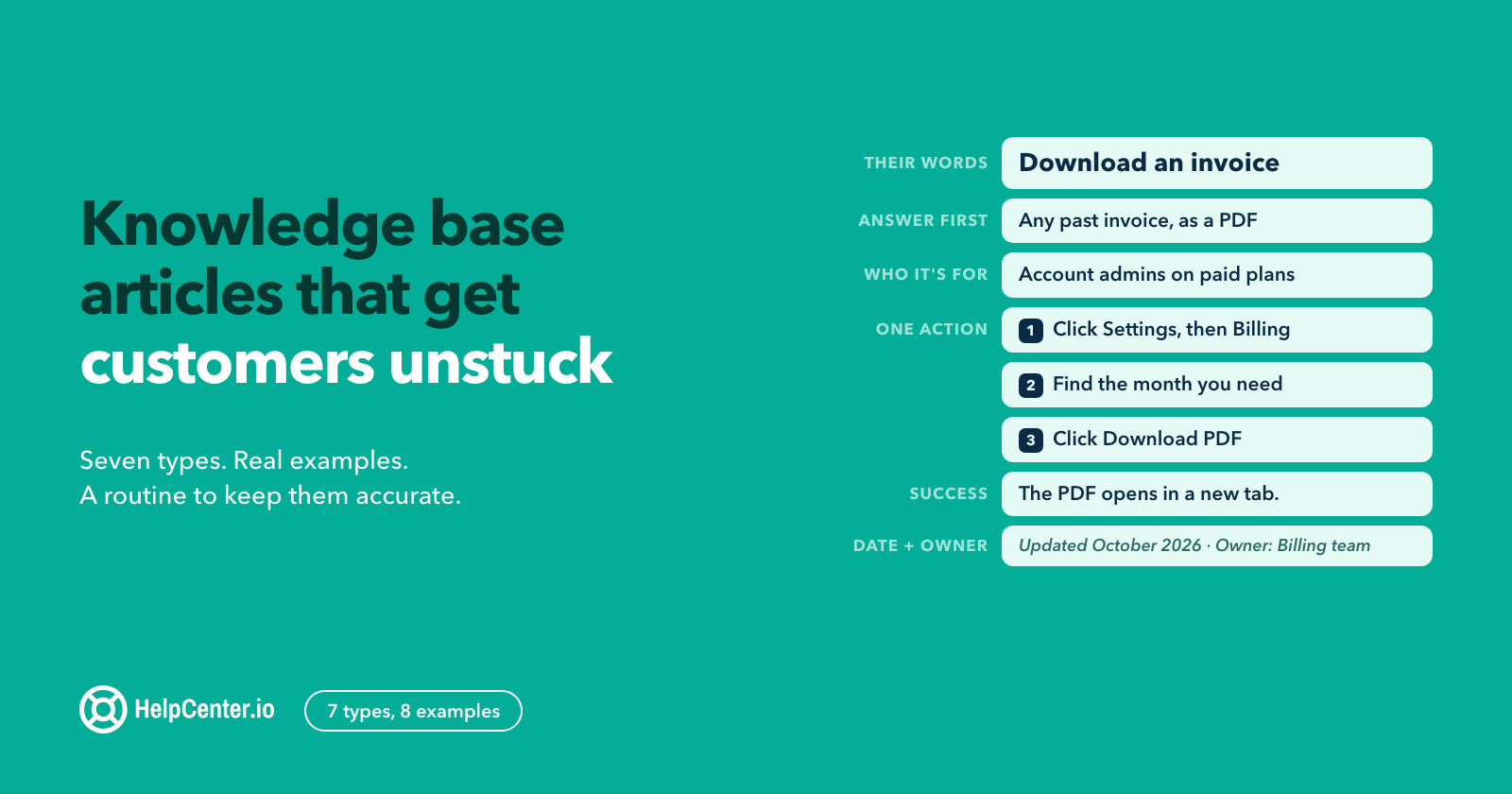
Download an invoice
Account admins on paid plans can download any past invoice as a PDF from Settings > Billing.
- Click Settings, then Billing.
- Under Invoices, find the month you need.
- Click Download PDF.
The PDF opens in a new tab. Not an admin? Ask your account owner, or see who your admins are under Settings > Members.
Updated October 2026 · Owner: Billing team
The second version uses the customer's verb ("download"), answers in one line, says who it applies to, gives one action per step, shows the result, and redirects the reader who lacks access. It is also shorter.
Knowledge base article templates
You do not need to design a structure for each type yourself. We published seven free templates in Markdown, with HTML versions of four and filled examples of the two you will write most:
| Template | Use it for |
|---|---|
| How-to | Any single task with steps |
| Troubleshooting | Errors and "it doesn't work" reports |
| FAQ | Short answers grouped by topic |
| Getting started | The first session after sign-up |
| Billing or policy | Prices, plans, refunds, rules |
| Integration | Connecting another tool |
| Release note | What changed, and whether readers must act |
Get them here: 7 free knowledge base article templates. If you would rather start from a designed help center than a blank page, HelpCenter.io's knowledge base templates show the layouts you can start from.
How often should you update knowledge base articles?
Update an article whenever it is used and found wrong, and review the rest on a schedule tied to how fast that part of your product changes. A fixed "review everything every six months" rule sounds tidy, but it spends the same effort on an article read 5,000 times a month as on one read twice a year.
KCS gives a better default, which it calls "reuse is review": the person using an article is the best judge of whether it is still right. Its rule for what to do next is "flag it or fix it." In the guide's words: "Fix it: if we are confident and we have a license level to make the update we fix it. Flag it: if we are not confident or we don't have the license level to make the update we flag it." (KCS, Flag It or Fix It)
In practice, for a small team:
- Give every article an owner. A person or a team, written on the article or in your editor, not "support".
- Tie reviews to releases. When a feature ships or changes, the release checklist includes "update the articles that mention it." This catches most drift at the source.
- Let agents flag in the moment. If an agent sends an article and the customer comes back confused, the agent flags it. Five minutes, while the context is fresh.
- Review your most-read articles monthly and everything else when it is flagged, when its feature changes, or once a year, whichever comes first.
- Update the visible date only when you have actually checked the article. A date that moves without a check teaches readers to ignore it.
Do not delete old articles just to make the help center smaller. KCS warns that "Archiving old articles treats the symptoms of findability, not the cause," and compares upkeep to a garden that "requires constant weeding." (KCS, Archiving Old Articles) Retire an article when its feature is gone. Keep the rare-but-real ones, and make sure search finds them.
How to tell whether your articles are working
No single number tells you an article is good. KCS says so directly: in self-service "we can count activity like searches and page views and sessions, but they don't have a one-to-one relationship to issues pursued and resolved." Its answer is to combine data, direct feedback and observation, and to watch trends: "it is the trends that are most important, not the absolute value." (KCS, Self-Service Measures)
Four signals are worth checking every week or two:
- Searches with no results. Missing articles, or articles that use different words from your customers. The fix is a new article or a better title.
- Article ratings and comments. A "No" on "Was this helpful?" with a comment is the most specific feedback you will get. Read every one.
- Tickets that arrive after a visit to an article. If people read the article and still write in, the article is missing a step or a condition.
- Ticket volume for a topic before and after you publish. Compare a few weeks on either side, and remember that launches and seasons move these numbers too.
A note on framing: KCS calls self-service "a customer engagement strategy" and adds that cost reduction is a side benefit, "it is not a deflection or avoidance strategy." (KCS, Self-Service Success) Articles that exist to keep customers away from your team read that way. Articles that exist to get customers unstuck faster read better and get used more. For more on making search itself work, see knowledge base search: the fastest route to customer success.
Knowledge base articles and AI answers
Your articles now have a second audience. AI assistants in your own help center, chat tools and general answer engines read them and answer from them. The same habits that help people help these systems: one question per article, the answer near the top, explicit conditions ("on the Pro plan", "admins only") and a current date. An AI answer is only as accurate as the article it was built from, so stale articles now produce confidently wrong answers as well as confused readers.
If you are preparing a help center for AI answers, the practical checklist for AI-ready help center content goes through ten checks in detail.
Common mistakes with knowledge base articles
- Titles in your team's vocabulary. Internal feature names and codenames are words customers never search for.
- Burying the answer. Two paragraphs of background before the first step. Readers skip it or leave.
- One article for every plan and platform. If the steps differ, split them with tabs (as Slack does) or into separate articles.
- Screenshots as the only instructions. They go out of date with every redesign, cannot be searched, and are hard to read on a phone. Use them to confirm a step written in text, not to replace it.
- Writing once and never testing. An article written from memory by an admin often fails for a regular user.
- No way out. Every troubleshooting article should end with how to reach a person, and what to include when they do.
Knowledge base article FAQ
What is a knowledge base article?
A single help center page that answers one customer question or solves one problem, written so the reader can act on it without contacting support. Common types are how-to, troubleshooting, FAQ, getting started, billing or policy, integration, and release notes.
How do you write a knowledge base article?
Pick one question, choose the article type, title it in the customer's words, give the answer first, then numbered steps with one action each, show what success looks like, test it with a regular user's permissions, and publish it with a date and an owner.
How long should a knowledge base article be?
As short as the task allows. KCS suggests "a page or less in length." If an article covers several tasks or several platforms with different steps, split it.
How often should you update knowledge base articles?
Whenever someone uses an article and finds it wrong, whenever the feature it describes changes, and on a schedule for your most-read articles (monthly works for most small teams). Review the rest at least once a year.
What are some good knowledge base websites to learn from?
Slack, Dropbox, Notion, Shopify, Stripe and Mailchimp all run public help centers with well-structured articles; the examples above link to one article from each. For whole help centers rather than single articles, see 10 knowledge base examples from SaaS and e-commerce.
Where to publish your articles
Any help center tool can host articles written this way. We make HelpCenter.io, a branded help center with search, article ratings and analytics on every plan, so you can see what customers search for and which articles help. Analytics history is 14 days on Bootstrap, 60 days on Growth and 365+ days on Catalyst. Plans start at $39/mo, or $29/mo billed annually, and AI answers are included on Catalyst and are a $29/mo add-on on Bootstrap and Growth (see pricing). If you are starting from scratch, the ultimate guide to building a knowledge base covers structure, categories and launch, and the help center product page shows how it works.