Meet Intercom + Fin: Your help center is now ready to power your AI conversations
Your HelpCenter.io articles now power Intercom: search in the Messenger, insert-to-reply in the Inbox, and automatic Fin training on every publish.

We're thrilled to announce something that's been on our list for a while - and yours too.
Undeniably, you will get a better help center solution if you pick a purpose-built solution like HelpCenter.io instead of an all-in-one tool like Intercom. However, if you customer support team lives inside Intercom and you are utilizing Fin, here's where things get uncomfortable:
Why would you be maintaining two knowledge bases?
You write articles in HelpCenter.io because the editor is good, the translations are smart, the analytics are real, or any one of the numerous reasons our users pick HelpCenter.io over any other solution out there. Your customers chat with you in Intercom because that's where they are - on your site, in your app, at the moment they need help.
And somewhere in between, teams have been copy-pasting articles into Intercom's own knowledge base so Fin, Intercom's AI agent, has something useful to say.
Not anymore.
Today, we're happy to announce our official integration with Intercom that makes HelpCenter.io and Intercom work together across three important surfaces: Messenger, Inbox, and Fin.
What You Get
Your Help Center, Inside the Intercom Messenger
Visitors can now search your HelpCenter.io articles directly from the Intercom Messenger.
It is mobile-first, fast, and powered by the same typo-tolerant search index your help center already uses. Customers can get to the right article from the chat bubble, without needing to open a separate help center tab first.
For multilingual help centers, the Messenger experience also includes a quiet 🌐 language switcher with bilingual language names, so visitors can move between available translations without friction.
And if they cannot find what they need, they are already one step away from starting a conversation with your team.
Your Agents, With the Right Article One Click Away
Inside the Intercom Inbox, the HelpCenter.io app appears in the conversation sidebar for your support team.
This is not the same experience as the visitor-facing Messenger search. The Inbox surface is built for agents: compact, information-dense, and designed for fast replies.
Agents can search articles, see article IDs, check how recently an article was updated, and insert a HelpCenter.io article link directly into their Intercom reply.
No tab switching. No manual link hunting. No guessing whether the article is current.
Fin, Powered by Your HelpCenter.io Articles
This is the biggest part of the release.
Every published article in HelpCenter.io can now sync automatically to Intercom Fin as training content. When you publish a new article, update an existing one, or add translations, HelpCenter.io keeps Fin's content source up to date.
Each translation syncs as its own Fin-readable entry, so your German-speaking customers can get German answers, your Spanish-speaking customers can get Spanish answers, and your French-speaking customers can get French answers.
Unpublish an article, and Fin stops using it. Publish a new one, and Fin can usually start using it within minutes to a few hours, on Intercom's schedule.
Why This Matters
Every help center product has an integrations page. Many integrations are useful. Some are mostly checkbox features.
This one goes deeper.
Intercom Fin charges $0.99 per resolved conversation. That price has an assumption built into it: Fin can only resolve what it knows.
If Fin's knowledge is thin, duplicated, or out of date, you risk paying for a lot of conversations that still end with "I'll connect you with a teammate." But your HelpCenter.io articles are already the kind of content Fin needs:
- Written in your voice - not generated from scattered snippets or old macros
- Organized by category - with the structure your team already maintains
- Translated for your customers - with each language available to sync separately
- Updated when your product changes - so answers stay aligned with reality
- Measured in HelpCenter.io - so you know what people are searching for and reading
Now that same knowledge works inside Intercom too.
The result is simple: more customer questions can end with a useful answer, fewer conversations need to be escalated, and your support team can spend more time on the issues that actually need human judgment.
How It Works
You have to ways to connect your help center to Intercom. Either through the Intercom's app store by signing in into your Intercom account and clicking directly on the Install button or through your HelpCenter.io dashboard.
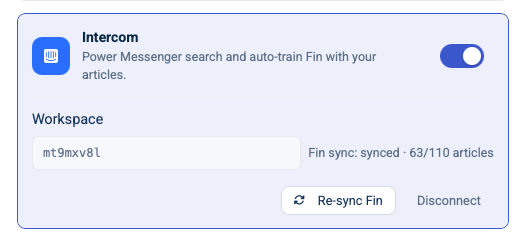
To install the Intercom app through your help center dashboard, go to Settings and find the Integrations section. Then on Intercom, click on the toggle to start the connection process.

You will be redirected to Intercom to authorize the connection, then returned to HelpCenter.io to choose which help center site should be linked. If you have only one help center with us, just click on the "Connect Intercom" button to proceed and get back to the Settings page of your help center. There, you will find a confirmation of the now-enabled extension and you will notice your content getting synced to Fin for context:
A few details not to miss:
- Available on all plans - the Intercom integration is not plan-gated so regardless if your are going with our smallest our highest plan, you can integrate your knowledge base with Intercom.
- Admin-site role required - reader-role members cannot connect or manage the integration.
- One workspace, one site - each Intercom workspace can be connected to exactly one HelpCenter.io site. If that workspace is already connected elsewhere, the new connection will be rejected.
Once connected:
- Messenger search becomes available for visitors through the HelpCenter.io app in Intercom Messenger.
- Inbox search becomes available for agents in the Intercom conversation sidebar.
- Fin sync starts in the background and backfills your published articles.
After the first sync, updates continue automatically. When article content changes, HelpCenter.io re-syncs the article. When a translation changes, that translated version is updated too. Fin's own training cycle is handled by Intercom and usually completes within minutes to a few hours, depending on their schedule.
If you ever want to push a fresh sync manually, you can use Re-sync Fin from the Intercom integration page in HelpCenter.io.
What We Paid Attention To
When building this extension, we paid attention to some details that should make the whole integration process seamless, secure, and intuitive to you.
Idempotent Sync
HelpCenter.io only re-sends an article to Fin when the article content actually changes.
A position change, category move, or tag update does not waste an Intercom API call. That keeps sync behavior cleaner and saves rate limit for the work that matters.
Honest Disconnect
When you disconnect Intercom, HelpCenter.io removes the Fin content source, revokes the Intercom access token, and clears the local credentials.
That means Fin stops citing your HelpCenter.io articles, and the authorization is closed properly on Intercom's side too.
Separate Surfaces for Separate Jobs
The Messenger and Inbox experiences are intentionally different.
Visitors need a clean, mobile-first search flow that gets them to an answer quickly. Support agents need dense context, article metadata, and a fast way to insert links into replies.
So we built them as separate surfaces, each optimized for the person using it.
Encrypted Token Storage
Your Intercom OAuth tokens are stored encrypted on our end. They never sit in the database as plaintext.
What's Coming Next
This release is the foundation for a deeper HelpCenter.io and Intercom workflow.
Next, we're looking at:
- Inline article reading inside the Messenger - so visitors can read full articles without leaving the chat experience.
- Conversation analytics enrichment - so you can see which articles Fin is using, how often, and which ones are saving your team the most tickets.
- Reverse migration - for teams that want to import Intercom articles into HelpCenter.io and use HelpCenter.io as their main authoring tool.
If you've been waiting to try Fin because the per-resolution cost felt difficult to justify without a strong knowledge base behind it, this is a good moment to take another look.
With HelpCenter.io powering the content, Fin has the material it needs to be useful.
Let us know what you think. Drop us a message through our contact form or on our email - we're always listening and constantly improving so you get the best help center builder experience with us.
— The HelpCenter.io Team