AI Knowledge Base Software in 2026: What Each Tool Is Allowed to Answer From
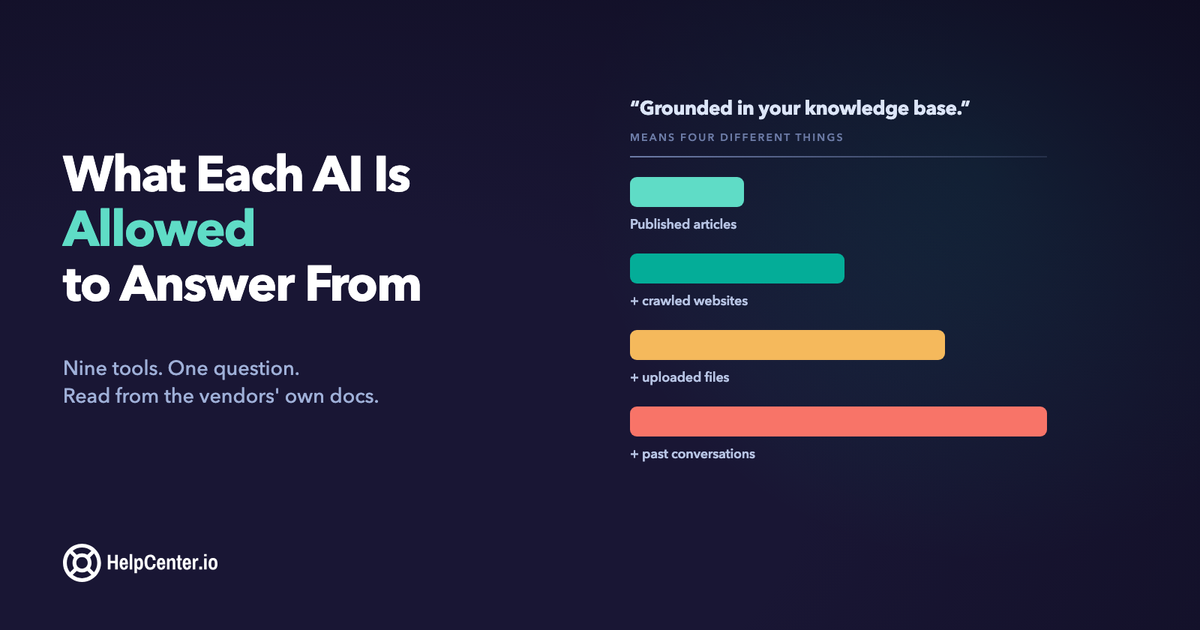
Every help center platform now ships AI search. Open any two vendor pages and you will read the same sentence: answers are grounded in your knowledge base. It is the one claim nobody differentiates on, which makes it useless for choosing between them.
So I spent a day in the documentation instead of the marketing pages: eight vendors, their own help centers, reading what they tell existing customers rather than what they tell buyers. The sentence turns out to mean at least four different things, and the differences are the ones that matter after launch: how wide the source set can be pushed, whether the customer is shown where an answer came from, and what the thing says when it doesn't know.
"Grounded in your content" is a dial, not a guarantee
Start with the good news, because it reframes the whole category. Every tool below restricts answers to a source set you control. None of them will answer your customer out of general model knowledge. Intercom's documentation is explicit that Fin "only provides answers based on your support content or data." Help Scout documents that AI Answers "gets all of its information to help your visitors from the knowledge sources you add to the agent." The hallucinating-chatbot scenario that dominated 2023 buying conversations has largely been engineered out.
What replaced it is subtler and much less discussed. "The sources you provide" is a configurable set, and most platforms ship it much wider than a help center. Zendesk pulls in external content through a web crawler or knowledge connectors alongside your help center. Front layers a knowledge base with public websites it crawls up to 3,000 pages deep, third-party sources for content sitting behind a login, uploaded PDFs, short internal notes, and your team's historical conversations, which its documentation says are "automatically included." Help Scout accepts "other publicly available sites and documents" (PDFs and spreadsheets included). Intercom takes articles and Snippets, uploaded PDFs, synced websites, and content pulled from Zendesk, Guru, Notion, Confluence, Salesforce or Box.
Front's last source is worth sitting with, because it is the one you do not switch on. Feeding an AI agent your historical ticket replies is a real capability with a real payoff: it is often where the answers actually live. It also promotes something a support rep improvised on a Tuesday in 2023 to an authoritative source your customers now get quoted back to them, with no editorial pass in between. Intercom reaches something similar from the other direction: Fin's documentation says it learns from conversations it resolved successfully, and is "likely to use that answer in future conversations." Both are legitimate trades. Neither is the trade most people think they are making when they read "grounded in your knowledge base."
Nine tools, three questions
Every claim below comes from the vendor's own documentation, read in August 2026. Where a vendor does not document something publicly, the cell says so rather than guessing.
| Tool | What it can answer from | Sources shown to the customer | When it doesn't know |
|---|---|---|---|
| HelpCenter.io | Your published articles. There is no setting that widens it. | Always: every answer lists the articles it used | Logs the question as a content gap |
| Document360 (Eddy) | Your knowledge base; external sources can be added under Manage sources | Numbered citations linking to source articles | Answers "I do not know" |
| HelpDocs (Ask AI) | Your published docs, not the open web | Every answer links to its source article | Declines rather than inventing an answer |
| Helpjuice (Swifty) | Your Helpjuice knowledge base, plus external websites you add | Links back to source articles; showing them is a setting you enable | Not documented publicly |
| Zendesk | Your help center, plus external content via federated search, knowledge connectors or a web crawler | The answer sits above the search results it came from; an admin can switch generative search off entirely | Declines and asks the customer to rephrase |
| Intercom (Fin) | Articles and Snippets, plus PDFs, synced websites, and content from Zendesk, Guru, Notion, Confluence, Salesforce or Box | Not documented publicly | Expresses uncertainty, asks for clarification, then hands off to a human |
| Help Scout (AI Answers) | The sources you add: Docs sites plus other publicly available sites and documents | Not documented in the setup guide | Says it cannot find an answer; guardrails can route to your team |
| Front (Autopilot) | Front knowledge bases, crawled public websites, third-party sources behind a login, PDFs, notes, and past conversations (included automatically) | Shows which sources contributed to a draft | Not documented publicly; drafts cite their sources so an agent can check before sending |
| Notion / Confluence / Slite | Your workspace; Slite and Confluence can also reach connected third-party tools | Varies by product | Varies by product |
Citations are either a guarantee or a checkbox
This is the row I would look at first, and it is the one buyers skip.
A source link does two jobs. For your customer it is the only way to check whether the answer is current. An AI summary of a stale article is a confident, well-written, wrong answer, and it looks identical to a right one. For you it is the debugging tool. HelpDocs makes this point in its own documentation better than I could: read the citations on a handful of wrong answers and you will usually find the one article causing each of them. Without citations, a bad answer is unattributable, and you are left rewriting content on a hunch.
Which is why "on by default" and "always on" are different products. Helpjuice puts "Show Sources in Responses" in an advanced settings panel, off until somebody enables it. Zendesk goes the other way: the generated answer sits directly above the search results it was derived from, so the articles stay in view, though an admin can switch generative search off altogether. Both are defensible. But a setting that can be turned off will eventually get turned off, usually by someone tidying up the widget six months after launch, who has no idea they just removed the only audit trail anyone had.
What it says when it doesn't know
The failure path is the most honest thing in any vendor's documentation, and the four approaches are genuinely different.
Document360's Eddy replies "I do not know" when it cannot cite a reliable source, including when the only article that would answer the question sits behind a permission the reader doesn't have. HelpDocs declines rather than inventing. Zendesk declines and coaches the customer to rephrase. Fin does the most work: it gives context on what it found, says it is unsure, attempts an answer where it can, asks for clarification, and hands off to a human if that fails.
No vendor on this page can promise the number is zero, and the more careful ones do not try. Intercom publishes a figure for Fin (under 1%) rather than a guarantee, which is the right shape for a claim like this. Treat a vendor that implies otherwise as being looser with its wording, not as shipping a better model.
The part almost nobody sells is what happens to the question afterwards. An unanswered question is the single most valuable input your documentation gets: it is a customer telling you, unprompted and for free, exactly which article you have not written. On our side that is the whole loop: every question and every zero-result search is logged, the ones with no article behind them stack up in a tray ordered by how often they were asked, and someone writes the top one. The next customer who asks gets a real answer. If a platform you are evaluating cannot show you the list of questions it failed, it is throwing away your best content backlog.
Three families, and which one you are actually shopping for
"Help center tools with AI search" covers three products that solve different problems, and most disappointing purchases are a family mismatch rather than a bad tool.
Help center platforms: HelpCenter.io, Document360, Helpjuice, HelpDocs. The product is the published knowledge base; AI answers on top of it. Buy here if the job is a branded, searchable help center on your own domain that several people maintain, and you do not need a ticketing queue.
Support desks with a knowledge base attached: Zendesk, Intercom, Help Scout, Front. The product is the queue; the help center feeds it. Buy here if you already run inbound support at volume and deflection is the goal. If you are weighing a move in the other direction, we wrote up what migrating off a Zendesk help center actually involves.
If your team already lives in Intercom, you can keep one knowledge base instead of two: our Intercom integration syncs your published HelpCenter.io articles to Fin as training content. And if you want a chat bubble without a support-desk suite, we also make HelpCenter.chat: free human live chat and a shared inbox, plus optional Orelvi AI that answers from your published help-center articles, shows its references, and hands over to your team when it cannot help.
And if you would rather have the AI assistant you already use do the upkeep, the HelpCenter.io MCP server gives Claude, ChatGPT and other MCP clients 77 tools to draft, update and organize your articles inside the permissions you approve. It is included on Growth and Catalyst.
Still deciding whether chat should start with AI or with people? Our chatbot vs live chat guide works out what an AI answer costs per outcome, per AI conversation, and per credit, using each vendor's published prices.
Internal wikis: Notion, Confluence, Slite. Excellent at answering your own team; not built to be a public help center. Their AI is also metered differently: Slite allots monthly questions per seat on its entry plan, Atlassian's Rovo runs on credits, Notion sells agent credits on top of the plan. Fine for a colleague asking twice a day, awkward to model against public traffic you don't control.
We keep a broader, non-AI-specific breakdown in our comparison of the best knowledge base software in 2026, and if the job is narrower than a full help center, our FAQ software comparison covers the lighter end.
A note on what this costs
AI answering is billed in two shapes: per successful resolution, or included in the plan. Intercom charges $0.99 per Fin outcome on top of seats, Help Scout $0.75 per AI resolution, Zendesk meters automated resolutions above a plan allowance, and Front's Autopilot starts at $0.05 per conversation. Helpjuice bundles its AI suite into a $449/month tier. HelpDocs allots monthly AI credits by plan.
Ours is flat: Ask AI and follow-up conversations are included on Catalyst ($179/month billed annually, $199 monthly) or a $29/month add-on on the other plans, with no per-answer fee. The AI Widget is on every plan; AI translations are Catalyst only. Full detail is on the pricing page, and we broke the billing models down properly in the FAQ software comparison rather than repeating that table here.
The thing worth modelling before you sign: under usage pricing, the better your help center gets, the more you pay. That can still be the right deal if AI answers are replacing headcount. It is a strange incentive to accept if deflection is the entire point.
Four questions to ask before you turn AI search on
What exactly is in the source set today? Not what it can be restricted to, but what it is pointed at right now. If the answer includes a crawled website or historical ticket replies, ask when that content was last reviewed by a human.
Can citations be turned off, and who can turn them off? If the answer is "an admin, in a settings panel," write down that you decided to keep them on, and why. That note is what stops someone quietly removing them next year.
Where do the failures go? Ask to see the report of questions the AI could not answer, sorted by frequency. If there isn't one, you are buying deflection without the feedback loop that makes deflection improve.
What does it do with permission-gated content? Document360 and Intercom both scope answers to what the specific reader is allowed to see. If a platform doesn't, an AI search box is a new way for internal-only articles to reach the public.
The part that is not about the tool
Every product here is a retrieval system with a writing layer on top. Retrieval cannot return an article nobody wrote, and it cannot disambiguate a page that answers nine questions at once. The teams whose AI search works well are not the ones who picked the cleverest model. They are the ones whose articles answer one question each, in the words customers actually use, kept current enough to be worth citing.
That is also what makes a help center legible to the AI systems you don't control. The same structure that lets your own widget answer accurately is what lets external answer engines quote you correctly, which we covered in our knowledge base SEO guide.
If you want to see the grounded version working before you commit to anything, the AI overview page runs a live demo against a fictional help center, sources and all, and if you are moving from another platform, migration is free and we do it for you.
Frequently asked questions
What is AI knowledge base software?
A knowledge base whose search box returns a composed answer rather than a list of links. The AI retrieves the relevant articles from your own published content and writes a direct answer from them, usually with links back to the articles it used. The knowledge base underneath is a normal help center; the AI is a retrieval and writing layer over content you wrote.
Does AI knowledge base software hallucinate?
Far less than it did, because every major platform now restricts answers to a source set you define rather than general model knowledge. The realistic failure mode in 2026 is not invention. It is a confident, accurate summary of an article that is out of date, or an answer drawn from a source you forgot was connected. Citations are how you catch both. Intercom publishes a hallucination rate for Fin of under 1% rather than claiming zero, which is the honest shape for a claim like this, and true of every product in the category.
Which help center tools have built-in AI search?
All of the major ones now do. HelpCenter.io, Document360, Helpjuice and HelpDocs build it into the help center itself. Zendesk, Intercom, Help Scout and Front provide it as part of a support desk. Notion, Confluence and Slite offer AI search over an internal workspace rather than a public help center. The useful question is no longer whether a tool has AI search, but what it is allowed to answer from and whether it shows its sources.
Is AI search included in the price or billed separately?
Both models are common. Intercom, Help Scout, Zendesk and Front meter AI answering by resolution or conversation on top of seat pricing. Helpjuice and HelpCenter.io include it in a plan: ours on Catalyst, or as a $29/month add-on on other plans, with no per-answer fee. HelpDocs allots monthly AI credits per plan. Model your real question volume against both shapes before choosing.
Can AI answer from my old support tickets as well as my help center?
On some platforms, yes. Front includes your team's similar past conversations automatically, and several tools accept PDFs, content behind a login and crawled public websites. It is genuinely useful, since that is often where the real answers are. Treat it as an editorial decision rather than a settings change: anything in the source set can be quoted to a customer as though you wrote it deliberately.