Best help center software for 2027: 10 platforms tested against a published rubric
Ten help center platforms scored on one weighted rubric: typo tests you can repeat, Lighthouse runs, MCP and llms.txt checks. HelpCenter.io finished first with 97.4 out of 100. See every score and reweight it for your team.
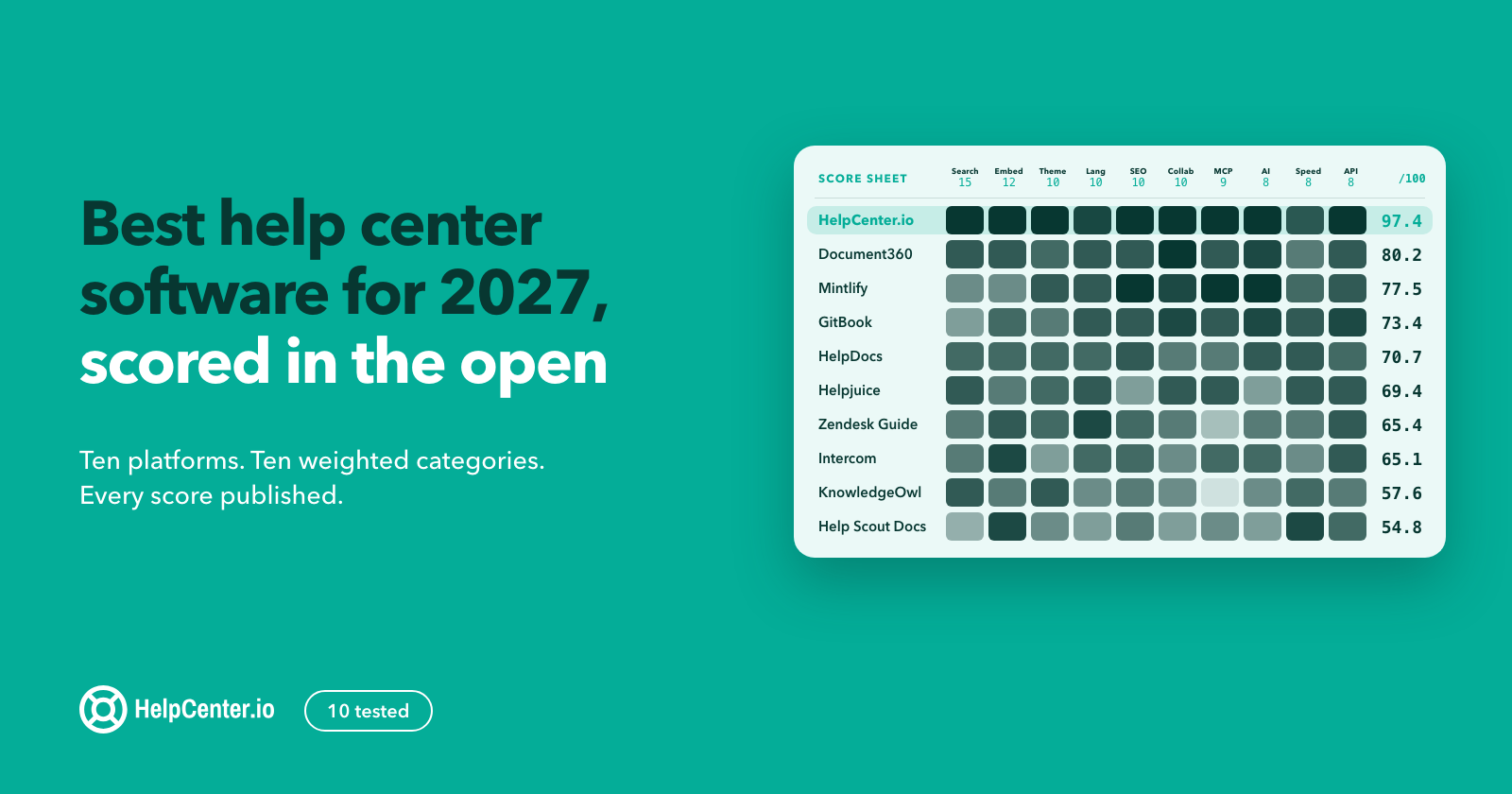
The best help center software for most customer-facing teams is HelpCenter.io (our product), at 97.4 out of 100 on a published ten-category rubric you can reweight to your own priorities. Document360 (80.2) is a strong pick for documentation teams that want a custom workflow builder, and Mintlify (77.5) for developer docs built around AI agents.
Disclosure: we make HelpCenter.io. Start a free 14-day trial, no card needed.
The ranking at a glance
Ranked by total score out of 100. The order comes from the rubric alone; price is shown as context and is not scored.
- HelpCenter.io, 97.4. Best for customer help centers that also need in-product help, FAQ sections and AI-agent access, without code.
- Document360, 80.2. Best for documentation teams that want a custom workflow builder.
- Mintlify, 77.5. Best for developer docs where AI-agent access matters most.
- GitBook, 73.4. Best for technical teams who write docs alongside code.
- HelpDocs, 70.7. Best for small teams that want a lightweight knowledge base with forgiving short-word search.
- Helpjuice, 69.4. Best for teams that want the vendor to design the knowledge base for them.
- Zendesk Guide, 65.4. Best for teams already on Zendesk, especially those publishing in many languages.
- Intercom, 65.1. Best for teams that want the help center inside an AI-first support suite.
- KnowledgeOwl, 57.6. Best for teams that want forgiving search and full template control.
- Help Scout Docs, 54.8. Best for small teams on Help Scout who want a simple, fast Docs site.
HelpCenter.io finished 17.2 points ahead of Document360 and led or tied for first in nine of the ten categories. Only Help Scout Docs scored higher, on speed. In search, HelpDocs matched a higher share of short-word typos. See Where competitors win and the category leaderboards.
How we tested
What counts as a help center here. A public, customer-facing site where customers search and read answers, which we could test live without signing in. Ticketing, shared inboxes and chat are outside the rubric; if you want them in the same product, see How to choose. Internal wikis are out too, and our knowledge base software roundup covers them.
The rubric. Ten categories, each scored 0 to 5 against written criteria (half points allowed), then multiplied by the category's weight divided by 5. Scores come only from live tests and official vendor sources. If we could not verify something, it scored as not documented.
| Category | Weight | What we checked |
|---|---|---|
| Search | 15 | Typo queries on long and short words, synonym queries, a non-English set, which plan has meaning-based search |
| Embedding | 12 | In-app widget, contextual and proactive help, embedding the help center or FAQ blocks in your site or app, plan needed |
| Theming | 10 | How far you get without code, what happens to customizations on updates, theme history and restore, AI help |
| Multilingual | 10 | Languages per plan, translation workflow, localized pages and search |
| SEO/AEO | 10 | Canonical tags, hreflang, structured data, sitemaps, custom domain or subfolder, llms.txt and Markdown |
| Collaboration | 10 | Drafts and reviews, version history and comparison, comments, roles, generally available real-time co-editing |
| MCP | 9 | First-party MCP server, read or write, reader-facing endpoint, breadth, safety, plan |
| AI-agent readiness | 8 | llms.txt and Markdown per page, grounded AI answers, how agents are set up and supervised |
| Speed/CDN | 8 | Lab performance on a home page and an article, CDN |
| API | 8 | Public API coverage for content, webhooks, authentication, documentation |
MCP and AI-agent readiness together carry 17 of the 100 points. A product scoring zero on both would top out at 83, so the AI rows cannot decide the ranking alone. How to reweight these scores shows the order with them removed.
Search. Tested in November 2026 on public pages, on one to four help centers per product (the vendor's own plus customer sites), with the recipe in the next section. Search scripts and sites are in the method appendix.
Speed. Three Lighthouse runs per page (mobile, simulated throttling) from the central US, on each vendor's own home page and one article, taking the median and scoring in bands.
Sources. Official docs, pricing pages and changelogs, listed at the end of each product section. Prices are in USD as shown on each vendor's public pricing page, and we quote only what the page states.
Run the typo test on your shortlist
Typo handling separated these products more than any other test, and you can repeat it on any help center, including your current one, in about 20 minutes with the search box and a notepad.
- Pick six words the site's search already finds: three longer ones (password, account, subscription) and three short ones of four or five letters (login, email, theme). Search each spelled correctly and note the top five results.
- Make two typos of each word: swap two neighbouring letters in the middle, and drop one middle letter. For short words we swapped letters 2 and 3 and dropped letter 3: "theme" becomes "tehme" and "thme", "user" becomes "uesr" and "usr".
- Count a typo as handled when its top five results share at least one article with the correct spelling. Log each query as word, typo, shared article yes or no, and report handled out of total for long and short words separately: almost every product handles long words, and short words are where they split.
- Run three synonym pairs the same way, counting a hit when the synonym's top five include an article from the original word's search: "remove" for "delete", "sign in" for "login", "bill" for "invoice".
- Search a nonsense string such as "zzqxjv". It should return nothing. A search that always returns something is guessing, and you will see that guess when a real query has no good answer.
- If your help center serves other languages, repeat steps 1 to 3 with words from each language.
Documented typo tolerance does not always show up: Zendesk documents one typo for terms of three to five characters, yet its search API matched none of our short-word typos, the one-edit missing-letter ones included.
Comparison table
| Product | Search (15) | Embedding (12) | Theming (10) | Multilingual (10) | SEO/AEO (10) | Collaboration (10) | MCP (9) | AI-agent readiness (8) | Speed/CDN (8) | API (8) | Total |
|---|---|---|---|---|---|---|---|---|---|---|---|
| HelpCenter.io | 15 | 12 | 10 | 9 | 10 | 10 | 9 | 8 | 6.4 | 8 | 97.4 |
| Document360 | 12 | 9.6 | 7 | 8 | 8 | 10 | 7.2 | 7.2 | 4.8 | 6.4 | 80.2 |
| Mintlify | 7.5 | 6 | 8 | 8 | 10 | 9 | 9 | 8 | 5.6 | 6.4 | 77.5 |
| GitBook | 6 | 8.4 | 6 | 8 | 8 | 9 | 7.2 | 7.2 | 6.4 | 7.2 | 73.4 |
| HelpDocs | 10.5 | 8.4 | 7 | 7 | 8 | 6 | 5.4 | 6.4 | 6.4 | 5.6 | 70.7 |
| Helpjuice | 12 | 7.2 | 7 | 8 | 4 | 8 | 7.2 | 3.2 | 6.4 | 6.4 | 69.4 |
| Zendesk Guide | 9 | 9.6 | 7 | 9 | 7 | 6 | 1.8 | 4.8 | 4.8 | 6.4 | 65.4 |
| Intercom | 9 | 10.8 | 4 | 7 | 7 | 5 | 6.3 | 5.6 | 4 | 6.4 | 65.1 |
| KnowledgeOwl | 12 | 7.2 | 8 | 5 | 6 | 5 | 0 | 4 | 5.6 | 4.8 | 57.6 |
| Help Scout Docs | 4.5 | 10.8 | 5 | 4 | 6 | 4 | 4.5 | 3.2 | 7.2 | 5.6 | 54.8 |
Points are weighted: score out of 5 × weight ÷ 5. Each product section shows the raw scores out of 5 and the evidence behind them; together these tables are the full score sheet.
Price and AI billing
Context, not scored. Price units differ by vendor (per site, per seat, per agent, per account), so compare the unit before the number.
| Product | Starting price | Free plan or trial | How AI answers are billed |
|---|---|---|---|
| HelpCenter.io | FAQ sections free; FAQ page $9/mo ($7 billed yearly); help center from $39/mo ($31 billed yearly), never more than $199/mo before AI translation | Free FAQ sections, no time limit; 14-day trial on paid plans, no card | AI answers add-on $29/mo per help center with 500 AI credits a month, one credit per AI answer; extra packs of 500 for $29 or 2,500 for $119 |
| Document360 | Quote only | None listed on the pricing page | Part of the quoted AI suite |
| Mintlify | Free plan; Pro $450/mo billed annually ($540 monthly) | Free plan | Pro includes 10,000 credits a month; an Assistant answer costs 25 credits |
| GitBook | Free plan; Essential $65 per site/mo plus $12 per user/mo, billed annually | Free plan; 14-day trial of paid features | AI credits on paid plans: $20 a month on Essential, $100 a month on Ultimate, per site |
| HelpDocs | Sprout $99/mo billed annually ($129 monthly) | 14-day trial, no card | AI on every plan; 1,000 AI credits a month on Sprout |
| Helpjuice | $249/mo, no AI suite | 14-day trial, no card | AI suite from the $449/mo plan |
| Zendesk Guide | Suite Team $55 per agent/mo billed annually | 14-day trial | Generative search up to 100,000 eligible searches a month; Copilot add-on $50 per agent/mo billed annually |
| Intercom | Essential from $29 per seat/mo ($19 for new customers) | 14-day trial, no card | Fin at $0.99 per outcome |
| KnowledgeOwl | Basic $100/mo | 30-day trial | Extra AI responses $50 for 1,000 |
| Help Scout Docs | Free plan; paid plans from $25 per user/mo billed annually | Free plan with 1 Docs site | $0.75 per resolution through the Envoy add-on |
1. HelpCenter.io
97.4/100, first overall. HelpCenter.io is a hosted help center with an AI Widget, FAQ sections you can place on any website and an MCP server that lets AI assistants read and edit your content. It scored 5/5 in eight of the ten categories, more than any other product here. For a buyer, that means search, in-app help, design, SEO, live co-editing and AI-agent access in one product, without code.
| Search | Embedding | Theming | Multilingual | SEO/AEO | Collaboration | MCP | AI-agent readiness | Speed/CDN | API |
|---|---|---|---|---|---|---|---|---|---|
| 5/5 | 5/5 | 5/5 | 4.5/5 | 5/5 | 5/5 | 5/5 | 5/5 | 4/5 | 5/5 |
What stood out in testing. Search caught every long-word typo (18 of 18 across three help centers), all six typos on a Swedish help center, 15 of 18 short-word typos and all 9 synonym queries; the nonsense control returned nothing on every site.
Article pages carry Article structured data and breadcrumbs, a FAQ-style article added FAQPage markup, and home pages carry Organization, WebSite and a search action.
Each public help center serves llms.txt, returns Markdown when a client asks for it, and exposes a read-only MCP endpoint at /mcp with three tools: search, fetch and list categories. The signed-in MCP server has 78 tools, from articles and change sets to design, the widget and FAQ sections. Every plan can import and sync Notion pages, and help centers with the Overview page can compare any two versions of an article side by side or inline.
Price and plans. A help center is $39 a month ($31 billed yearly) plus $6 for each teammate who edits (a flat $90 a month for 16 or more), and never more than $199 a month ($179 billed yearly) before AI translation; at that cap everything else is included. In a plan you build, every paid help center includes typo-tolerant search, subfolder hosting, version history, the public API, webhooks and the read-only MCP server. More languages, AI answers (meaning-based search and Ask AI, one monthly credit per answer), AI translation, single sign-on and the read-and-write MCP server are add-ons for each help center. The review workflow ($29 a month) and live co-editing ($49 a month, review workflow included) are add-ons priced once for the whole account. FAQ sections are free for one person (up to 25 FAQs in 3 sections, with a small badge), and a hosted FAQ page, at yourname.faqs.page or your own domain, is $9 a month. Prefer ready-made plans? Bootstrap $29, Growth $119 and Catalyst $179 a month billed yearly: languages, subfolder hosting and the read-and-write MCP server start at Growth, and Catalyst adds Ask AI, automatic AI translation, staged changes, custom roles and live co-editing.
Where it falls short. Article pages loaded slower than most rivals in our lab test (Lighthouse 46 on mobile), and in a plan you build, proactive widget messages come only at the price cap. Teams that want ticketing in the same product should look at Zendesk, Intercom or Help Scout. Other losses are under Where competitors win.
Sources: pricing, pricing in Markdown, AI features, MCP server, MCP tool reference, llms.txt on our help center, Notion import, plus live tests on self.helpcenter.io and three customer help centers.
Try it. Start a free 14-day trial, no card needed, see what the help center includes, or build your plan on the pricing page.
2. Document360
80.2/100. Document360 is a dedicated knowledge base platform for public and private documentation, with strong authoring workflows and the Eddy AI assistant.
| Search | Embedding | Theming | Multilingual | SEO/AEO | Collaboration | MCP | AI-agent readiness | Speed/CDN | API |
|---|---|---|---|---|---|---|---|---|---|
| 4/5 | 4/5 | 3.5/5 | 4/5 | 4/5 | 5/5 | 4/5 | 4.5/5 | 3/5 | 4/5 |
What stood out in testing. On Document360's own documentation, search matched all 6 long-word typos and 3 of 6 short-word typos, with a clean nonsense control. Collaboration shares the top score on this list: up to 10 people can edit an article at once in the Advanced WYSIWYG editor, with a custom workflow builder, inline comments and AI summaries of what changed between versions. Document360's docs say co-editing is rolling out to projects in phases, so check that yours has it. Document360 generates llms.txt automatically and serves Markdown versions of pages. Its own documentation is published in six languages, each with its own sitemap. Our lab speed runs were slow on both pages.
Plan gating that matters. Pricing is a quote that depends on team accounts, workspaces, languages, SSO and the AI suite. Document360 has a Knowledge base widget for embedding help in a site or app, and its install page ties the widget to the Business and Enterprise plans; the MCP server is listed for Business and Enterprise too. Custom CSS and custom JavaScript are supported and apply across the whole site, but neither the docs nor the pricing page say which plan includes them, so ask in your quote.
Where it falls short. Co-editing does not work in the Markdown editor. Custom CSS has no version history. The MCP server can create, update and publish articles, but it is authenticated and aimed at editors and integrations; for readers without accounts, Document360 points to its separate Ask Eddy AI Public API, so there is no per-site, read-only MCP endpoint.
Sources: pricing, search, collaborative editing, llms.txt, MCP, custom CSS, Knowledge base widget, release notes. Side by side: HelpCenter.io vs Document360.
3. Mintlify
77.5/100. Mintlify is a developer-docs platform built around Git, with a strong AI-agent focus.
| Search | Embedding | Theming | Multilingual | SEO/AEO | Collaboration | MCP | AI-agent readiness | Speed/CDN | API |
|---|---|---|---|---|---|---|---|---|---|
| 2.5/5 | 2.5/5 | 4/5 | 4/5 | 5/5 | 4.5/5 | 5/5 | 5/5 | 3.5/5 | 4/5 |
What stood out in testing. Mintlify's page-source basics were the most complete we checked: canonical tags, structured data, sitemaps, llms.txt and Markdown on its own docs and on a customer site, plus hreflang on its own docs. Every Mintlify site we tried exposed an MCP endpoint, and its admin MCP tools can edit, publish and review. In the web editor, several people can work on the same page at once, with comments and suggestions. Search, tested through the MCP endpoint, matched long-word typos 10 times out of 18 and short-word typos twice in 18. It also returned results for our nonsense control on every site, so it never reported "no results".
Plan gating that matters. AI translations are on Pro. Required review before publishing (GitHub or GitLab repositories) and the publisher and commenter roles are Enterprise features. Mintlify removed the assistant widget settings from the dashboard: widgets already embedded keep working, and setting one up on a new site means emailing support.
Where it falls short. It is built for developer documentation: content syncs with Git and design is configured in code. Typo handling was below the dedicated help center tools.
Sources: pricing, changelog, review before publishing, search MCP, admin MCP, web editor, themes.
4. GitBook
73.4/100. GitBook is a docs platform for technical teams, with Git sync, change requests and an AI assistant.
| Search | Embedding | Theming | Multilingual | SEO/AEO | Collaboration | MCP | AI-agent readiness | Speed/CDN | API |
|---|---|---|---|---|---|---|---|---|---|
| 2/5 | 3.5/5 | 3/5 | 4/5 | 4/5 | 4.5/5 | 4/5 | 4.5/5 | 4/5 | 4.5/5 |
What stood out in testing. We tested search through the read-only MCP endpoint that published GitBook sites expose. Long-word typos matched 9 times out of 18, short-word typos never (0 of 18), and synonyms once in 9. The AI-agent basics are strong: llms.txt and llms-full.txt on every plan, Markdown for every page, and an MCP endpoint per published site. The Docs Embed lets readers ask the GitBook Assistant, search your docs or browse pages without leaving your product, though the Assistant in the embed needs the Ultimate plan.
Plan gating that matters. Pricing is per site plus per user. AI translation is not on the Free plan; on Essential and Ultimate it is billed in AI credits (30 per 1,000 words translated) drawn from the plan's monthly credits, and GitBook's docs call it a paid add-on. Live edits are locked by default and cannot be switched on for sections published as Public or Unlisted, or synced with GitHub or GitLab; those sections use change requests.
Where it falls short. Typo handling was below the dedicated help center tools. Branding runs through built-in customization settings (logo, fonts, colors, links) and custom blocks. GitBook is built for product and developer docs, although it does market its Ultimate plan for help centers.
Sources: pricing, Docs Embed, live edits, translations, MCP for published docs, LLM-ready docs, customization.
5. HelpDocs
70.7/100. HelpDocs is a lightweight knowledge base for customer and internal docs, with its Lighthouse help widget and custom HTML templates from the Bloom plan.
| Search | Embedding | Theming | Multilingual | SEO/AEO | Collaboration | MCP | AI-agent readiness | Speed/CDN | API |
|---|---|---|---|---|---|---|---|---|---|
| 3.5/5 | 3.5/5 | 3.5/5 | 3.5/5 | 4/5 | 3/5 | 3/5 | 4/5 | 4/5 | 3.5/5 |
What stood out in testing. HelpDocs had the highest short-word typo rate we measured: 11 of 12, with a clean nonsense control. Long-word typos were patchier (7 of 12). HelpDocs offers AI Visibility (llms.txt and a Markdown version of every article) on every plan, an MCP server that can search, read, draft and update articles and categories, and imports from 16 sources. Article pages carry TechArticle structured data.
Plan gating that matters. Languages scale by plan: 3, 20 or unlimited. Custom HTML templates and the audit trail need Bloom or above; Sprout has custom CSS and JavaScript.
Where it falls short. We found no public, reader-facing MCP endpoint per site; the MCP server is authorized against your HelpDocs account. Collaboration means presence indicators and an Editing badge, not simultaneous co-editing. A customer site we checked did not serve llms.txt.
Sources: pricing, product update, MCP, collaborating on articles. Side by side: HelpCenter.io vs HelpDocs.
6. Helpjuice
69.4/100. Helpjuice is a dedicated knowledge base vendor whose plans include a knowledge base design made for you by its team.
| Search | Embedding | Theming | Multilingual | SEO/AEO | Collaboration | MCP | AI-agent readiness | Speed/CDN | API |
|---|---|---|---|---|---|---|---|---|---|
| 4/5 | 3/5 | 3.5/5 | 4/5 | 2/5 | 4/5 | 4/5 | 2/5 | 4/5 | 4/5 |
What stood out in testing. Search matched every long-word typo we tried (12 of 12) on two English help centers and all 12 typos on Portuguese and Spanish help centers, but no short-word typos (0 of 12). Synonyms worked 5 times out of 6. The pricing page lists live collaboration and workflows, localization with AI article translation, and a fully customized design done by Helpjuice's team on every plan. The Swifty AI helpbar can be added to external websites with a code snippet; when the knowledge base is embedded, only public articles are used. On the page-source side Helpjuice was the weakest: no canonical tags, no structured data, and no llms.txt or Markdown on the sites we checked.
Plan gating that matters. The Knowledge Base plan ($249 a month) excludes the AI suite (AI Writer, AI Search, AI Chatbot); AI starts with the AI-Knowledge Base plan ($449 a month).
Where it falls short. Its first-party MCP server covers a broad set of admin tasks, around 53 tools, but it is a single account-level endpoint authenticated with an API key, with no reader-facing MCP endpoint per site.
Sources: pricing, MCP server, Swifty AI helpbar. Side by side: HelpCenter.io vs Helpjuice.
7. Zendesk Guide
65.4/100. Zendesk Guide is the help center inside Zendesk's customer service suite and the natural choice for teams already running Zendesk ticketing.
| Search | Embedding | Theming | Multilingual | SEO/AEO | Collaboration | MCP | AI-agent readiness | Speed/CDN | API |
|---|---|---|---|---|---|---|---|---|---|
| 3/5 | 4/5 | 3.5/5 | 4.5/5 | 3.5/5 | 3/5 | 1/5 | 3/5 | 3/5 | 4/5 |
What stood out in testing. We tested search through Zendesk's Help Center search API on three help centers, including Zendesk's own in English and German. Long-word typos worked 13 times out of 18, but none of the 18 short-word typos returned a matching article, the nine one-edit missing-letter typos included, and synonyms matched 2 times out of 9. Zendesk documents fuzzy matching (one typo for terms of three to five characters, two for longer terms) plus semantic search and generative answers on the help center results page. Multilingual support is the most mature on this list: localized article versions, automatic hreflang tags (10 language alternates on Zendesk's own help center) and bulk AI translations on Enterprise. Article pages carry TechArticle structured data. We found no native llms.txt and no Markdown version of articles on Zendesk help centers.
Plan gating that matters. Zendesk's pricing page lists 40+ help center languages from Suite Professional ($115 per agent a month billed annually), while Suite Team lists one default language. Custom themes are not available on Suite Team. Team Publishing (review and approval workflows) and bulk AI translations are Enterprise features. Generative search covers up to 100,000 eligible searches a month, with a paid extender add-on beyond that.
Where it falls short. Zendesk has no generally available help center MCP server for readers or content. It documents an early-access Zendesk MCP server (Zendesk Bridge) that lets outside AI agents search the help center and work tickets, and a generally available MCP client for its own AI agents. Code-edited themes stop receiving automatic theme updates. We found no real-time co-editing in Zendesk's documentation.
Sources: pricing, fuzzy and generative search, semantic search, generative search usage, hreflang, bulk AI translations, themes, Team Publishing, MCP client, Zendesk Bridge. Side by side: HelpCenter.io vs Zendesk.
8. Intercom
65.1/100. Intercom's help center is part of its AI-first customer service platform, alongside the Messenger and Fin, its AI agent.
| Search | Embedding | Theming | Multilingual | SEO/AEO | Collaboration | MCP | AI-agent readiness | Speed/CDN | API |
|---|---|---|---|---|---|---|---|---|---|
| 3/5 | 4.5/5 | 2/5 | 3.5/5 | 3.5/5 | 2.5/5 | 3.5/5 | 3.5/5 | 2.5/5 | 4/5 |
What stood out in testing. Intercom's search guide describes ranking by how often a term appears in an article's title, description and body, and does not mention typo tolerance. Even so, long-word typos matched 14 times out of 18 across three help centers and 5 of 6 in German. Short-word typos never matched (0 of 18). The Messenger is a mature way to put help inside a product. Intercom's own help center serves llms.txt and Markdown versions of articles, but a customer help center we checked returned 404 for llms.txt. Theming is the most limited on this list: Intercom says it is "not possible to use HTML, CSS or iFrames to customize" the Help Center.
Plan gating that matters. A multilingual help center is listed from the Advanced plan. Proactive Support Plus (posts, checklists, product tours, surveys) is an add-on from $99 a month. Intercom's MCP server is available for US and EU hosted workspaces; Australia-hosted workspaces are not supported yet.
Where it falls short. Design is limited to Intercom's built-in settings. We found no simultaneous co-editing documented and no reader-facing MCP endpoint per help center. Its first-party MCP server can create and update articles, though, which is more than several dedicated knowledge base tools offer.
Sources: pricing, help center search, help center customization, MCP server, llms.txt. Side by side: HelpCenter.io vs Intercom.
9. KnowledgeOwl
57.6/100. KnowledgeOwl is a knowledge base specialist with configurable search and full template control from its Pro plan.
| Search | Embedding | Theming | Multilingual | SEO/AEO | Collaboration | MCP | AI-agent readiness | Speed/CDN | API |
|---|---|---|---|---|---|---|---|---|---|
| 4/5 | 3/5 | 4/5 | 2.5/5 | 3/5 | 2.5/5 | 0/5 | 2.5/5 | 3.5/5 | 3/5 |
What stood out in testing. KnowledgeOwl had the most forgiving search we tested: 18 of 18 long-word typos and 13 of 18 short-word typos matched. That forgiveness has a cost, because our nonsense control returned results on two of three sites, including KnowledgeOwl's own knowledge base. Fuzziness is configurable (automatic, one typo or two typos, and fuzzy search can be turned off for full results), so teams can tune it. Themes can be styled without code (logo, colors, fonts) on every plan, and KnowledgeOwl implements a custom branded theme at no extra charge.
Plan gating that matters. Every plan includes one knowledge base and one author; extra authors are $25 a month and extra knowledge bases $50 a month. Full HTML, CSS and JavaScript control, a custom domain and API access start on Pro ($250 a month). A contextual help widget is listed in the plan comparison, so confirm which plan includes it.
Where it falls short. There is no first-party MCP server yet; KnowledgeOwl lists one as coming soon, and its roadmap marks it in progress. llms.txt is a file you write yourself, and we found no Markdown versions of pages. We found no built-in translation workflow in the documentation. Collaboration is an overwrite warning rather than co-editing.
Sources: pricing, plans, search and fuzziness, AI features, roadmap, llms.txt, multiple authors.
10. Help Scout Docs
54.8/100. Help Scout Docs is the knowledge base inside Help Scout, a shared inbox and support suite. Docs content appears in Beacon, Help Scout's embeddable widget.
| Search | Embedding | Theming | Multilingual | SEO/AEO | Collaboration | MCP | AI-agent readiness | Speed/CDN | API |
|---|---|---|---|---|---|---|---|---|---|
| 1.5/5 | 4.5/5 | 2.5/5 | 2/5 | 3/5 | 2/5 | 2.5/5 | 2/5 | 4.5/5 | 3.5/5 |
What stood out in testing. Search was the weakest we tested for typos: 0 of 36 typo queries returned the right article across three Docs sites, which fits Help Scout's own advice to add misspellings as article keywords. Synonym queries did well (7 of 9). Pages were among the fastest in our lab runs. Beacon is included in all plans and can show proactive messages, and AI answers cost $0.75 per resolution through Help Scout's Envoy add-on, whose Scout agent answers in Beacon from your Docs content. You can set a monthly cap on resolutions.
Plan gating that matters. The number of Docs sites depends on the plan: 1 on Free, 2 on Standard, 3 on Plus and 5 on Pro, with extra sites at $20 a month billed annually. Labels and site text are translated per Docs site; for article content you keep one Docs site per language, or use the Weglot, Crowdin or Transifex integrations, or the beta AI Assist on Plus and Pro. The MCP integration needs Standard or above.
Where it falls short. No llms.txt or Markdown, design limited to branding plus custom CSS and JavaScript, and no co-editing documented for Docs. Its first-party MCP is read-only for new connections.
Sources: pricing, failed searches, Beacon guide, Help Scout MCP, translating Docs, customizing Docs. Side by side: HelpCenter.io vs Help Scout.
Results by category
Scores out of 5, highest first. Read the category that decides your purchase, not only the total.
Search (weight 15)
Typos, short words, synonyms and a non-English set. Long-word typo handling was common; short words separated the field.
HelpCenter.io 5 · Document360 4 · Helpjuice 4 · KnowledgeOwl 4 · HelpDocs 3.5 · Zendesk Guide 3 · Intercom 3 · Mintlify 2.5 · GitBook 2 · Help Scout Docs 1.5
| Product | Long-word typos | Short-word typos | Synonyms | Non-English typos | Nonsense control returned results |
|---|---|---|---|---|---|
| HelpCenter.io | 18/18 | 15/18 | 9/9 | 6/6 | 0 of 4 sites |
| Document360 | 6/6 | 3/6 | 2/3 | not tested | 0 of 1 site |
| Mintlify | 10/18 | 2/18 | 3/9 | not tested | 3 of 3 sites |
| GitBook | 9/18 | 0/18 | 1/9 | not tested | 0 of 3 sites |
| HelpDocs | 7/12 | 11/12 | 3/6 | not tested | 0 of 2 sites |
| Helpjuice | 12/12 | 0/12 | 5/6 | 12/12 | 0 of 4 sites |
| Zendesk Guide | 13/18 | 0/18 | 2/9 | 3/6 | 0 of 4 sites |
| Intercom | 14/18 | 0/18 | 5/9 | 5/6 | 0 of 4 sites |
| KnowledgeOwl | 18/18 | 13/18 | 1/9 | not tested | 2 of 3 sites |
| Help Scout Docs | 0/18 | 0/18 | 7/9 | not tested | 0 of 3 sites |
Embedding (weight 12)
Mature in-app widgets are common among the suites; HelpCenter.io also embeds FAQ sections on every plan.
HelpCenter.io 5 · Intercom 4.5 · Help Scout Docs 4.5 · Zendesk Guide 4 · Document360 4 · GitBook 3.5 · HelpDocs 3.5 · Helpjuice 3 · KnowledgeOwl 3 · Mintlify 2.5
Theming (weight 10)
From built-in settings only (Intercom) to full template code (Zendesk outside Suite Team, KnowledgeOwl from Pro, HelpDocs from Bloom). HelpCenter.io's AI theming agent builds a theme from your website on every plan; we found no equivalent elsewhere.
HelpCenter.io 5 · Mintlify 4 · KnowledgeOwl 4 · Zendesk Guide 3.5 · Document360 3.5 · Helpjuice 3.5 · HelpDocs 3.5 · GitBook 3 · Help Scout Docs 2.5 · Intercom 2
Multilingual (weight 10)
Zendesk's localized versions with automatic hreflang remain the most mature, on its higher plans.
Zendesk Guide 4.5 · HelpCenter.io 4.5 · Document360 4 · Helpjuice 4 · GitBook 4 · Mintlify 4 · Intercom 3.5 · HelpDocs 3.5 · KnowledgeOwl 2.5 · Help Scout Docs 2
SEO/AEO (weight 10)
Mintlify and HelpCenter.io had the most complete page-source basics; Helpjuice the least.
HelpCenter.io 5 · Mintlify 5 · Document360 4 · GitBook 4 · HelpDocs 4 · Zendesk Guide 3.5 · Intercom 3.5 · Help Scout Docs 3 · KnowledgeOwl 3 · Helpjuice 2
Collaboration (weight 10)
Document360 and HelpCenter.io share the top score: Document360 for up to 10 co-editors and workflows (rolling out in phases, per its docs), HelpCenter.io for live co-editing plus a review workflow with staged changes and custom roles.
Document360 5 · HelpCenter.io 5 · GitBook 4.5 · Mintlify 4.5 · Helpjuice 4 · Zendesk Guide 3 · HelpDocs 3 · Intercom 2.5 · KnowledgeOwl 2.5 · Help Scout Docs 2
MCP (weight 9)
Eight of the ten have a generally available first-party MCP server; Zendesk's is in early access and KnowledgeOwl's is in progress. Only HelpCenter.io, GitBook and Mintlify also give each public site its own reader-facing endpoint.
HelpCenter.io 5 · Mintlify 5 · Document360 4 · Helpjuice 4 · GitBook 4 · Intercom 3.5 · HelpDocs 3 · Help Scout Docs 2.5 · Zendesk Guide 1 · KnowledgeOwl 0
AI-agent readiness (weight 8)
llms.txt and Markdown per page are standard at HelpCenter.io, Document360, GitBook and Mintlify. HelpDocs documents them on every plan, though one customer site we checked did not serve llms.txt.
HelpCenter.io 5 · Mintlify 5 · Document360 4.5 · GitBook 4.5 · HelpDocs 4 · Intercom 3.5 · Zendesk Guide 3 · KnowledgeOwl 2.5 · Help Scout Docs 2 · Helpjuice 2
Speed/CDN (weight 8)
Help Scout had the best average across its two pages (80.5) and HelpDocs the best single page (86 on its home page). Most others averaged between 39 and 68 on Lighthouse's mobile score. Response headers showed a CDN for seven of the ten.
Help Scout Docs 4.5 · HelpCenter.io 4 · Helpjuice 4 · GitBook 4 · HelpDocs 4 · Mintlify 3.5 · KnowledgeOwl 3.5 · Zendesk Guide 3 · Document360 3 · Intercom 2.5
| Product | Home page (Lighthouse mobile, median of 3) | Article | CDN seen in headers |
|---|---|---|---|
| HelpCenter.io | 76 | 46 | Yes |
| Document360 | 42 | 40 | Yes |
| Mintlify | 67 | 51 | Yes |
| GitBook | 66 | 70 | Yes |
| HelpDocs | 86 | 60 | Not evident |
| Helpjuice | 65 | 56 | Yes |
| Zendesk Guide | 50 | 46 | Yes |
| Intercom | 40 | 38 | Yes |
| KnowledgeOwl | 69 | 67 | Not evident |
| Help Scout Docs | 79 | 82 | Not evident |
API (weight 8)
Every vendor offers a content API; coverage and authentication options differ.
HelpCenter.io 5 · GitBook 4.5 · Zendesk Guide 4 · Intercom 4 · Document360 4 · Helpjuice 4 · Mintlify 4 · Help Scout Docs 3.5 · HelpDocs 3.5 · KnowledgeOwl 3
How to reweight these scores
Our weights reflect a customer-facing help center. Yours may not, and the scores out of 5 make it easy to rerun the ranking with your own. The rule is one line:
New total = Σ (your weight × score ÷ 5) ÷ Σ your weights × 100.
In a spreadsheet, put your ten weights in row 1 (columns B to K), each product's ten scores out of 5 below them, and use =SUMPRODUCT(B$1:K$1,B2:K2)/5/SUM(B$1:K$1)*100.
If you only want to drop categories, there is a shortcut: subtract the points that product earned in the dropped categories (from its row in the comparison table), then divide by the weight that is left. Without MCP and AI-agent readiness (17 points of weight), Document360 earned 7.2 + 7.2 = 14.4 there, so it becomes (80.2 − 14.4) ÷ 83 × 100 = 79.3. HelpCenter.io earned the full 9 + 8 and becomes (97.4 − 17) ÷ 83 × 100 = 96.9.
Here are two worked examples. The first removes the two AI rows. The second is a weighting for developer docs: Collaboration 20, MCP 15, AI-agent readiness 15, API 15, Search 10, SEO/AEO 10, Theming 5, Multilingual 5, Speed/CDN 5 and Embedding 0.
| Product | Published weights | Without MCP and AI-agent readiness | Developer-docs weights |
|---|---|---|---|
| HelpCenter.io | 97.4 (1st) | 96.9 (1st) | 98.5 (1st) |
| Document360 | 80.2 (2nd) | 79.3 (2nd) | 84.0 (3rd) |
| Mintlify | 77.5 (3rd) | 72.9 (3rd) | 86.5 (2nd) |
| GitBook | 73.4 (4th) | 71.1 (joint 4th) | 80.0 (4th) |
| HelpDocs | 70.7 (5th) | 71.0 (6th) | 69.5 (joint 5th) |
| Helpjuice | 69.4 (6th) | 71.1 (joint 4th) | 69.5 (joint 5th) |
| Zendesk Guide | 65.4 (7th) | 70.8 (7th) | 60.0 (8th) |
| Intercom | 65.1 (8th) | 64.1 (9th) | 64.0 (7th) |
| KnowledgeOwl | 57.6 (9th) | 64.6 (8th) | 50.5 (9th) |
| Help Scout Docs | 54.8 (10th) | 56.7 (10th) | 50.0 (10th) |
Without the AI rows, the middle of the table compresses: GitBook, Helpjuice, HelpDocs and Zendesk Guide land within 0.3 points of each other, and KnowledgeOwl passes Intercom. With developer-docs weights, Mintlify moves up to second.
HelpCenter.io stays first in both, because it scored 5/5 in eight of the ten categories. If your docs live in Git, Mintlify and GitBook still fit that workflow best; the rubric does not score it. If one category decides your purchase, read its leaderboard rather than any total.
Where competitors win
- Review models: Document360 pairs its tied 5/5 on collaboration with a custom workflow builder, and GitBook's change requests let editors request reviews and merge edits back into the main version, a familiar model for teams that review docs like code.
- Short-word typos: HelpDocs matched a higher share (11 of 12) than HelpCenter.io (15 of 18). KnowledgeOwl matched 13 of 18.
- Multilingual depth: Zendesk tied with us on the score, and its localized article versions with automatic hreflang and bulk AI translations are the most mature model we saw, from Suite Professional up.
- Page-source basics (tie): Mintlify matched our 5/5, with canonical tags, structured data, sitemaps, llms.txt and Markdown on its own docs and a customer site, plus hreflang on its own docs.
- Speed: Help Scout's Docs pages were the fastest in our lab runs.
- Done-for-you design: Helpjuice designs the knowledge base for you on every plan, and KnowledgeOwl implements a custom branded theme at no extra charge.
- Suites: Zendesk, Intercom and Help Scout put ticketing, inbox and chat in the same product. That is outside this rubric, and it matters if you want one vendor for everything.
How to choose
- You already run Zendesk, Intercom or Help Scout for tickets. Their built-in help center is the least work. Check typo handling first (our results above), and whether you need design control beyond what the suite allows.
- You write developer documentation in Git. GitBook or Mintlify fit that workflow best.
- You are a small team with no developer. Look for no-code theming, typo-tolerant search on the entry plan and an in-app widget. HelpCenter.io scored highest on all three; HelpDocs is a lighter option. KnowledgeOwl's search is forgiving, but custom code starts on Pro, so check which plan includes its contextual help widget.
- You serve several languages. Zendesk (40+ languages from Suite Professional), Document360, GitBook, Mintlify and HelpCenter.io all handle localized sites. At HelpCenter.io, more languages and AI translation are paid add-ons per help center in a plan you build; on the classic plans, languages start at Growth and Catalyst includes automatic AI translation. Compare which plan includes AI translation before you shortlist.
- AI assistants are a main channel. Check for llms.txt, Markdown per page and a reader-facing MCP endpoint. HelpCenter.io serves all three on every help center, and GitBook and Mintlify generate them for published sites by default.
- You only need FAQs. HelpCenter.io is free for up to 25 FAQs in 3 sections you embed on your own site, and a hosted FAQ page with unlimited FAQs, at yourname.faqs.page or your own domain, is $9 a month.
- Before you buy. Test your own content in a trial, check speed from your own region, and confirm prices and plan limits on each vendor's pricing page.
Switching
Most vendors here offer an importer or an API for moving content. At HelpCenter.io, a do-it-yourself import from your dashboard starts instantly and takes a few minutes, depending on how much content you move; it works with Zendesk, Intercom, Help Scout, Document360, Front and HelpDocs. If you would rather our team do it, a free migration moves every article, category and image in up to 7 working days (estimated). HelpDocs imports from 16 sources and, by default, adds imported content alongside existing articles. Document360 includes standard migration in most quotes.
Your next step. Start a free 14-day trial of HelpCenter.io, no card needed, and run the typo test on your own content.
FAQ
What is the best help center software for small teams?
On our rubric, HelpCenter.io scored highest overall (97.4/100). For small teams the deciding factors are usually no-code design, typo-tolerant search on the entry plan and an in-app widget. HelpDocs and KnowledgeOwl are strong on search, and Help Scout Docs is simple and fast if you already use Help Scout.
Which help center software has typo-tolerant search?
In our tests, HelpCenter.io, KnowledgeOwl, Helpjuice and Document360 matched every long-word typo; Intercom and Zendesk Guide matched most. Short words separated the field: HelpDocs (11 of 12), HelpCenter.io (15 of 18), KnowledgeOwl (13 of 18) and Document360 (3 of 6) handled some; the others handled two or fewer. Help Scout Docs did not match any of our typo queries.
Which help center platforms have an MCP server?
HelpCenter.io, Document360, Mintlify, GitBook, HelpDocs, Helpjuice, Intercom and Help Scout have generally available first-party MCP servers. HelpCenter.io, GitBook and Mintlify also give each public site its own read-only MCP endpoint. Zendesk offers an MCP client for its own AI features and an early-access MCP server; neither is a generally available server for help center content. KnowledgeOwl lists one as coming soon.
What is llms.txt, and which platforms generate it?
llms.txt is a plain-text index of a site's pages written for AI tools. In our checks, HelpCenter.io, Document360, GitBook and Mintlify serve it, along with Markdown versions of pages. HelpDocs documents it on every plan; one customer site we checked did not serve it. Intercom serves it on its own help center. KnowledgeOwl supports a file you write yourself. We found none on Zendesk, Help Scout Docs or Helpjuice help centers. Our llms.txt guide covers what to put in one.
Method appendix
Query set. Per site: six long-word typos, six short-word typos and three synonym pairs (such as remove for delete), built with the recipe above from common help center words, plus German, Swedish, Portuguese or Spanish words where a site served those languages. Control: zzqxjv. Each language counts as its own site, which is why HelpCenter.io (Swedish), Helpjuice (Portuguese and Spanish), Zendesk and Intercom (German) show four sites in the control column.
Test sites. Vendor-owned: self.helpcenter.io, support.zendesk.com (English and German), intercom.com/help (English and German), docs.helpscout.com, docs.document360.com, help.helpjuice.com, gitbook.com/docs, mintlify.com/docs, support.knowledgeowl.com and support.helpdocs.io. Plus 19 customer help centers, unnamed: three each for HelpCenter.io and Helpjuice, two each for Zendesk, Intercom, Help Scout, GitBook, Mintlify and KnowledgeOwl, one for HelpDocs and none for Document360.
Search endpoints. Each site's own search request, Zendesk's Help Center search API, and the public MCP search tool for GitBook and Mintlify.