Live Chat Etiquette: 12 Rules for Customer Service Teams
12 live chat etiquette rules for support teams, with the decisions behind them, a one-page agent checklist and a weekly chat review scorecard.
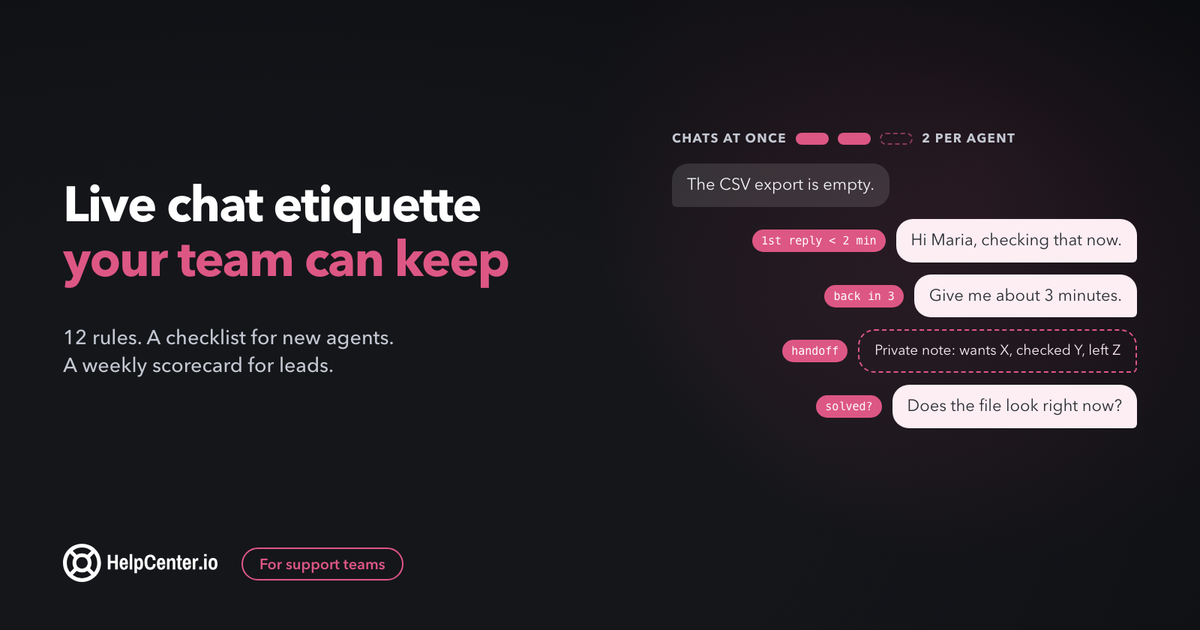
Good live chat etiquette lets a small team give every visitor a fast, clear, friendly conversation, on every shift, without anyone burning out. This guide turns it into 12 rules you can adopt this week, with the operating decisions behind them, a one-page checklist for new agents and a scorecard for reviewing chats.
The short answer: live chat etiquette is the set of habits that make a support chat feel quick and human: reply within a time you promised, read before you answer, ask one thing at a time, say how long you need, hand off without making the customer repeat themselves, keep messages short, protect sensitive data, and confirm the problem is solved before you close.
Most etiquette lists stop at manners. The rules below also cover the parts a team lead has to decide: what reply time to promise, how many chats one person should hold, when a conversation belongs somewhere else, and what an agent may do when a customer turns abusive. For the exact wording of greetings, holds and closings, we link to our 60 canned responses rather than repeat them here. One disclosure: we make HelpCenter.chat, a live chat with a free plan. It has a short section near the end, with its limits.
What is live chat etiquette in customer service?
Live chat etiquette in customer service is the shared standard a support team follows in chat conversations with customers: how fast you reply, how you write, how you hold and hand off, what you never ask for, and how you end the chat. It differs from email etiquette because the customer is waiting on the other side right now, often in a small window while doing something else.
That last point drives almost every rule. In email, a reply that takes an hour and covers everything is good service. In chat, the same hour of silence feels like being ignored, and a long, complete paragraph is hard to read in a chat bubble. Etiquette in chat is mostly about managing the wait and keeping each message easy to take in.
This guide is about support chat with customers. Etiquette for internal team chat (Slack, Teams) is a different topic.
The 12 rules at a glance
| # | Rule | What the customer notices |
|---|---|---|
| 1 | Promise a reply time you can keep, then keep it | They know how long to wait, and the wait matches |
| 2 | Hold only as many chats as you can do well | Replies stay quick and specific, not rushed |
| 3 | Greet with what you already know | They do not have to introduce themselves twice |
| 4 | Read everything, then ask one question at a time | No questions they already answered |
| 5 | Say how long you need, then check back | Silence never lasts longer than you said |
| 6 | Hand off with a summary | They never repeat their story to the next person |
| 7 | Give bad news with a next step | A "no" still leaves them with something to do |
| 8 | Match their tone, stay on your side of it | You sound like a person, not a script or a pal |
| 9 | Write short, plain messages | Easy to read on a phone, in a second language |
| 10 | Confirm it is solved before you close | The chat ends when they are done, not when you are |
| 11 | Move it off chat when chat is the wrong place | Long or sensitive issues get a proper channel |
| 12 | Never ask for card numbers, passwords or codes | Their data stays safe, and so does your business |
Rules 1, 2, 11 and 12 are team decisions. Write them down once, so each agent does not have to improvise them mid-conversation. The rest are habits each agent practises every chat.
Rule 1: Promise a reply time you can keep, then keep it
Customers start a chat because they expect a fast answer. In a HubSpot survey, 66% of consumers said they expect a response from customer service in five minutes or less. You do not need to beat that number on every chat. You need to tell people what to expect and then match it.
Split the promise in two:
- First reply: a real person acknowledging the question. This is the one that matters most, because it ends the "is anyone there?" feeling. When your team is online, aim to send it within a minute or two, even if it only says you are looking into it.
- Full answer: this can take longer, as long as you say so (rule 5).
Then make the promise visible and honest:
- Show your hours and your usual wait. "We usually reply in a few minutes, Monday to Friday, 9:00 to 17:00 CET" is better than a green dot that stays green at 23:00.
- Write an offline message that sets a real expectation. Say when someone will reply and where (in this chat or by email), and link to your help center for the questions people can solve themselves.
- Plan for spikes. After a release, an outage or a newsletter, chat volume jumps. Decide in advance who joins the queue, and switch the widget's wording to a longer wait rather than letting the promise break quietly.
- Answer the longest wait first. Sort the queue by waiting time, not by who looks easiest.
If you cannot keep a five-minute promise with your headcount, promise fifteen and keep it. A kept promise feels better to a customer than a fast one that is broken half the time.
Rule 2: How many chats can one person handle?
There is no industry standard worth quoting here. The numbers that circulate online are vendor blogs citing each other. So this is our guidance: start each person at two chats at once, and raise the limit only while reply times and quality hold.
Two is a good start because it covers the natural gaps in a conversation. While one customer is checking a setting or typing a long reply, you can answer the other. Beyond that, the work changes: you stop reading each message fully and start skimming, and skimming is where most chat mistakes come from.
Signs a person is holding too many chats:
- they ask for information the customer already gave (rule 4 breaks first);
- "one moment please" messages go up, and so do the waits after them;
- chats end with the issue half solved, and the same customer comes back the next day;
- replies get shorter and more generic, with more pasted text sent unedited.
Simple, repeat questions (order status, a password reset link) can run at three or four. Technical troubleshooting, billing disputes and anything with an upset customer deserve one person's full attention. If your tool lets you cap concurrent chats per person, set the cap. If it does not, make it a team rule and check it in your weekly review.
Rules 3 to 10: inside the conversation
These are the habits each agent practises in every chat. Each one has a single example line written for this guide; for more wording, follow the links into the canned responses guide.
Rule 3: Greet with what you already know
Use the customer's name if you have it and refer to what they already wrote. If they are logged in, you may already see their plan, their last conversation or the page they were on. Use it, so they do not have to explain who they are.
Example: "Hi Maria, I can see you are on the export settings page. Let me check why the CSV is empty."
More openers: greetings and first replies.
Rule 4: Read everything, then ask one question at a time
Read the whole message, and the conversation history, before you type. Then, if you need more information, ask for one thing. A list of five questions in one message gets two of them answered, and the customer feels interrogated. One question, answered, then the next, keeps the chat moving and shows you are working through it with them.
Example: "Thanks, that helps. Which browser are you using?"
Rule 5: Say how long you need, then check back
When you need to look something up, give a time, not "one moment". Then come back before that time runs out, even if you do not have the answer yet. Silence is what customers remember, not the length of the task.
Example: "I am checking this with our billing records now. Give me about three minutes and I will be right back."
If it will take longer than ten minutes, offer to follow up by email instead of keeping them waiting in the window. More wording: when you need more time or need to hand off.
Rule 6: Hand off with a summary, so nobody repeats themselves
Being passed along and asked to start again is one of the most common complaints in support. In Salesforce's State of the Connected Customer research (sixth edition, 14,300 consumers and business buyers), 56% of customers said they often have to repeat or re-explain information to different representatives.
The fix is a habit, not a tool. Before you transfer a chat, write a short internal note for your colleague: what the customer wants, what you have checked, and what is left. Then tell the customer who is taking over and that they have the full picture.
Example note: "Wants a refund for the duplicate charge on 3 Nov. Confirmed two charges in billing. Needs a manager's OK for the refund."
Rule 7: Give bad news with a next step
Sometimes the answer is no: the feature does not exist, the refund window has closed, the bug will not be fixed this week. Say it clearly, early in the message, and then give the customer something they can do: a workaround, a date, an alternative, or a place to follow progress. A clear no with a path forward lands better than a vague maybe.
Example: "The refund window on annual plans closed on 1 November, so I cannot refund this one. What I can do is switch you to monthly billing from your next renewal, so you are never locked in for a year again."
More wording: feature requests and saying no, and billing, refunds and cancellations.
Rule 8: Match their tone, and stay on your side of it
Mirror the customer's level of formality. If they write "hey, quick one", you can be relaxed; if they write a careful, formal message, answer in kind. Emojis and exclamation marks are fine when the customer uses them, and best left out when they are frustrated.
Matching tone does not mean matching mood. If a customer is angry, stay calm and specific. Acknowledge the problem in plain words ("you were charged twice, and that should not have happened") instead of a stock apology, then move straight to what you are doing about it.
Rule 9: Write short, plain messages anyone can read
Chat is read in a small window, often on a phone and often in a second language. Keep each message to two or three short sentences and send steps as a separate message or a numbered list. Leave out internal jargon, product codenames and idioms that do not translate.
The W3C's accessibility guidance makes the same point for people with reading difficulties: WCAG's reading-level guidance notes that text using short, common words and short sentences is easier to decode. It is a AAA criterion, so treat it as a goal rather than a legal minimum, but it is a good test for every saved reply.
A few more habits that help:
- Link to a help center article for anything longer than three steps, instead of pasting the article into the chat.
- Spell out what to click exactly as it appears on screen: "Settings, then Billing".
- Do not send several messages in a burst while the customer is typing. Wait for their reply.
Rule 10: Confirm it is solved before you close
Ask before you end the chat, and let the customer have the last word. Closing a conversation the moment you think the problem is fixed is how "solved" chats turn into repeat chats.
Example: "That should do it. Could you try the export once more and tell me if the file looks right?"
If the customer goes quiet, send one follow-up, then close politely with a way back in. Wording for both: closing the conversation and follow-ups when the customer goes quiet.
Rule 11: When should you move a conversation off chat?
Chat is the right place for questions that can be answered while the customer waits. Some conversations need a different channel, and moving them is good etiquette, not a brush-off. Move it when:
- The investigation will take more than about ten minutes, for example a bug you need to reproduce or a question for another team.
- You need files, logs or screenshots that are easier to send by email or in a ticket.
- The topic needs a written record: contract terms, a refund dispute, a data deletion request, anything legal.
- You need to see their screen or walk through a long setup together; book a call.
- The customer asks to switch. Always say yes.
How to move it without losing the thread:
- Tell the customer why and what happens next: "This needs a look from our developers. I will open a ticket and you will get an email from us by tomorrow noon."
- Carry the conversation over. Attach the chat transcript or paste a summary into the ticket so nobody asks again (rule 6).
- Give them the reference, then send the first email when you said you would.
Rule 12: What should you never ask for in chat?
Never ask a customer to type a full card number, a password or a one-time login code into chat. Verify identity through your product instead: ask them to log in, or send a reset link to the email address on the account.
For card numbers, the payment card industry's own guidance is clear. In FAQ 1085, the PCI Security Standards Council says chat counts as an end-user messaging technology, like email and SMS, and that PCI DSS prohibits sending unprotected card numbers through it. Asking for card data in chat is not banned outright, but FAQ 1310 explains that if you receive card numbers in chat, that channel has to be protected under all the applicable PCI DSS requirements. For a small team, the practical rule is simple: take payments on your payment page, never in chat. (This is general guidance, not legal advice.)
If a customer pastes a card number anyway: do not quote it or repeat it back. The council's FAQ 1157 says card data received through an unintended channel should be removed immediately or secured under PCI DSS, and that staff should reply in a way that does not spread it further. In chat, that means deleting or redacting the message if your tool allows it (or following your own security process if it does not), telling the customer you removed it for their safety, and sending them to the payment page.
Your policy for rude and abusive chats
Most frustrated customers are frustrated with the problem, not with the agent, and the rules above calm the large majority of tense chats. A few cross the line. Agents handle those better when the team lead has written down, in advance, where the line is and what they may do.
Separate the two cases:
- Rude: sharp, impatient, sarcastic, writing in capitals. Stay calm, acknowledge the problem, and keep solving it. Do not answer the tone.
- Abusive: insults aimed at the agent, threats, slurs, harassment, or repeated messages meant to intimidate. This is where the policy applies.
A simple policy, our suggestion, that a small team can adopt as is:
- One clear warning. "I want to help with this, and I will keep helping as long as we keep the conversation respectful."
- If it continues, the agent may end the chat. They say so in one sentence, offer email as the way to continue, and close.
- Log it. Add a private note with what happened, so the next person who talks to this customer knows.
- The lead backs the agent. Review it the same day, follow up with the customer yourself if the underlying issue is real, and never ask the agent to apologise for ending an abusive chat.
- Threats go further. Anything that threatens someone's safety goes to the founder or manager at once.
For wording that opens and closes tense chats, see upset or angry customers. Write the middle of those replies fresh; a pasted paragraph is the fastest way to make an angry customer angrier.
A one-page live chat etiquette checklist
Copy this into your team handbook or the first page of your saved replies. It is the version to hand a new agent on day one.
Before your shift
- Check the chat widget shows the right hours and wait time.
- Read any internal notes about outages, releases or known bugs.
- Open the help center articles you link most, so you can send them quickly.
During each chat
- First reply within your promised time, even if it is only "I am looking into it".
- Use their name and what you already know; read the whole message and history first.
- Ask one question at a time.
- When you need time, give a number of minutes and come back before it runs out.
- Two or three short sentences per message; link articles instead of pasting them.
- Bad news early, with a next step.
- Never ask for card numbers, passwords or login codes. Remove any that are pasted.
- Transfers: private note first (what they want, what you checked, what is left), then tell the customer who is taking over.
Closing
- Confirm it is solved and let the customer have the last word.
- If they go quiet: one follow-up, then a polite close with a way back in.
- Anything still open moves to email or a ticket, with a date you will keep.
After the chat
- Tag the topic, so repeated questions become visible.
- If you answered the same question three times this week, flag it for a help center article or a saved reply.
- Log any abusive chat with a private note and tell your lead.
How to review chats each week
Etiquette only stays a standard if someone checks it. Once a week, read five closed chats per agent, picked at random rather than the ones someone remembers. Score each chat with yes or no on the lines below. Yes and no is faster and fairer than a five-point scale, and it shows exactly which habit to work on.
| Check | Yes / No |
|---|---|
| First reply came within the promised time | |
| The agent did not ask for anything the customer had already given | |
| Every wait had a time attached, and the agent came back before it ran out | |
| Messages were short and free of internal jargon | |
| Any transfer had a private note, and the customer did not repeat themselves | |
| Any "no" came with a next step | |
| No sensitive data was requested, and any pasted data was removed | |
| The customer confirmed the issue was solved, or it moved to a ticket with a date |
Then do two things with what you find:
- Coach one habit per person per week. Pick the line with the most "no" answers and work on that, not on everything at once.
- Fix the cause, not only the chat. A question that keeps coming up deserves a help center article, so customers can answer it themselves before they open the chat. Our guide to reducing support tickets shows how to find those questions and write the articles. A reply that agents keep rewriting deserves a better saved reply.
Over a few weeks the scorecard also tells you whether rule 2's concurrency limit is right: if the "no" answers cluster in the busiest hours, the limit is too high for that time of day.
Where HelpCenter.chat fits
We make HelpCenter.chat, so read this section with that in mind. If you are still choosing a tool, our comparison of live chat software for small businesses covers the main options fairly, ours included.
What it gives you for the rules above:
- Rule 1: the shared inbox sorts conversations by who has waited longest, so the longest wait is always on top.
- Rules 3 and 9: saved replies with variables that fill in the customer's name, and help center articles you can insert in a click instead of pasting them.
- Rule 6: private notes and assignments. Mention a teammate in a private note and they get pinged without the customer seeing it.
- Optional AI answers: Orelvi, an optional AI assistant on the AI plans, answers customers from your published HelpCenter.io articles, with references, and hands over to your team when it cannot help. That handoff matters: in a December 2023 Gartner survey of 5,728 customers, the top concern about AI in customer service was that it would get harder to reach a person.
The limits, said plainly: the free plan covers 2 team seats and 100 new conversations per monthly usage period, with no credit card. When you reach the allowance, new conversations pause until it resets (existing threads stay available). AI plans start at $29 per month per workspace. The help center behind the chat is HelpCenter.io, and a bundle of the two saves 20% on both. If you have not added chat to your site yet, start with how to add live chat to your website, and if you are deciding between a bot and people, read chatbot vs live chat.
Live chat etiquette: common questions
What are the basic rules of live chat etiquette?
Reply within a time you have promised, read the whole message before answering, ask one question at a time, say how long you need and check back, hand off with a summary, keep messages short and plain, never ask for card numbers or passwords, and confirm the problem is solved before closing.
How fast should you respond to a live chat?
Send a first reply from a person within a minute or two while your team is online, even if it only says you are looking into it. In a HubSpot survey, 66% of consumers said they expect a response from customer service in five minutes or less.
How many chats should an agent handle at once?
There is no reliable industry standard. Our guidance is to start each person at two chats at once and raise the limit only while reply times and quality hold. Simple, repeat questions can run higher; troubleshooting and upset customers deserve full attention.
Can an agent end a chat with an abusive customer?
Yes, if your team has a written policy that allows it. A good policy gives one clear warning, lets the agent end the chat if the abuse continues, offers email as the way to continue, logs what happened, and has the team lead back the agent.