Best Chatbots for Customer Service: 8 Compared by Real Cost
Eight support bots compared on what they answer from, how they hand off to people, and one comparable cost at 300 and 1,000 conversations a month.
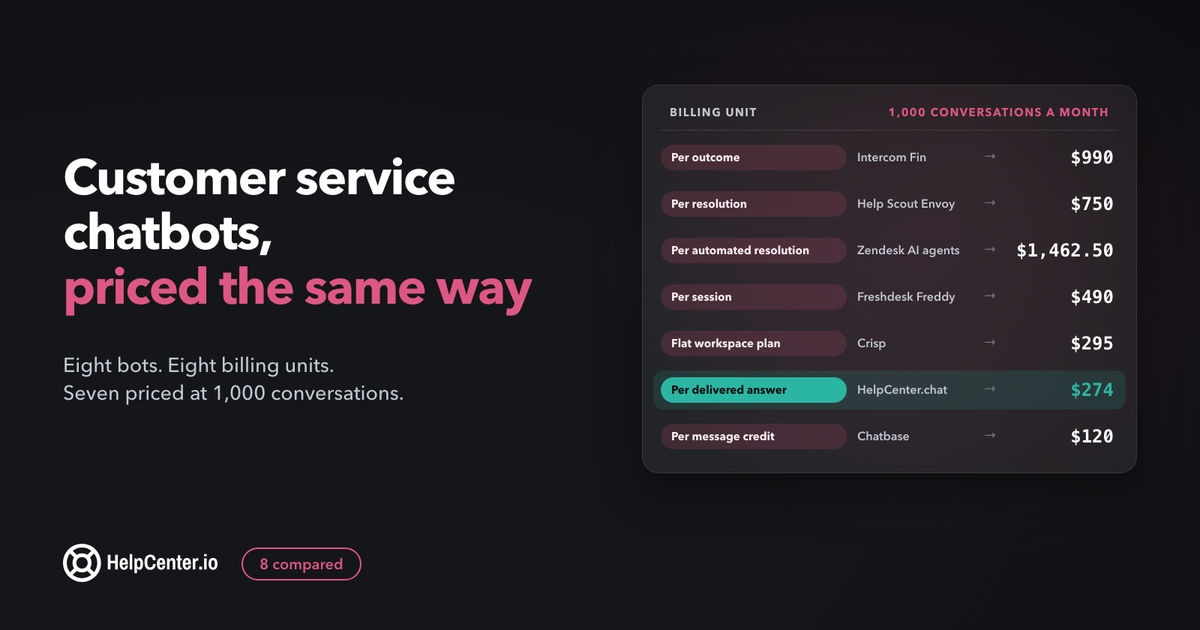
The right chatbot for customer service answers from your own help center, hands a conversation to a person without making the customer start over, and sends you a bill you could have predicted. This guide compares eight support bots on exactly those three things, with every price read from the vendor's own pricing page and turned into one comparable number: what 300 or 1,000 conversations a month would cost.
The short answer: for a small SaaS support team that already has a help center, the best customer service chatbot is the one that reads only your published articles, shows its sources, hands off cleanly, and bills a unit you can forecast. Per-outcome pricing (Intercom Fin at $0.99, Help Scout Envoy at $0.75) is simplest to forecast. Credit and session pricing is often cheaper but needs your own arithmetic.
We make HelpCenter.chat, one of the eight tools below. We say where it fits and where it does not, and we priced it with the same method as everyone else.
How we compared them
Most lists of support bots compare features. Features matter less than three questions a buyer has to answer before switching anything on:
- What does the bot read? A support bot is only as accurate as the content behind it. We quote what each vendor's pricing page says about its sources. Where the page says nothing, check the product's documentation before you buy, and ask whether the bot shows the customer where its answer came from.
- How does it hand off? Every bot will meet questions it cannot answer. What matters is whether the customer reaches a person in the same conversation, and whether that person sees what was already said.
- What do you pay for? Every vendor bills on a different unit: outcomes, resolutions, automated resolutions, sessions, conversations, credits or messages. We wrote down each unit in the vendor's own words and worked out the monthly cost at two volumes, 300 and 1,000 conversations a month.
Prices were read on the vendors' pricing pages in November 2026 and are in US dollars. We did not run our own accuracy tests on these bots, so this guide makes no claims about how often each one is right. Where a vendor publishes a resolution rate, it is the vendor's own figure, and we say so. Tools whose price we could not read on a public pricing page were left out.
Customer service chatbots compared
| Tool | You pay per | Bot price | Seats needed | Best for |
|---|---|---|---|---|
| Intercom Fin | Outcome | $0.99 per outcome | Yes, per seat | Teams that want one predictable unit and a full helpdesk |
| Help Scout Envoy | Resolution | $0.75 per resolution | Yes, per user | Email-first teams already on Help Scout |
| Zendesk AI agents | Automated resolution | $1.50 committed, $2.00 pay as you go, after included ones | Yes, per agent | Larger teams that need omnichannel and voice |
| Freshdesk Freddy AI Agent | Session | $49 per 100 sessions | Yes, per agent | Teams already running Freshdesk |
| Tidio Lyro | Conversation (AI and human share one limit) | From $390 a year for 50 conversations a month | Included in the plan | Small online stores and simple sites |
| Crisp | AI credits included in a flat workspace plan | $95 a month, around 450 automated conversations | Included (10 seats) | Small teams that want a flat monthly bill |
| Chatbase | Message credit | $120 a month billed yearly for 4,000 credits | None, unlimited members | Teams that want a standalone bot on any site |
| HelpCenter.chat Orelvi | Credit per delivered answer (handoffs free) | $29 a month for 200 credits | Included (2 to 10 chat seats) | Small teams whose help center runs on HelpCenter.io |
The best chatbots for customer service
1. Intercom Fin
Fin is the bot inside Intercom's customer service suite, and its pricing is the easiest on this list to forecast. Intercom states it plainly: "Fin is priced at $0.99 per outcome." An outcome is counted when a customer "confirms their issue is resolved", when they "don't ask for more help after Fin responds", or when "Fin completes a workflow (Procedure), including handoffs". That last part matters: a handoff that Fin carries out as a workflow can count as a billed outcome.
What it costs: 300 outcomes a month is $297 and 1,000 is $990. On top of that you pay for people. Intercom's page says "Seats: You pay per teammate based on your plan (Essential, Advanced, Expert)", with Essential at $29 per seat a month and a new-customer price of $19. It also notes "Minimum monthly commitment applies (e.g. 50 outcomes)".
Where it is weaker: the bill grows in a straight line with volume, and the full suite is more than many small teams need. Intercom also tests different versions of its pricing page, so read it yourself on the day you buy. If you are weighing Intercom as a whole helpdesk, our HelpCenter.io vs Intercom comparison covers the help center side.
2. Help Scout Envoy
Help Scout sells its AI agent as an add-on called Envoy, and the agent inside it is called Scout. Help Scout describes it as "An AI assistant that offers instant answers to customers using your knowledge base content and custom sources." Its definition of a billable resolution is strict in the buyer's favour: "A resolution is a single conversation that is resolved by Envoy's built-in AI agent, Scout, without human assistance." If the customer asks for more help or presses "I still need help", "the conversation won't count as a resolution and you won't be charged."
What it costs: "At $0.75 per resolution", 300 resolutions a month is $225 and 1,000 is $750. Paid seats start at $25 per user a month billed annually ($30 monthly) on Standard. You can set a monthly cap on Envoy spending, and the bot switches off for the rest of the cycle when you reach it. New accounts get "3 months of free, unlimited Envoy resolutions", which is the most generous trial here.
Where it is weaker: it lives inside Help Scout, so it suits teams that already run their inbox and Docs there. Help Scout's page shows an average Envoy resolution rate of 73%; that is the vendor's own figure, not an independent test.
3. Zendesk AI agents
Zendesk includes AI agents in its plans, promises to "Power every resolution with connected knowledge", and bills for what they resolve: "Zendesk AI agents are included in every Suite and Support plan, with pricing based on the successful outcomes they deliver." Its unit is the automated resolution, and Zendesk explains that "you pay only for customer requests that were successfully resolved by the AI agent, without any escalation to a human agent."
What it costs: Suite Team is $55 per agent a month paid yearly ($69 monthly) and includes "5 ARs per agent/month"; Suite Professional is $115 ($149 monthly) with 10. Beyond the included ones, committed automated resolutions are $1.50 each and pay-as-you-go ones $2.00. For a five-agent team on Suite Team, 25 resolutions are included. At 300 resolutions a month, the other 275 cost $412.50 committed or $550 pay as you go. At 1,000, the other 975 cost $1,462.50 or $1,950. Seats are another $275 a month paid yearly.
Where it is weaker: the highest price per resolution on this list once you pass the included ones, and the messaging bot "Requires messaging", so check which channels your plan covers. It is strongest for teams that want email, messaging and voice bots in one place. Our HelpCenter.io vs Zendesk comparison covers the help center side if you are pricing the whole suite.
4. Freshdesk Freddy AI Agent
Freshworks bundles Freddy AI Agent into Freshdesk Omni's Growth, Pro and Enterprise plans and bills by session. A session "is a unique interaction between an end-user and an AI Agent", and for chat "all interactions between the end-user and AI Agent within 24 hours from session initiation are counted as one session."
What it costs: Growth is $29 per agent a month billed annually, Pro $79. Freshworks offers "500 free sessions on the Growth, Pro, and Enterprise plans", but "limited to once per account", so they are a trial, not a monthly allowance. After that, additional sessions are $49 per 100. At 300 sessions a month that is $147, and at 1,000 it is $490.
Where it is weaker: a session is billed whether or not the bot resolved it. If the bot resolves half of its sessions, your real cost per resolved conversation is $0.98, twice the session price. Divide $0.49 by your own resolution rate to see your number.
5. Tidio Lyro
Tidio's AI agent Lyro is built into every Tidio plan. Tidio says "Lyro answers customer questions on its own and hands off to your team when needed. Conversations handled by Lyro and your team count toward the same plan limit." Tidio also offers to "Keep your Help Center synced with Lyro". The shared limit is the thing to understand before you buy: a conversation counts once whether Lyro or a person answers it.
What it costs: Starter is $390 a year ($33 a month shown) for "50 AI + human conversations" a month, and Growth starts at $750 a year for 100, with larger volumes "Up to 1,000 conversations for Lyro and your team" chosen in a selector on the page. That works out to about $0.65 and $0.63 per conversation at the two entry tiers. We could not read a US dollar price for 300 or 1,000 conversations without the selector, so check it for your volume.
Where it is weaker: volumes are low for the price compared with the flat-rate tools below, and every human conversation uses the same allowance. It suits small online stores, especially on Shopify, more than SaaS teams with a large help center.
6. Crisp
Crisp prices each workspace at a flat monthly rate and includes AI credits in each paid plan, translated into an approximate number of bot conversations. That makes it the easiest flat bill on the list.
What it costs: Mini is $45 a month per workspace with 4 seats and "Around 90 automated conversations". Essentials is $95 with 10 seats and "Around 450 automated conversations". Plus is $295 with 20 or more seats and "Around 1350 automated conversations". So 300 conversations fit in Essentials at $95 (about $0.32 each) and 1,000 fit in Plus at $295 (about $0.30 each). The free plan has "No AI credits included".
Where it is weaker: the conversation counts are approximate by Crisp's own wording, and the jump from Essentials to Plus is large if you outgrow 450. The plan price also pays for the inbox and seats, so compare it with a helpdesk plus bot, not with a bot alone.
7. Chatbase
Chatbase is a standalone AI agent builder: you give it sources to learn from (the Business plan adds "Tickets and Zendesk macros as sources") and place the agent on your site. There are no seat fees ("Unlimited members, no seat fees"), and billing is by message credit.
What it costs: Basic is $120 a month billed yearly ($150 monthly) with "4,000 message credits/month"; Business is $400 ($500 monthly) with 15,000. Extra credits are $40 per 1,000. How many credits a conversation uses depends on the model: Chatbase says "Each request made to the AI model costs a certain number of message credits depending on your chosen model", and actions add requests. As an example of ours, not Chatbase's: if a reply costs one credit and a resolved conversation takes two replies, 300 conversations use 600 credits and 1,000 use 2,000, both inside Basic. That is $0.40 per conversation at 300 and $0.12 at 1,000.
Where it is weaker: it is a bot, not a support desk, so handing off to a person means connecting a helpdesk or using Chatbase's own inbox, and your answers are only as current as the sources you keep re-syncing. Bigger models cost more credits per reply, so test with the model you plan to use.
8. HelpCenter.chat Orelvi (ours)
We make HelpCenter.chat. Its AI agent, Orelvi, is deliberately narrow: "Orelvi answers from published, public help-center articles. Private, restricted, and unpublished content is excluded from customer-facing chat knowledge." "Answers include references, and Orelvi hands over to your team when it cannot help." Human chat is free (2 team seats, 100 new conversations a month), and the AI plans add credits.
What it costs: Start is $29 a month for 200 AI credits, Grow $79 for 600, Scale $199 for 1,500, all per workspace. "A delivered standard answer, requested reply draft, or summary uses one credit", and "Human messages, failed generations, internal retries, and handoffs use no credits." With the same two-answers-per-conversation example used for Chatbase, 300 conversations use 600 credits, which is Grow at $79 (about $0.26 each). 1,000 conversations use 2,000 credits: Scale at $199 plus five $15 top-ups of 100 credits, $274 in total (about $0.27 each). There are no overage bills: "No automatic top-ups, overage bills, or annual commitment."
Where it is weaker: Orelvi needs a HelpCenter.io knowledge base ("It requires a verified owner and a connected, current HelpCenter.io knowledge base"), so it is not a fit if your help center lives elsewhere. HelpCenter.chat is website chat, not an omnichannel suite: no phone, no social inboxes. If you need those, Zendesk, Freshdesk or Intercom are better choices. More on how it works on the Orelvi page.
What does a support chatbot cost per resolved conversation?
Here is every tool at the same two volumes. The method: the bot's own price for 300 and 1,000 conversations a month, using each vendor's billing unit, without seats. Read the notes column before comparing, because the units are not the same thing.
| Tool | 300 a month | 1,000 a month | How we got there |
|---|---|---|---|
| Intercom Fin | $297 | $990 | $0.99 × outcomes; seats extra; minimum commitment applies |
| Help Scout Envoy | $225 | $750 | $0.75 × resolutions; seats extra; first 3 months free |
| Zendesk AI agents (5 agents, Suite Team) | $412.50 to $550 | $1,462.50 to $1,950 | (conversations − 25 included) × $1.50 committed or $2.00 pay as you go; seats extra |
| Freshdesk Freddy AI Agent | $147 | $490 | $49 per 100 sessions; every session billed, resolved or not; seats extra |
| Tidio Lyro | Not shown | Not shown | Entry tiers $0.63 to $0.65 per conversation; higher volumes priced in a selector |
| Crisp | $95 | $295 | Essentials (~450 included) and Plus (~1,350 included); flat, seats included |
| Chatbase | $120 | $120 | Basic, 4,000 credits; assumes 2 replies at 1 credit each (our example) |
| HelpCenter.chat Orelvi | $79 | $274 | Grow, then Scale plus 5 top-ups; assumes 2 answers per conversation (our example); seats included |
Three things the table hides, and they change the answer more than the headline price:
- What counts. Intercom, Help Scout and Zendesk bill only for conversations they count as resolved. Freshdesk bills every session. Tidio counts every conversation, human or bot. Credit-based tools bill per answer, so a long conversation costs more than a short one.
- Seats. Per-resolution tools still need a helpdesk seat for every person who takes the handoffs. Crisp, Tidio and HelpCenter.chat include seats in the plan; Chatbase has none.
- Your resolution rate. For session and conversation billing, divide the price by the share of conversations the bot actually resolves. A bot that resolves 40% of what it touches costs 2.5 times its sticker price per resolved conversation.
For a small team, the honest summary is that the per-resolution tools are the easiest to budget and the most expensive at volume, while the flat and credit tools are cheaper but ask you to measure your own numbers. If you are still deciding whether you need a bot at all, our guide to chatbot vs live chat covers that choice first.
Chatbot or AI support agent: is there a difference?
An AI support agent is a chatbot that writes its answers from your content and can take actions, instead of following a script someone drew in a flow builder. Older support chatbots matched keywords and walked customers through fixed menus. Every tool in this guide is the newer kind: it reads your sources and writes an answer, and some can act in other systems, as Zendesk puts it, "Connect to external systems to read, write, parse data, and trigger actions." Vendors use "AI agent" and "chatbot" interchangeably. The label matters far less than two questions: what does it read, and what happens when it cannot help?
Get your help center ready before you switch a bot on
A support bot repeats your help center back to customers, so its first month is a test of your articles. In a December 2023 Gartner survey of 5,728 customers, the most common reason self-service failed was that "in 43% of cases, customers couldn't find content relevant to their issue." A bot cannot fix missing content. It can only find it faster. Before launch:
- List your top 20 questions. Pull them from the last month of conversations and tickets, not from memory. Write down how often each one came up.
- Check each has one article that answers it in the first paragraph. Bots pull passages, and an answer buried under three paragraphs of context is often missed or garbled. Our guide to writing knowledge base articles shows the structure.
- Write one topic per article. An article that covers billing, refunds and plan changes together gives the bot three half-answers to mix up.
- Publish what customers need, and nothing you would not want quoted. Check which content your bot can read: some read only published articles (Orelvi is one), others read whatever sources you connect. Old pricing and outdated articles get quoted back to customers, so remove or update them first.
- Put prices and limits in plain text. Bots read text far more reliably than screenshots or images of tables.
If you are still choosing where the articles live, our comparison of AI knowledge base software covers which tools give a bot clean, current content to read.
Set up the handoff before launch
Customers' top worry about support bots is easy to name. Gartner's survey of 5,728 customers found that "The top concern that consumers have about AI in customer service is that it will get more difficult reaching a person". A visible, quick handoff answers that concern. Decide these before the bot goes live:
- Always hand off: billing disputes and refunds, account access and security, cancellations, anything legal, and any customer who is clearly upset.
- Hand off after two failed answers. If the customer rephrases twice or says the answer did not help, bring in a person. Most tools let you set this as a rule or an instruction.
- Say who is coming and when. Outside your hours, collect an email and say when someone will reply. A handoff to an empty inbox is worse than no bot.
- Pass the whole conversation. The person who picks it up should see what the customer asked and what the bot said, so the customer never repeats themselves.
Our guide to chatbot vs live chat describes what a good handoff feels like from the customer's side.
Measure it in the first 30 days
Every vendor counts success in its own unit, and the unit is the one that bills you. Track your own numbers alongside it:
- Resolution as the vendor counts it, and as you count it. Intercom counts an outcome when the customer does not ask for more help; Help Scout when no human assisted; Zendesk when there was no escalation. Each week, read 20 conversations the bot "resolved" and check whether the customer actually got the right answer.
- Handoff share. The share of bot conversations that reach a person. Too low can mean customers are giving up, not getting answers.
- Reopened and repeat contacts. A customer who comes back the next day with the same question was not resolved, whatever the dashboard says.
- Failed answers turned into articles. Keep a weekly list of questions the bot could not answer, and write or fix one article for each. This is where most of the improvement comes from.
After 30 days, recompute the cost table above with your real resolution rate and volume. That number, not the sticker price, is what to compare at renewal.
Where HelpCenter.chat fits
We make HelpCenter.chat, so here is the honest version. It fits a small team that runs, or is happy to run, its help center on HelpCenter.io and wants website chat with an AI first answer and a person behind it. Human chat is free on 2 seats and 100 new conversations a month, with "No credit card". Orelvi starts at $29 a month per workspace, answers only from your published articles with references, and hands over when it cannot help, without spending a credit on the handoff.
On the HelpCenter.io side, AI answers inside the help center are included on Catalyst and are a $29 a month add-on on Bootstrap and Growth (details on the HelpCenter.io AI page). If you want both products, "Bundles save 20% on both recurring product lines": Start Together is $54.40 a month for HelpCenter.io Bootstrap with Orelvi Start.
It is not the right choice if you need phone support, social inboxes, or a bot that reads sources outside your help center. The HelpCenter.chat pricing page has every limit, and our guide to the best live chat software for small business compares chat tools if you mainly need people answering.
Customer service chatbots: common questions
How much does a customer service chatbot cost?
For a small team handling 300 bot conversations a month, the tools in this guide we could price range from about $79 to $550 a month for the bot alone, before seats. Per-resolution pricing runs from $0.75 (Help Scout) to $2.00 (Zendesk pay as you go). Flat and credit plans are cheaper per conversation but depend on how long your conversations are.
Will a chatbot replace my support team?
No. A good support bot answers the repeated questions your help center already covers and passes everything else to a person with the context attached. Your team spends less time on the same ten questions and more on the conversations that need judgement.
What should a customer service chatbot never answer on its own?
Billing disputes, refunds, account access and security, cancellations and legal questions. Set these as automatic handoffs before launch, along with any conversation where the customer is upset or has rephrased the same question twice.
Do I need a help center before adding a chatbot?
Yes. Every bot in this guide answers from content you give it, and most answer best from a help center. Start with articles for your 20 most common questions, each answering in its first paragraph, and switch the bot on after that.