llms.txt for Help Centers: What AI Agents Actually Fetch
We checked 30 days of server logs across the help centers we host. Here is who really fetches llms.txt, how to set it up, and how to verify AI agents in your own logs.
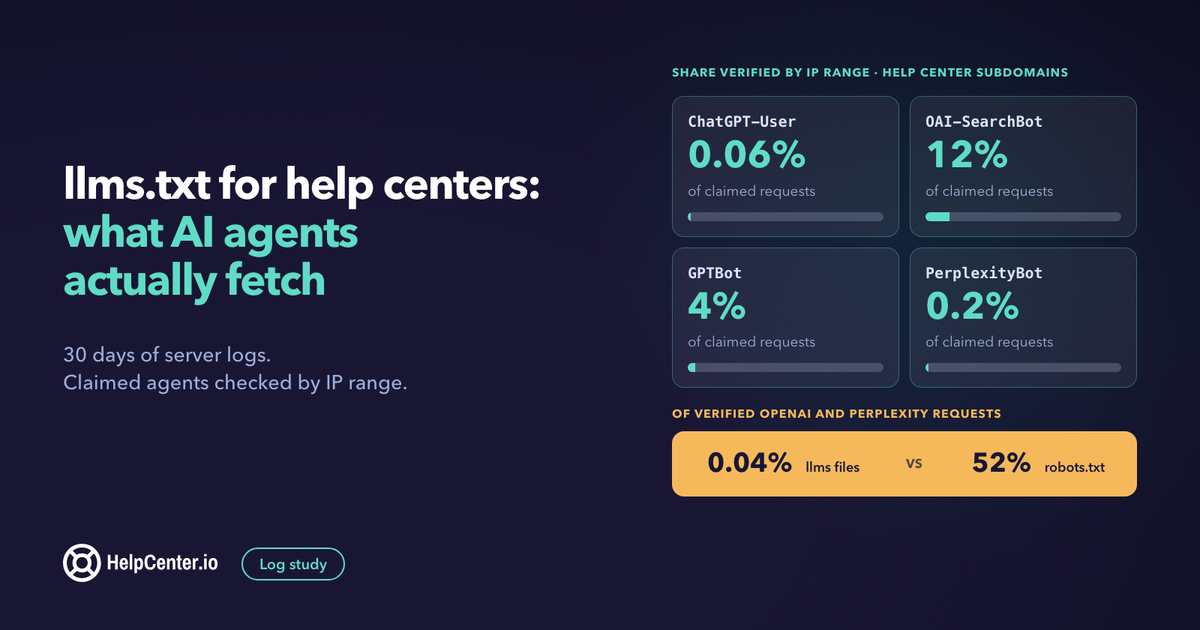
You can give your help center an llms.txt file in a few minutes, and after reading this you will know exactly what it does for you: it helps coding agents and developer tools find your docs, and it does very little for ChatGPT or Perplexity answers. We checked 30 days of server logs across our own site and the help centers we host. Of the requests we could verify as coming from OpenAI and Perplexity, 52% were for robots.txt and 0.04% were for an llms file.
We make HelpCenter.io, a hosted help center and knowledge base, and every help center on it publishes an llms.txt automatically. So we have a stake in this file being useful, and we also have the logs to check whether it is. This guide shares what we found, how to set the file up properly, how to run the same check on your own logs, and where your effort is better spent if the goal is to show up in AI answers.
What is llms.txt?
llms.txt is a plain Markdown file, usually at the root of a site, that gives AI agents a short, clean map of your content. The llmstxt.org proposal describes it as a way "to provide information to help agents use a website". The only required part is an H1 with the site name. A short summary in a blockquote and sections of links with one-line descriptions usually follow.
Three related files are easy to mix up:
- llms.txt is the index: titles, links, one-line descriptions.
- llms-full.txt is the full text of every page in one file. It is a convention that docs platforms added on top of the proposal, and it suits small and medium doc sets.
- robots.txt and sitemap.xml are the files crawlers have always read. robots.txt says who may fetch what. The sitemap lists every URL. Neither is replaced by llms.txt.
The proposal is now at version 2, which also recommends link relations that point from each page to its Markdown version and to the llms.txt that covers it. Check what your platform supports before you assume it. Our own help centers serve a Markdown version of every page on request, and they do not send those two link relations today.
What we measured, and how
We read 30 days of load balancer logs, from 12 October to 10 November 2026. The logs cover three kinds of host: our marketing site at helpcenter.io, help centers on a helpcenter.io subdomain, and help centers on customers' own domains. Everything below is an aggregate. No customer or help center is named.
We looked for requests whose user agent named one of 14 AI agents, including ChatGPT-User, OAI-SearchBot, GPTBot, PerplexityBot, Perplexity-User, ClaudeBot and Claude-User. Then we did the step most log studies skip. OpenAI and Perplexity publish the IP ranges their agents use, so we checked whether each request that claimed one of their names came from the matching range. Perplexity's own documentation asks for this: "match each User-Agent against its own IP ranges".
Four limits to keep in mind:
- A user agent is a label the sender chooses. Anyone can type "ChatGPT-User".
- Requests answered from a CDN cache never reach our load balancer, so real fetches are undercounted.
- Most traffic to customers' own domains reaches us through a CDN, which replaces the visitor's address with its own. Those requests cannot be verified either way.
- We used the range files as published on 11 November. Ranges change, so a few October requests may be marked unverified when they were real. Anthropic's agents are counted by user agent only, because we had no range file to check them against.
Do AI assistants read llms.txt?
Rarely. In 30 days, requests naming an AI agent fetched llms.txt or llms-full.txt in fewer than 0.01% of their requests across every host we serve.
| Where | Share of all llms file fetches by named AI agents (30 days) | Of those fetches, share from verified OpenAI or Perplexity ranges |
|---|---|---|
| Our marketing site | 76% | 38% |
| Our own hosted help centers | 10% | 0% |
| Customer help centers on a helpcenter.io subdomain | 0% | 0% |
| Customer help centers on their own domain | 14% | Not verifiable (CDN) |
The verified fetches came from ChatGPT-User, PerplexityBot and OAI-SearchBot, and every one of them was on our marketing site. In the same 30 days, 52% of all verified OpenAI and Perplexity requests were for robots.txt and 14% were for sitemap files. Those agents asked for robots.txt more than 1,000 times as often as for an llms file.
The files were not ignored by everyone. Most of the requests for our marketing site's llms.txt came from browsers, scripts and bots we could not attribute to an AI company. That fits what larger studies report. Ahrefs looked at 137,000 domains and found that 97% of llms.txt files received no requests at all in May 2026, classifying visitors by user agent. Evil Martians measured its own site and concluded that "Only one AI assistant reads llms.txt regularly: Claude Code." Mintlify, a docs platform, reported more activity on llms-full.txt across 25 companies in a June 2025 post. It is older data from a vendor with a stake, as we are.
Most "AI bot" traffic on help centers is not the AI company
This was the bigger surprise. On our marketing site, more than half of the requests that claimed to be ChatGPT-User, OAI-SearchBot or PerplexityBot really came from that company. On help center subdomains, almost none did.
| Claimed agent | Marketing site: share verified | Help center subdomains: share verified |
|---|---|---|
| ChatGPT-User | 53% | 0.06% |
| OAI-SearchBot | 60% | 12% |
| GPTBot | 23% | 4% |
| PerplexityBot | 68% | 0.2% |
| Perplexity-User | 0% | 0% |
Unverified does not always mean fake, but here the pattern is hard to read any other way. Of the unverified "ChatGPT-User" requests on subdomains, 95% ended in a 4xx error and 59% asked for paths like /.env, /.aws or /proc/self. No assistant fetching an answer for a person asks for those. Nine different bot names, from ChatGPT-User to CCBot to DuckAssistBot, each sent nearly the same number of requests, within 7% of one another, with almost identical shares of those paths. That is what a vulnerability scanner looks like when it rotates through a list of trusted-sounding user agents.
Two honest caveats. We never saw a Perplexity-User request from Perplexity's published range on any host, so we cannot verify that agent at all from our data. And on customers' own domains, 85% of "ChatGPT-User" requests arrived through a CDN, so real assistant visits are almost certainly in there and cannot be counted.
The practical point: a dashboard that counts AI visits by user agent can overstate them by a wide margin, and a firewall rule that trusts those names lets scanners through. Verify by IP range before you size AI demand or write allow rules.
What verified AI agents do read on a help center
When we kept only requests from published ranges, each agent had a clear habit.
- OAI-SearchBot reads robots.txt. On help center subdomains, 97% of its verified requests were for robots.txt, spread across many help centers. Page fetches were a small remainder.
- GPTBot reads sitemaps. 98% of its verified requests on subdomains were for sitemap files.
- ChatGPT-User reads pages. It fetches when a person's question needs a live page. On our marketing site that meant the home page first, then comparison and how-to articles and the pricing page.
- PerplexityBot reads robots.txt, then product and comparison pages.
None of them needed llms.txt to find any of this. They found pages the way search crawlers always have: robots.txt, the sitemap and links.
Should you still publish an llms.txt?
Yes, if it costs you nothing to keep correct. As Evil Martians put it, the file takes minutes to ship and is harmless to leave up. Just be clear about who it is for.
- It helps coding agents and developer tools. If your help center includes API or developer documentation, people will paste your llms.txt or llms-full.txt into an AI coding tool, or the tool will fetch it. Both outside studies above found coding agents to be the real readers. In our logs, every request labelled Claude Code went to MCP and discovery endpoints, not to llms files, so an MCP server may matter more for that audience over time.
- It is a clean export for your own use. A single Markdown index of your help center is handy for audits, for migration and for feeding your own assistant.
- It is not a ranking or citation lever. Nothing in our data suggests that publishing the file changes what ChatGPT or Perplexity read or cite. Do not put it on a roadmap ahead of the work in the last section.
The file becomes a liability only when it is wrong: stale links, or pages listed that the public should not see.
How to set up llms.txt for a help center
A help center is harder than a marketing site because content changes weekly and some of it is private. Use this checklist whether your platform generates the file or you build it yourself.
- Generate it, never hand-write it. Build the file from the same source as your sitemap so the two cannot disagree. A hand-edited file is out of date within a month.
- List only what an anonymous visitor can read. Drafts, internal articles, password-protected sections and unlisted pages stay out. Test this by comparing the file against a private browser window, not against your editor.
- Respect your own indexing setting. If the help center asks search engines to stay away, it should not publish an llms.txt that invites agents in. Return a 404 instead of an empty file.
- Write one-line descriptions that answer "what will I learn here". Your article meta descriptions are usually the right text.
- Mirror your category structure. Use one H2 per category so an agent can skip to the section it needs.
- Use the default language. For a multilingual help center, generate the index in the default language and let the pages link to their translations.
- Add llms-full.txt only if the size is sensible. Our developer documentation's full file is just under 1 MB, which a coding agent can use. A 40 MB file helps no one.
- Offer Markdown versions of pages if you can. An agent that follows a link from the index should be able to get clean text, not a page of navigation.
- Check it in your logs after a month. The next section shows how.
For reference, this is how HelpCenter.io handles it. Every published help center serves /llms.txt and /llms-full.txt on every plan, with nothing to set up. Both are generated from published, public articles only, in the help center's default language, and both return a 404 when "Search engine indexing" is switched off in Settings. Each page also returns Markdown when an agent asks for it. The developer documentation has the details, and our AI-ready documentation page shows the rest of what a help center publishes for agents.
How to check your own logs for real AI agent traffic
You need raw access logs from your web server, load balancer or CDN. Analytics tools that run JavaScript will not show any of this, because bots do not run it.
- Split by hostname first. If one server answers for your site, your help center and your app, count each separately. Our first unsplit count of llms.txt requests was off by a factor of thousands.
- Remove your own traffic. Uptime monitors, deployment checks and your own curl commands are in the logs too.
- Find the claimed agents. Filter for ChatGPT-User, OAI-SearchBot, GPTBot, PerplexityBot and Perplexity-User in the user agent field.
- Verify the IP. Download the published range files and keep only requests whose client address falls inside the right one. OpenAI lists its files in its crawler documentation (searchbot.json, chatgpt-user.json and gptbot.json on openai.com). Perplexity lists perplexitybot.json and perplexity-user.json in its crawler documentation.
- Mind the CDN. If a CDN sits in front of your server, the address in your server log is the CDN's. Use the CDN's own logs, or log the forwarded client address.
- Drop scanner paths. Requests for
/.env,/.git,.phpfiles or/wp-paths are probes, whatever name they carry. - Count four things separately: llms files, robots.txt, sitemaps and pages. The comparison is the finding.
The verification step is a few lines of Python:
import ipaddress, json

ranges = json.load(open("searchbot.json"))["prefixes"]
nets = [ipaddress.ip_network(p.get("ipv4Prefix") or p.get("ipv6Prefix"))
        for p in ranges]

def is_real_searchbot(client_ip):
    ip = ipaddress.ip_address(client_ip)
    return any(ip.version == n.version and ip in n for n in nets)
Use one range file per agent. A request that says GPTBot from a ChatGPT-User address is still unverified.
What actually helps help center content show up in AI answers
The logs point to the old basics, because that is what the verified agents use.
- Allow the search agents in robots.txt. OpenAI states that sites opted out of OAI-SearchBot will not be shown in ChatGPT search answers. robots.txt was the file that agent requested most on help centers, so check that a security plugin or an old blanket rule is not blocking it.
- Keep the sitemap complete and current. It is how new and updated articles get found.
- Serve articles as real HTML. A help center that renders only in JavaScript shows an agent an empty page.
- Answer the question in the first two sentences. Use the customer's wording as the heading, then give the direct answer, then the steps.
- Keep facts dated and current. Prices, limits and version numbers go stale, and an assistant will repeat whatever is on the page.
- Put the help center on your own domain or a clear subdomain, and link to it from the product and the main site so crawlers reach it.
- Consider an MCP server for agents that act, not just read. Ours is described on the MCP server page, and it is included in the Growth and Catalyst plans.
Our knowledge base SEO guide covers each of these in depth, and the AI knowledge base software comparison shows how different platforms handle them.
Frequently asked questions
Does ChatGPT read llms.txt?
Almost never, in our data. Over 30 days, llms files were about 0.1% of verified ChatGPT-User and OAI-SearchBot requests on our marketing site, and 0% on customer help center subdomains. The same agents spent most of their requests on robots.txt and regular pages.
Does llms.txt help SEO?
No evidence says so. It is not a ranking signal for search engines, and the AI search agents we could verify did not use it to find pages. Publish it for coding agents and developer tools, and rely on robots.txt, sitemaps and good articles for search.
What is the difference between llms.txt and robots.txt?
robots.txt tells crawlers what they may fetch, and the major AI search agents check it. llms.txt is an optional Markdown index that suggests what is worth reading. Blocking an agent in robots.txt has an effect. Listing a page in llms.txt mostly does not.
Should a help center list private articles in llms.txt?
No. List only pages an anonymous visitor can open. If the help center is private or set not to be indexed, it should not publish an llms.txt at all.
Does HelpCenter.io create an llms.txt for my help center?
Yes. Every published help center serves llms.txt and llms-full.txt on every plan, generated from published, public articles, as long as search engine indexing is on. There is nothing to set up.
Try it on your own help center
Run the log check above before you decide how much llms.txt deserves. If you would like a help center that publishes the llms files, the sitemap and a Markdown version of every page without any setup, you can start a 14-day free trial of HelpCenter.io with no credit card and look at the files it generates for your own content.