ChatGPT Prompts for Customer Service: 40 to Copy
40 ChatGPT prompts for support teams, grouped by job, with a reusable context block and three rules that keep AI drafts accurate.
The right prompt turns ChatGPT into a fast first-draft writer for your support team: replies, saved replies, help articles and QA notes in your own voice, in seconds instead of minutes. This guide gives you 40 copy-ready prompts, grouped by the job they do, plus the one context block that makes every one of them better.
Short answer: the best ChatGPT prompts for customer service tell the model who it is, who the customer is, what your policy says and what format to return. Paste a short context block about your product and tone once, then use task prompts like the ones below. A person still reads and sends every reply.
How to write a customer service prompt that works
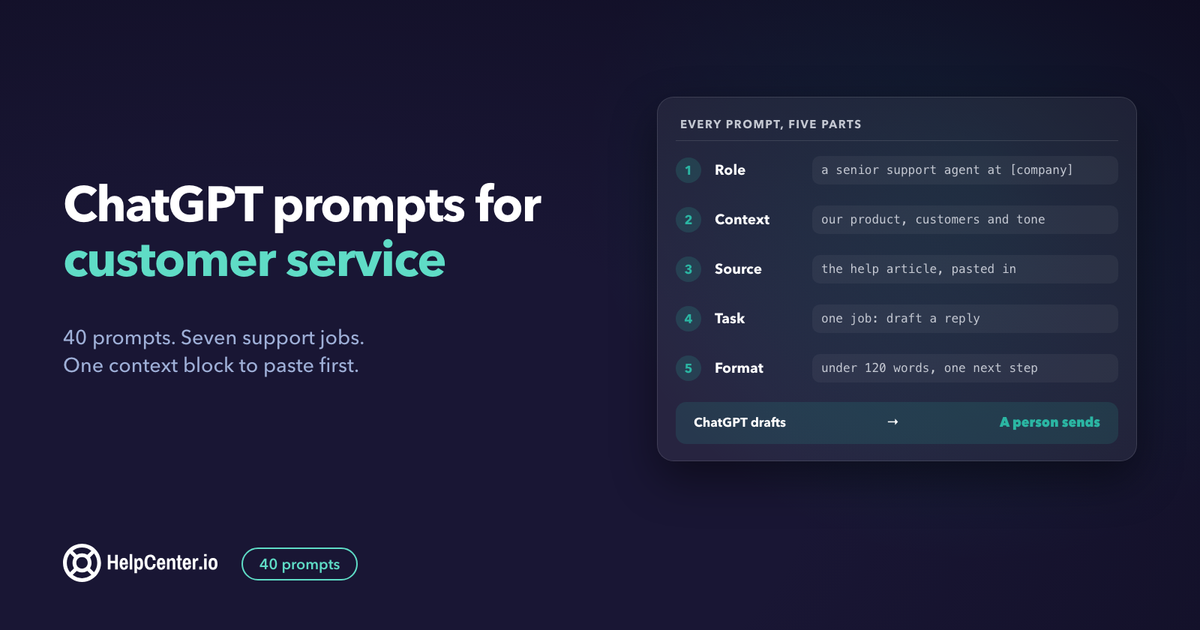
Most weak ChatGPT replies come from weak inputs. "Reply to this angry customer" gets you a generic apology. A prompt with five parts gets you something an agent can send after a light edit:
- Role: who ChatGPT is playing, for example "a senior support agent at a B2B software company".
- Context: your product, your customers and your tone. Write this once and reuse it.
- Source: the facts it may use, pasted in: the help article, the policy, the order status. Tell it to use nothing else.
- Task: one job per prompt. "Draft a reply" and "summarize the thread" are two prompts.
- Format: length, structure and reading level, for example "under 120 words, two short paragraphs, one next step".
The context block to paste first
Start every support chat with this block, filled in. If you use ChatGPT Projects, add it once under Project settings as the project instructions, and every chat in that project starts with it.
You are a senior customer support agent at [company], which makes [product] for [type of customer]. Our tone is [friendly and plain / formal / playful]: short sentences, no jargon, no exclamation marks. We never promise refunds, credits, dates or features unless the source text I give you says so. If the source does not answer the question, say what is missing and suggest what the agent should check. Always write in [language]. Our help center is at [URL].
Every prompt below assumes that block is in place. Text in [brackets] is yours to fill in.
Three rules before you paste anything
- Strip personal data. Replace names, emails, order numbers and card details with placeholders before you paste a ticket. On OpenAI's personal plans, "On personal workspaces with ChatGPT Free, Plus, or Pro, data sharing is enabled by default," and you can turn off "Improve the model for everyone" in Settings (OpenAI data controls). OpenAI states that "By default, OpenAI does not use content from ChatGPT Business, Enterprise, or Edu workspaces to train its models." Check your company's policy either way.
- Give it the facts, never ask it to recall them. ChatGPT does not know your refund window, your plan limits or today's outage. Paste the article or policy and tell it to use only that. This one habit removes most invented answers.
- A human sends. Treat every output as a draft. Read it for accuracy and tone, then send it from your help desk, where the conversation history lives.
Prompts for replying to customers
1. Draft a reply from your help article
Here is a customer message and the help article that answers it. Draft a reply under 120 words that answers the question using only the article, links to it once at [URL], and ends with one clear next step. Message: [paste]. Article: [paste].
2. Answer a "how do I" question step by step
The customer asked how to [task]. Using only these steps from our docs, write a numbered list of no more than six steps a beginner can follow, with the exact button and menu names in bold. Steps: [paste].
3. Reply when the answer is no
The customer asked for [request]. Our policy says no: [paste policy]. Write a reply that says no clearly in the first two sentences, explains the reason in one sentence, and offers the closest thing we can do: [alternative]. Do not apologize more than once.
4. Ask for the details you need
The customer reported: [paste]. List the three to five details we need to troubleshoot this, then write a short, friendly reply asking for them as a numbered list, so the customer can answer in one message.
5. Explain a bug and a workaround
We have a known issue: [description]. Engineering's status: [paste]. The workaround: [steps]. Write a reply that acknowledges the problem, gives the workaround, and promises an update only in the way the status allows. Do not give a fix date.
6. Rewrite an agent's draft
Rewrite this reply so it is warmer, shorter and easier to scan. Keep every fact and every link exactly as written. Draft: [paste].
7. Translate a reply and keep the tone
Translate this reply into [language] for a customer in [country]. Keep product names, button labels and links in English. Match our tone, and flag any phrase that does not translate cleanly. Reply: [paste].
8. Follow up after silence
We asked the customer for [information] three days ago and heard nothing. Write a two-sentence follow-up that makes it easy to reply, and say we will close the ticket on [date] if we do not hear back, without sounding impatient.
Prompts for difficult conversations
9. De-escalate an angry message
Here is an angry customer message: [paste]. First, list what the customer actually needs in one line each. Then draft a reply that acknowledges the specific problem (not "your frustration"), states what we will do next, and gives a time for the next update. No more than 150 words.
10. Write empathy lines that are not clichés
Give me eight ways an agent can show empathy for [situation, for example a failed payment before a launch] that name the customer's real problem. Avoid "I understand your frustration" and "Sorry for any inconvenience".
11. Apologize for our mistake
We made this mistake: [what happened]. The fix: [what we did]. What we offer: [credit or nothing]. Write an apology that owns the mistake in the first sentence, explains the fix in plain words and does not over-promise.
12. Handle a cancellation request
The customer wants to cancel because [reason]. Write a reply that confirms how to cancel (steps: [paste]), asks one optional question about why, and mentions [one relevant alternative, such as pausing or a smaller plan] once, without pressure.
13. Respond to a public review
Here is a negative public review: [paste]. Write a reply under 80 words that thanks them, addresses the one concrete issue, and moves the conversation to [support email or link]. It will be read by future customers, so stay calm and specific.
14. Practice a hard call
Role-play a customer who is [angry about a double charge]. Stay in character, push back twice, and only calm down if I acknowledge the issue and give a clear next step. After five turns, step out of character and score my replies on clarity, empathy and accuracy.
Prompts for saved replies and macros
Saved replies stop your team typing the same answer twenty times a day. These prompts help you write and maintain them. For finished examples you can copy, see our canned responses guide.
15. Find the replies worth saving
Here are 30 recent ticket subjects and first messages, anonymized: [paste]. Group them by underlying question, count each group, and list the five groups that most need a saved reply.
16. Write a saved reply with variables
Write a saved reply for [question]. Use {first_name}, {product} and {link} as placeholders, keep it under 90 words, and add one sentence an agent can delete if it does not apply.
17. Make three tone versions
Rewrite this saved reply in three versions: brief for live chat, complete for email, and extra-patient for a first-time user. Keep the facts identical. Reply: [paste].
18. Audit old macros
Here are our saved replies and our current pricing and policy text. Flag every reply that contradicts the current text, quote the outdated sentence, and suggest the corrected one. Replies: [paste]. Current text: [paste].
Prompts for help center articles
The cheapest ticket is the one that never arrives because the answer was already in your help center. These prompts turn solved tickets into articles. Our guide to writing knowledge base articles covers structure in more depth.
19. Turn a solved ticket into an article
Here is a solved ticket thread, anonymized: [paste]. Write a help article that answers the customer's question for everyone with the same problem: a title phrased the way customers ask it, a two-sentence answer at the top, numbered steps, and a "Still stuck?" line. Use only facts from the thread.
20. Write titles customers actually search for
Here are the words customers used in 15 tickets about [topic]: [paste]. Suggest five article titles that use their wording, not ours, and say which one you would pick and why.
21. Simplify a technical article
Rewrite this article for a non-technical reader at about a 7th-grade reading level. Keep every step and setting name. Move edge cases to a short "If this doesn't work" section at the end. Article: [paste].
22. Add a troubleshooting section
Here is an article and the five most common follow-up questions we get after customers read it: [paste both]. Write a troubleshooting section that answers each follow-up in two or three sentences.
23. Write an FAQ block for a page
From this article, write five questions a customer would ask about [feature], each answered in 40 words or fewer, using only the article's facts. Article: [paste].
24. Check an article for gaps
Read this article as a new customer who has never used [product]. List every step where you would get stuck, every term you would not understand, and every missing screenshot. Article: [paste].
25. Write release notes customers can use
Here are the engineering notes for this release: [paste]. Write customer-facing release notes: one line per change, starting with what the customer can now do, with the setting or page where they find it. Skip internal changes.
Prompts for analyzing tickets and feedback
26. Tag a batch of tickets
Classify each of these anonymized tickets into one of these categories: [list]. Return a table with ticket number, category, and a one-line reason. Add "Other" with a suggested new category when nothing fits. Tickets: [paste].
27. Read the sentiment behind the words
For each message, rate sentiment as positive, neutral, negative or at risk of churning, and quote the phrase that decided it. Messages: [paste].
28. Summarize a long thread for a handover
Summarize this ticket thread for the next agent in five bullets: the customer's goal, what we tried, what worked, what is still open, and the promised next step with its date. Thread: [paste].
29. Turn survey comments into themes
Here are 60 open-ended CSAT comments: [paste]. Group them into themes, count each theme, quote two representative comments per theme, and suggest one fix per theme that support could own.
30. Write a bug report from customer reports
Here are four customer reports of the same problem: [paste]. Write one bug report for engineering: summary, steps to reproduce, expected vs actual result, affected plans or browsers, and how many customers reported it.
31. Spot what your help center is missing
Here are last month's ticket topics with counts and the titles of our help articles: [paste both]. List the topics with no matching article, ranked by ticket count, and draft a title for each missing article.
Prompts for quality assurance and coaching
32. Score a conversation against your rubric
Score this conversation from 1 to 5 on each item of our QA rubric: [paste rubric]. For every score below 4, quote the line that cost points and rewrite it. Conversation: [paste].
33. Give coaching feedback an agent will accept
Based on these QA notes, write feedback for [agent] that starts with one specific thing they did well, names one habit to change with an example rewrite, and stays under 100 words. Notes: [paste].
34. Check a reply before it goes out
Check this reply against the source text. List any claim the source does not support, any promise we cannot keep, and any tone problem. Do not rewrite it. Reply: [paste]. Source: [paste].
35. Write a style guide from your best replies
Here are ten replies our customers rated highly: [paste]. Describe the patterns they share (length, openings, structure, phrases) as a one-page style guide with do and don't examples.
Prompts for running the team
36. Write an escalation guide
Using these rules for what goes to tier 2, billing and engineering: [paste], write a one-page escalation guide with a decision table: situation, who owns it, what to include in the handover, and target response time.
37. Build a new-hire onboarding plan
Write a two-week onboarding plan for a new support agent at [company]. Day by day: what to read in our help center, which ticket types to shadow, when to take their first live chats, and how we check readiness.
38. Write an outage status update
Facts we can confirm: [paste]. Write a status update for customers: what is affected, what still works, what we are doing, and when the next update comes. No cause unless confirmed, no fix time unless engineering gave one.
39. Prepare a weekly support report
Here are this week's numbers: [ticket volume, first response time, resolution time, CSAT, top five topics]. Write a five-bullet summary for leadership: what changed vs last week, the likely reason, and one action we will take.
40. Plan your busiest week
We expect [launch, sale, price change] on [date]. List the questions customers will likely ask, the saved replies and help articles we should prepare before then, and a staffing checklist for the week.
Make ChatGPT answer from your help center, not a guess
Pasting the right article into every prompt works, but it gets tedious. If your help center runs on HelpCenter.io, ChatGPT can read it directly. We make HelpCenter.io, so weigh this section accordingly.
- For your team: the HelpCenter.io plugin in ChatGPT's Plugin Directory lets agents search, write and organize articles from a chat, and it "Asks before it writes." You can ask it questions like "What did customers search for last month and not find?" The plugin and the MCP server behind it "are included in the Growth and Catalyst plans, and in the 14-day trials of both" (ChatGPT plugin).
- For your customers: every live, public HelpCenter.io help center has its own read-only MCP server at its address with /mcp on the end, on every plan. A customer who adds it to ChatGPT gets answers from your published articles, with a link to the one used.
- On your own site: if you would rather customers get AI answers without leaving your help center, Ask AI composes answers only from your published articles. It is included on Catalyst and is a $29/mo add-on on Bootstrap and Growth (AI answers).
Whatever tool you use, the rule from the top of this guide holds: an AI answer is only as good as the articles behind it. If you are deciding between a bot and people on chat, our guides to customer service chatbots and reducing support tickets cover the next steps.
Common mistakes with ChatGPT in customer service
- Sending first drafts. ChatGPT writes confident text even when the facts are wrong. Read before you send.
- One giant prompt. Asking for a summary, a reply and a tag in one go gives you three mediocre answers. Split the jobs.
- No source text. Without the article or policy pasted in, it fills gaps with plausible guesses about your product.
- Same tone everywhere. A live chat reply and an email to an upset customer need different lengths. Say which one you want.
- Never updating prompts. When your pricing or policy changes, update the context block and the saved replies the same day.
Start small: save the context block, pick the three prompts that match your most common tickets, and use them for a week. Then keep the ones your team actually reaches for.