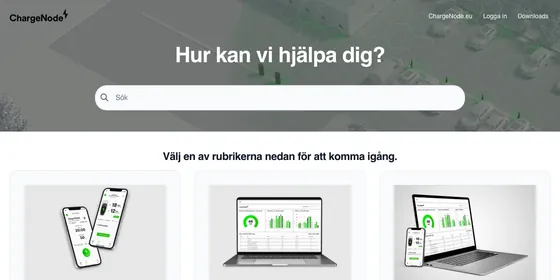
From a website
Every planIncluded
in every plan and in the 14-day trial
- 3 runs a day for each help center
- A light and a dark theme from your colours and fonts
- Your logo and favicon, with a light and a dark logo from a one-colour SVG
Paste your website. Get a help center that already looks like you.
The agent reads your colours, fonts and logo, then proposes a matching light and dark theme in seconds. You review every change in a live preview, and nothing goes live until you publish. When you want more, ask for it in plain language.
From a website on every plan, including the 14-day trial. Chat on Catalyst. No credit card needed.
Uncheck anything you would rather keep as it is.
The agent opens a site you own, reads your brand, and paints its proposal onto your live preview. A run takes seconds, and you decide what stays.
On every plan, including the 14-day trial: 3 runs a day for each help center, or 10 on Catalyst.
Ask for a change the way you would ask a designer. The agent proposes it as a card you can preview, accept or refine, and it keeps the thread of the conversation, so a follow-up like “a bit darker” just works.
Ask for something outside your help center's design, like live data from your app or a backend integration, and it tells you so instead of building something that only looks like it works.
Site owners and admins can have the agent write the small script a component needs: tabs, an accordion, an announcement bar people can dismiss. The code is shown in the chat card for you to read. It never runs before you accept it, you can accept everything except the script in one click, and editors cannot add scripts.
Catalyst Chat is included on Catalyst. The $29/mo AI add-on does not unlock chat.
You: Add an announcement bar at the top that people can dismiss.
Agent: I added a dismissible announcement bar above your header. It uses your theme colours, so it reads well in light and dark mode.
CSS is sanitized and scoped to your help center. Review before applying.
Includes JavaScript. It runs for every visitor once you publish, not in this preview. Read it before you accept.
(function () {
  'use strict';
  var KEY = 'hc-agent:announce:dismissed';
  function init() {
    var site = document.getElementById('hc-site');
    var bar = site && site.querySelector('.nw-announce');
    if (!bar) { return; }
    try {
      if (localStorage.getItem(KEY)) { bar.hidden = true; return; }
    } catch (e) {}
    var close = bar.querySelector('.nw-announce__close');
    close.addEventListener('click', function () {
      bar.hidden = true;
      try { localStorage.setItem(KEY, '1'); } catch (e) {}
    });
  }
  if (document.readyState === 'loading') {
    document.addEventListener('DOMContentLoaded', init);
  } else {
    init();
  }
})();Handing your brand to an AI should not mean handing over your help center. Every change waits for you, and every one can be undone.
A proposal paints your preview and nothing else. Accepting adds it to your draft, and your help center changes when you press Publish.
Every proposal is validated and sanitised on our side before you see it, and it is scoped to your help center. Custom CSS cannot reach past it.
Accepting a change keeps your translations, and any edits you had not saved yet.
Changed your mind after publishing? Restore an earlier version from the editor's version history.
Only owners and admins can add one. You read the code before you accept, nothing new runs in the preview, and you can accept everything except the script.
Before the agent reads a website, you confirm that you own or control it and may use its branding.
Branding from your website comes with every plan, and chat comes with Catalyst. There is no charge per run, and fair-use limits apply.
Included
in every plan and in the 14-day trial
$179 /mo, billed annually
or $199 month to month, for the whole Catalyst plan
Each help center also has a monthly fair-use allowance for the agent. Older plans that already include AI get chat too. Compare every plan.
Creating a theme from your website is included on every plan, including the 14-day trial: 3 runs a day for each help center, or 10 on Catalyst. Chatting with the agent is included on Catalyst, in its trial, and on older plans that already include AI. The $29/mo AI add-on does not unlock chat. Compare every plan.
Not until you say so. A proposal only paints the preview in your editor. Applying it adds the changes to your draft, and your help center changes when you press Publish. Every publish is saved as a version you can restore.
Use a site you own or control. Before the agent reads it, you confirm that you may use its branding, because it brings your colours, fonts, logo and favicon into your theme.
Colours, fonts, corner radius and density, page layouts and navigation, built-in components such as a contact call to action, FAQs or article lists, and custom HTML components whose CSS follows your theme in light and dark mode. It keeps the thread of the conversation, so a follow-up like “a bit darker” works.
Only when a site owner or admin asks for an interactive component, like tabs, an accordion or an announcement bar people can dismiss. The script is shown in the chat card for you to read, it never runs before you accept it, and you can accept everything except the script. Editors cannot add scripts.
It works on your help center's design, so it cannot connect to live data or your own systems, such as figures from your app or a backend integration. When you ask for something like that, it tells you so instead of building something that only looks like it works.
Yes. Accepting keeps your translations and any edits you had not saved yet. Nothing goes live until you publish, and every publish can be restored later.
Start a 14-day trial, open the Template Editor and paste your address. No credit card needed.
Help could not load. Open our help center.