Claude plugin

HelpCenter.io for Claude Design, write and run your help center in a conversation.

Install the HelpCenter.io plugin, and Claude works on your help center with you. It builds a branded theme from a short brief, puts help on your website, answers from your articles with links to the source, drafts what is missing, and shows you what customers searched for and could not find.

In Claude and Claude Code. For help centers on Growth and Catalyst, and in their 14-day trials.

The brief #10B981

Vaultline is a payments and treasury platform for startups. Dark, premium and precise, like part of a modern banking app. Brand colour emerald #10B981.

About four minutes later
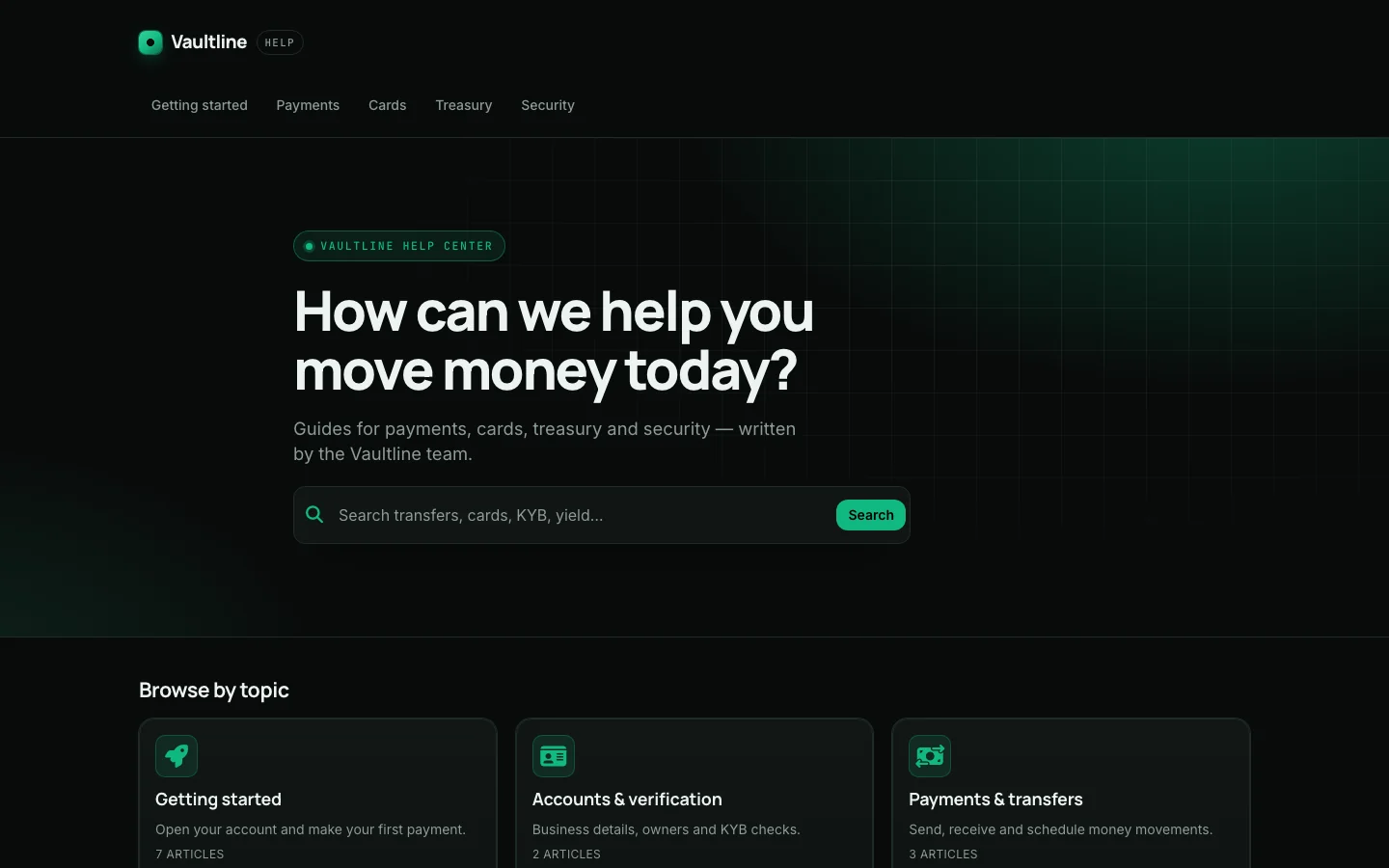
Vaultline's home page: near-black, with a glowing grid behind the heading “How can we help you move money today?”, an emerald search button and topic cards
Built and published by Claude from the brief above, with no human edits, in one of our test runs. Vaultline is a fictional brand.
Six skills, one connection

Ask for the work, not the clicks.

Each skill is the know-how for one kind of job, run on the HelpCenter.io connector's 77 tools and inside the permissions you grant. Claude picks the skill your request needs.

See all 77 tools
  • Design your help center

    A whole branded theme from a short brief, or one targeted change: colours, fonts, layouts, navigation and custom CSS, as a draft in the Template Editor.

    Ask: Restyle our help center to match our website, acme.example: same colours, fonts and logo. Don't publish anything.

    Skill: helpcenter-build-templates Needs: Design
  • Put help on your website

    The widget, inline FAQ sections, proactive-message events and single sign-on, added to your website's own code from Claude Code, with the HelpCenter.io side set up through the connector.

    Ask: Replace the floating launcher with the Help button in our header, show the Billing articles on /billing, and fire an event when an export fails so we can set up a proactive message.

    Skill: helpcenter-integrate-widget Needs: Your site's code Write content Manage embedding
  • Answer from your articles

    Searches and reads your help center, and answers with links to the articles it used.

    Ask: Find our articles about refunds and summarise the policy with links to the sources.

    Skill: helpcenter-find-knowledge Needs: Read content
  • Write and organize articles

    Drafts, stages and publishes articles, organizes categories, imports in bulk and adds images.

    Ask: Draft an unpublished article from these release notes, in the "Billing" category.

    Skill: helpcenter-maintain-articles Needs: Write content
  • Close the content gaps

    Turns searches that found nothing, article performance and reader feedback into what to write or fix next.

    Ask: What did people search for last month without finding an answer? Suggest three articles to write.

    Skill: helpcenter-improve-content Needs: Analytics
  • Get connected

    Connects, lists the help centers the connection can reach, and links you to their dashboards.

    Ask: Which of our help centers can you reach? Link me to their dashboards.

    Skill: helpcenter-get-started Needs: Read content
Design, from a brief

Three briefs, three help centers, about four minutes each.

Each one started as the same stock help center and a one-paragraph brief. A fresh Claude session, with only this plugin and the HelpCenter.io connector, chose the layout, palette and type, built all six page kinds, checked contrast in light and dark mode, and published. No human touched the design.

  • A palette for light and dark mode, with text contrast checked in both
  • Heading and body fonts, corner radius and spacing chosen together
  • All six pages laid out: home, category, article, search, contact and page not found
  • Header, footer and menu from your real categories, with no invented links
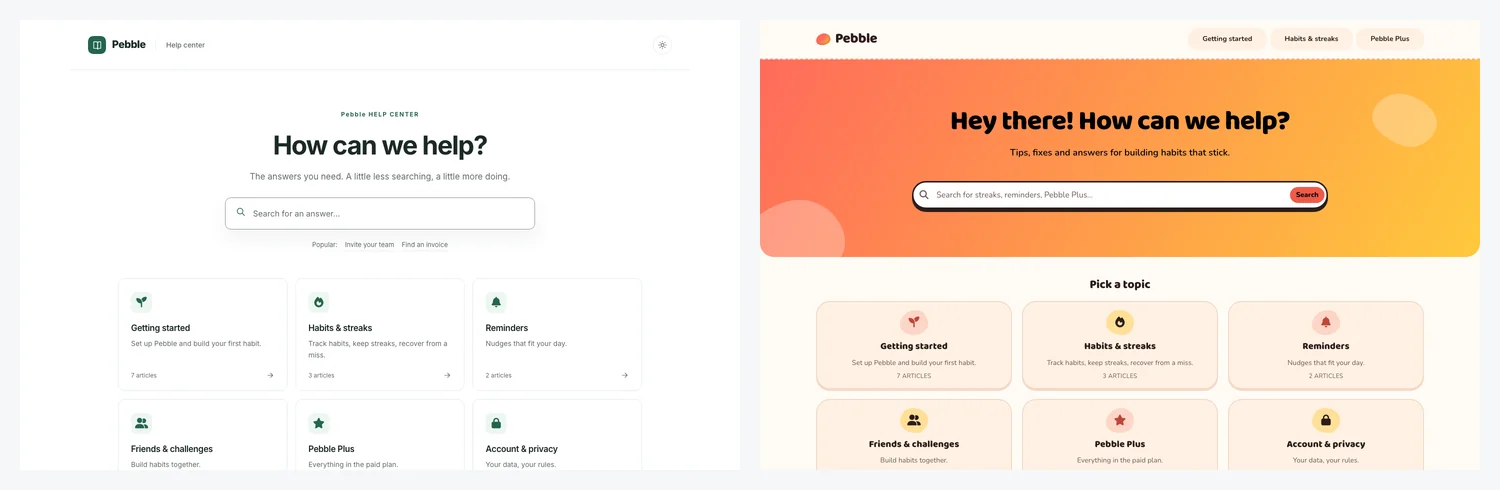
The same help center twice: on the left the default theme, plain white with green accents; on the right Pebble's theme, with a coral-to-yellow hero and rounded topic cards
Before: the help center as it starts, on the default theme. After: the same help center once Claude had built Pebble's brief.
Brief 1 of 3

Vaultline

Payments and treasury for startups

“Dark, premium and precise, like part of a modern banking app. Emerald #10B981.”

  • Emerald #10B981

What Claude built

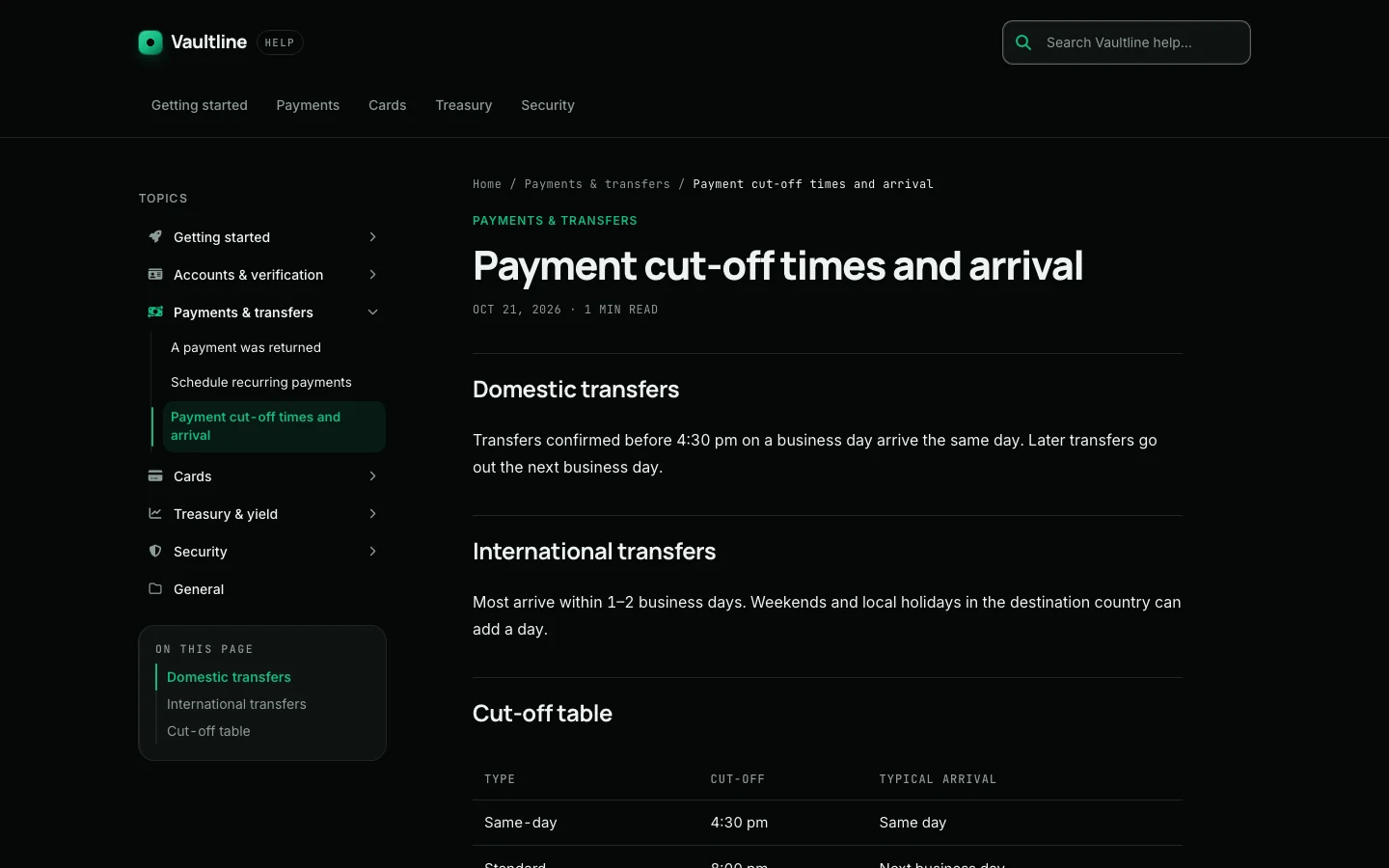
  • Near-black surfaces in both appearances, an emerald accent, and a grid that glows behind the hero.
  • A topic tree beside every article, with an “On this page” outline under it.
  • Monospace eyebrows, dates and breadcrumbs, like the small print on a statement.
Vaultline's home page: near-black, with a glowing grid behind the heading “How can we help you move money today?”, an emerald search button and topic cards
Home page
A Vaultline article, “Payment cut-off times and arrival”, with a topic tree and an On this page outline on the left
Article page
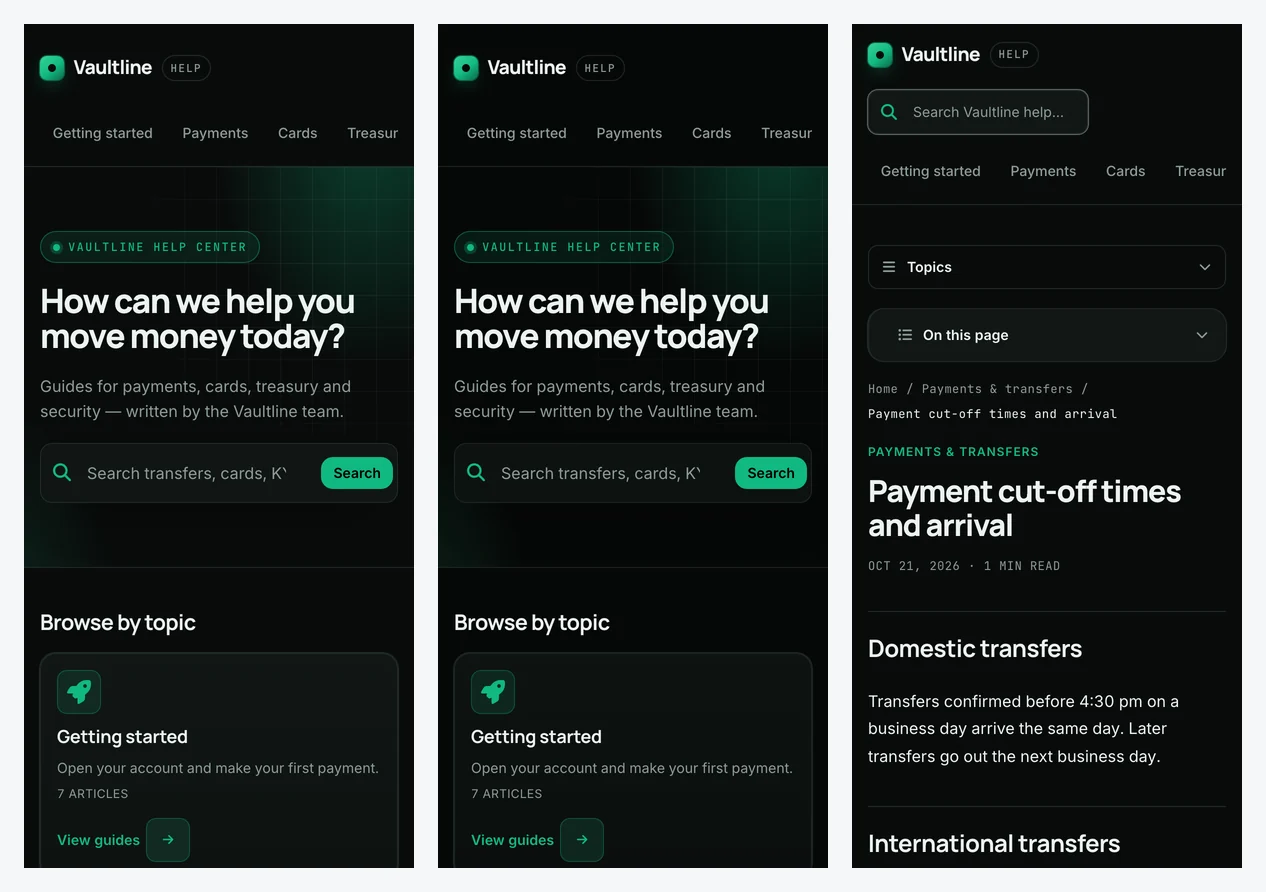
Vaultline on a phone: the home page in light and dark mode, and an article
On a phone, light and dark
Brief 2 of 3

Pebble

A habit app for teens

“Playful, friendly and bright, rounded, a bit of fun. Coral and sunny yellow.”

  • Coral
  • Sunny yellow

What Claude built

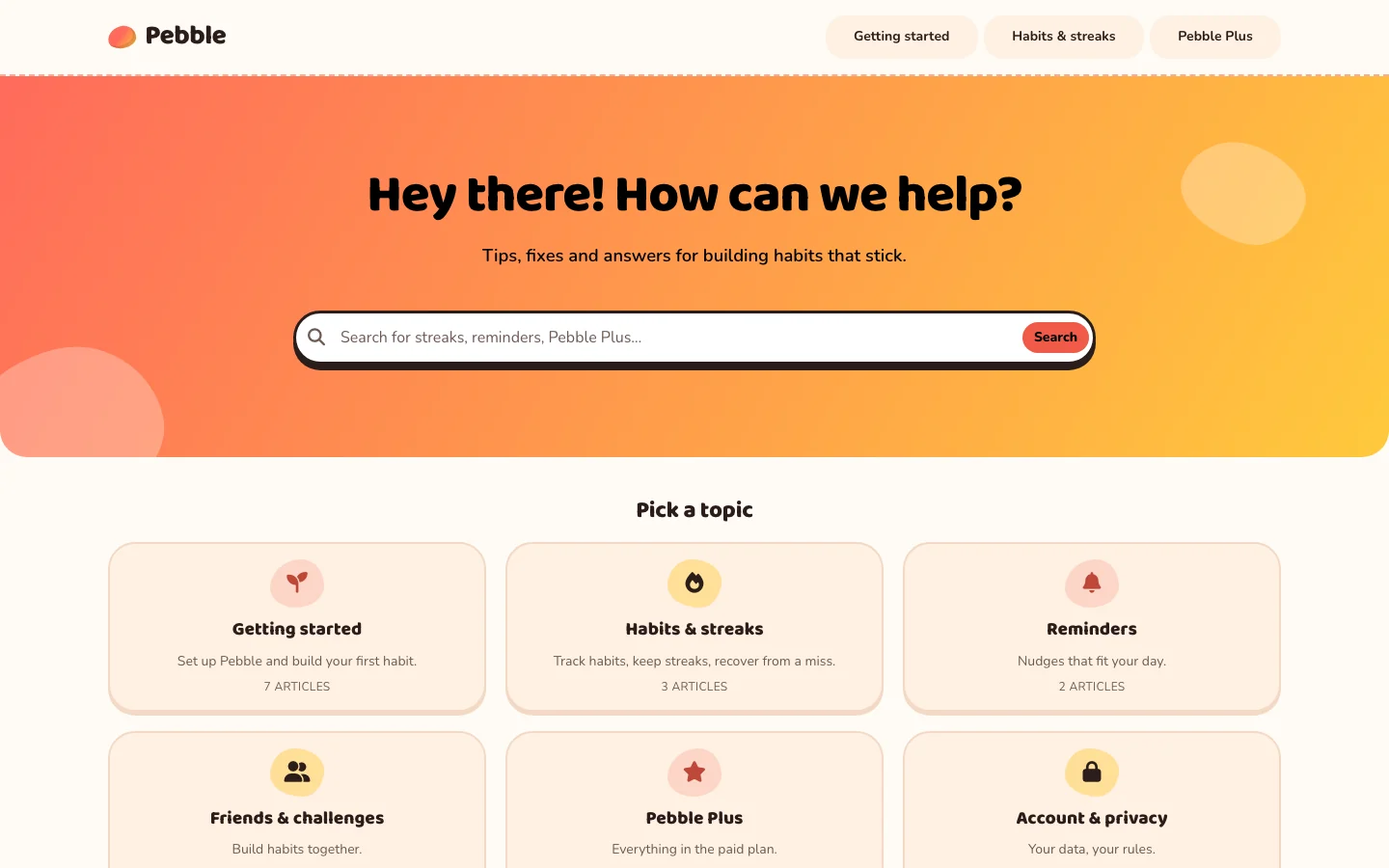
  • A coral-to-yellow hero with soft shapes, and a chunky, rounded display face.
  • Pill-shaped menu links and topic cards with a pressed-button edge.
  • Highlighter-marked headings in articles, and a warm dark mode.
Pebble's home page: a coral-to-yellow hero reading “Hey there! How can we help?”, pill-shaped menu links and rounded topic cards
Home page
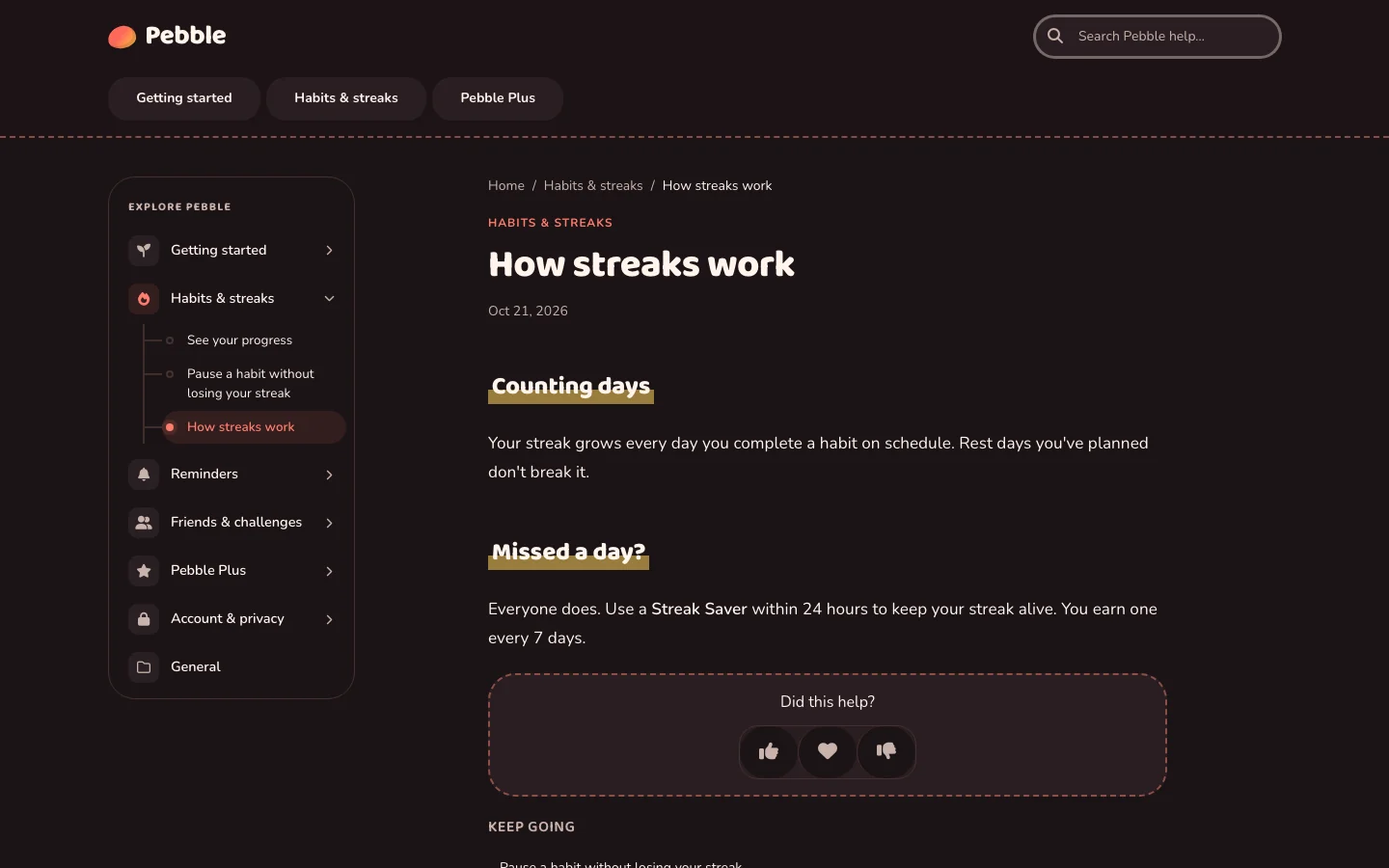
A Pebble article, “How streaks work”, in dark mode, with highlighter-marked headings and an Explore Pebble menu on the left
Article page
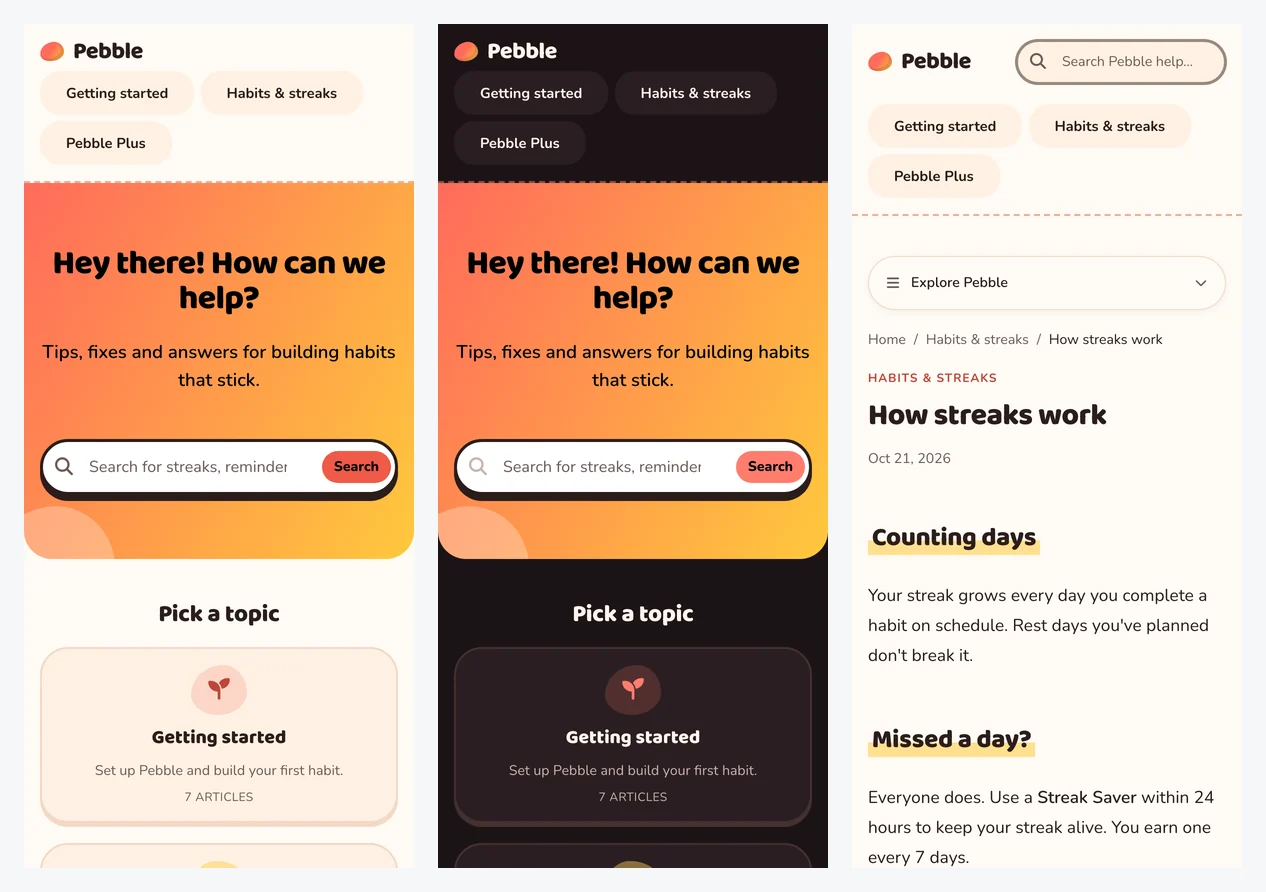
Pebble on a phone: the home page in light and dark mode, and an article
On a phone, light and dark
Brief 3 of 3

Forgekit

A logistics API

“Clean, enterprise, docs-first: a category tree, an outline beside each article, code-friendly type. Navy and electric blue.”

  • Navy
  • Electric blue

What Claude built

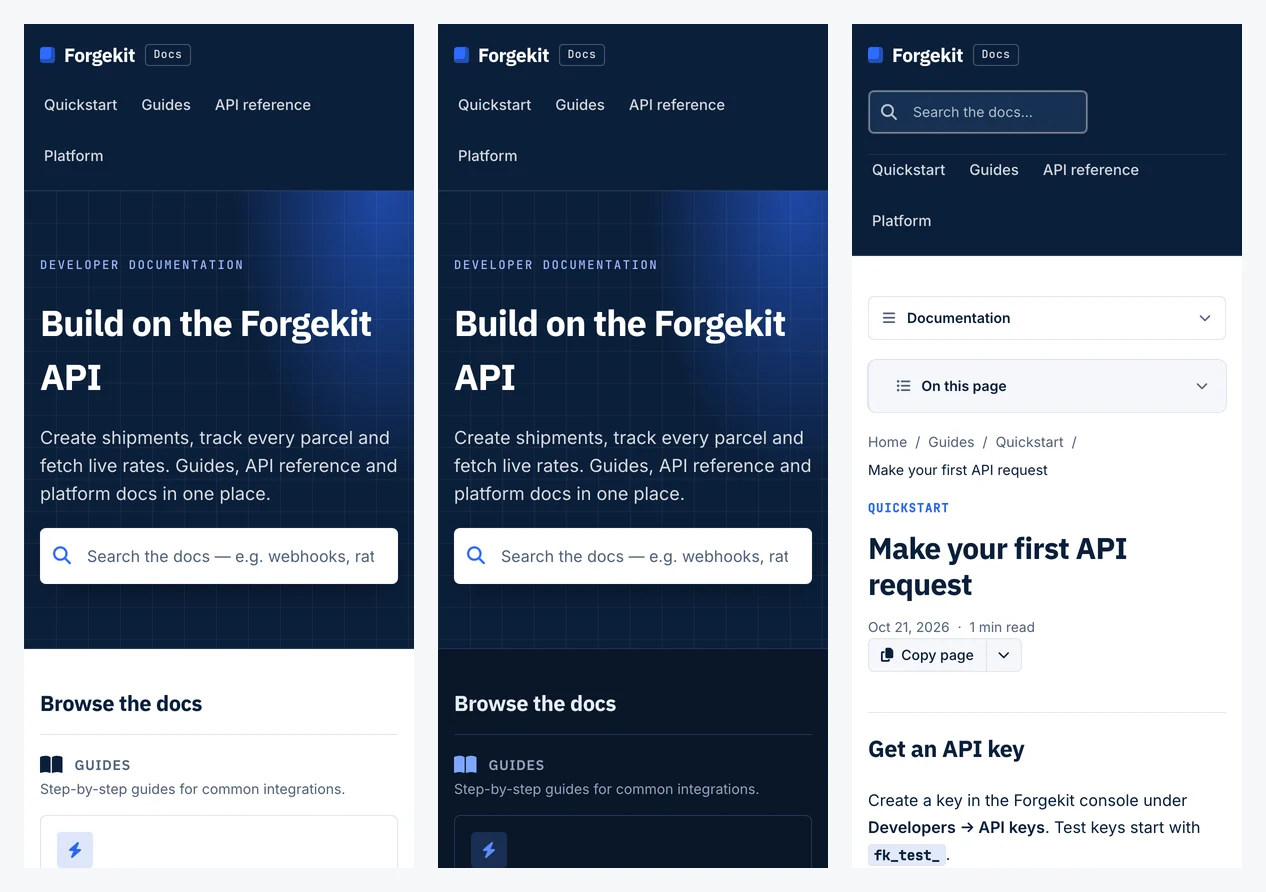
  • A docs home that groups the categories under Guides, API reference and Platform.
  • A documentation tree on the left of every article and an “On this page” outline on the right.
  • Dark code panels, monospace labels, and a docs search in the header of every article.
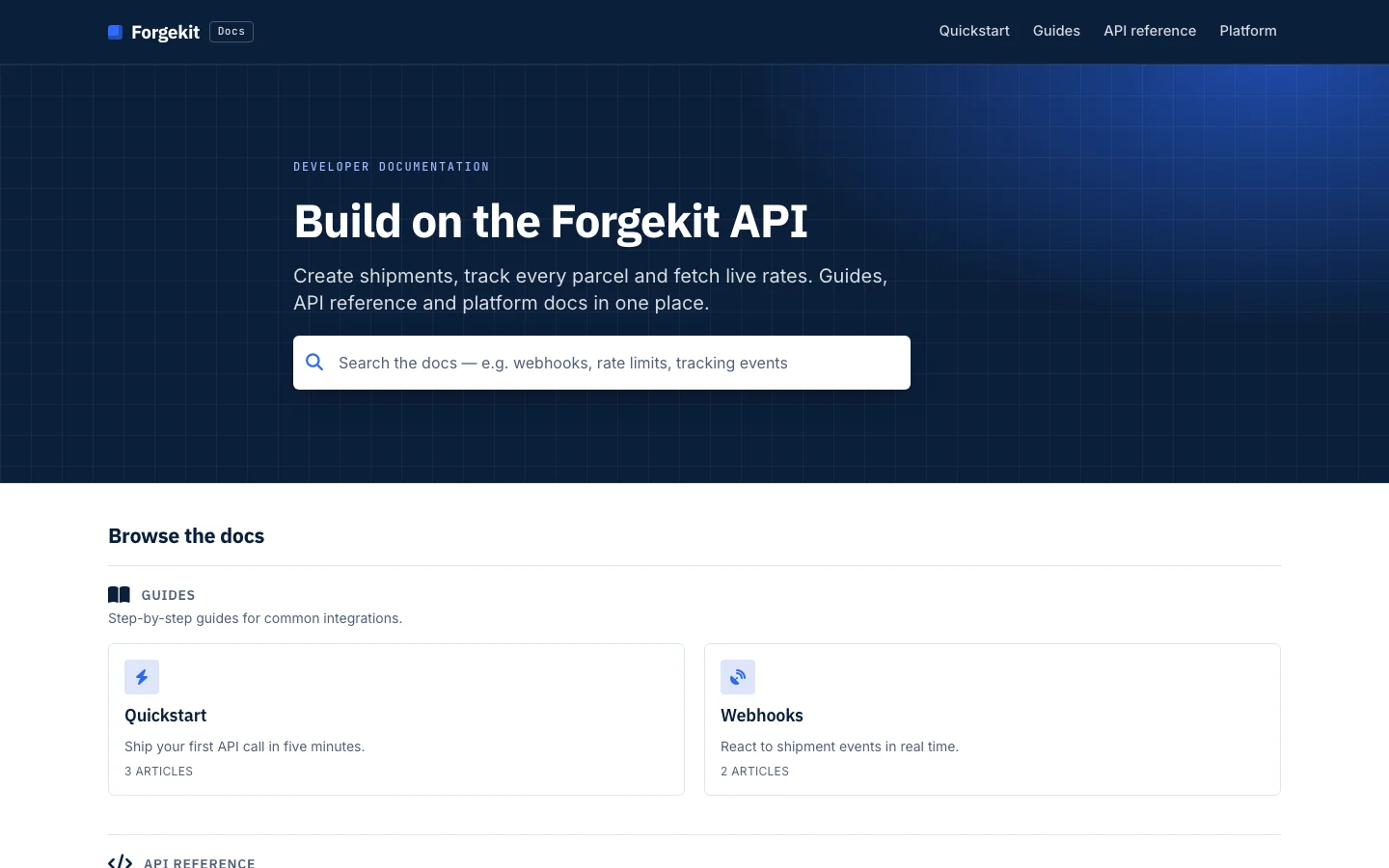
Forgekit's docs home page: a navy hero reading “Build on the Forgekit API” with a docs search, and categories grouped under Guides and API reference
Home page
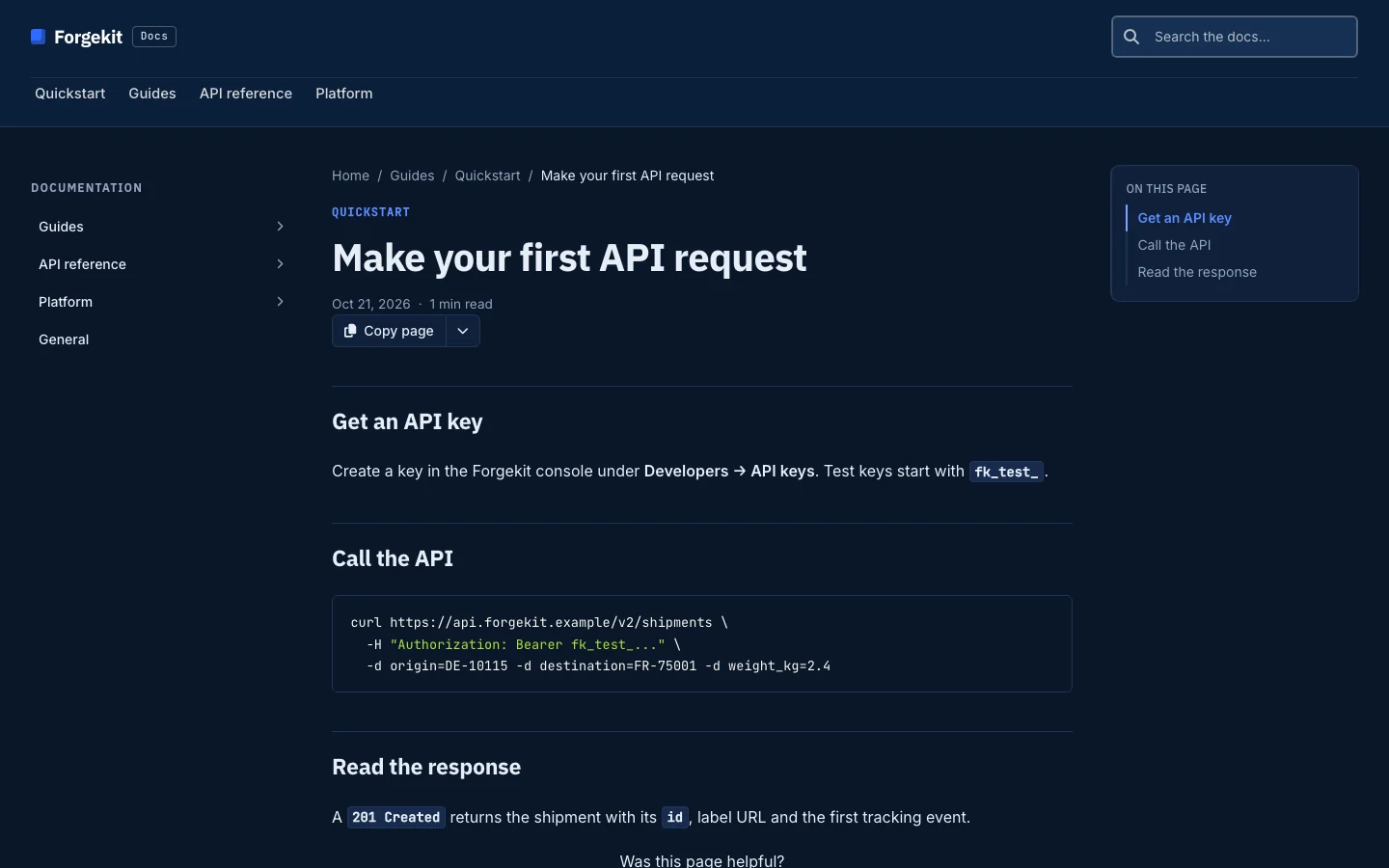
A Forgekit article, “Make your first API request”, with a documentation tree on the left, an On this page outline on the right and a dark code panel
Article page
Forgekit on a phone: the home page in light and dark mode, and an article
On a phone, light and dark

Then keep it yours. What Claude builds is an ordinary HelpCenter.io template: change text, colours and layout in the Template Editor without code, or ask for the next round in plain words, like “make the hero calmer” or “rebuild the article pages as docs”.

Vaultline, Pebble and Forgekit are fictional brands, made up for these test runs, and so is the content in their help centers.

On your website

Put help on your site, in your own code.

Open your website's project in Claude Code and ask for help on it. Claude adds HelpCenter.io where your stack expects it: the root layout of a Next.js app, the shell of a React or Vue app, a Blade, ERB or Django base template, a WordPress child theme, or the exact place to paste it in a website builder.

  • Plain HTML
  • Next.js
  • React
  • Vue and Nuxt
  • Laravel
  • Rails
  • Django
  • WordPress
  • Webflow
  • Wix
  • Shopify
  • Squarespace

In Claude Code, in the site's project

Ask: Add the HelpCenter.io widget to this site; here's the snippet from our dashboard. Put our FAQ section on the pricing page and write its questions from what the pricing page says.

helpcenter-integrate-widget
  • The widget, loaded once

    With its own button if the design has one, the right articles on each page of an app, and links in the page that open articles inside it.

  • FAQ sections with answers in them

    Placed inline on the page. Claude writes the questions and answers into the help center from your material, creates the section and fills it, so it has content the day it goes live.

  • Single sign-on, on Catalyst

    For a private help center: the token endpoint and the Login URL, so signed-in customers read it without a second login. The secret stays in the server's environment, and Claude never asks for it.

  • Events for proactive messages

    Fired from the moments that matter, like a failed payment or a stalled import.

Claude does the HelpCenter.io side too: it reads the widget's install code, adds your site's hosts to the allowed websites once you agree, creates the FAQ section and checks that visitors are being served. It adds only the Content Security Policy sources the widget needs and commits nothing unless you ask. A few steps stay in the dashboard, like the widget's appearance and the single sign-on secret: Claude hands you a short checklist for those, with the values filled in.

Day to day

Find what readers struggle with, and fix it in the same chat.

Claude reads your analytics and your articles together. Ask what is not working, and it ranks what readers rated poorly or searched for in vain, reads the articles involved, and proposes the change.

On Catalyst, an edit to a live article can be staged for your team to publish or discard. New articles are drafts on every plan.

  • See what is not working Searches that found nothing, and articles readers rate poorly. Skill: helpcenter-improve-content
  • Read before it writes The article in full, and what you already cover elsewhere. Skill: helpcenter-find-knowledge
  • Propose the fix A draft, an edit, or a staged change for review. Skill: helpcenter-maintain-articles
HelpCenter.io plugin Example
  1. You: Which of our most-read articles did readers rate worst this month? Fix the worst one.

  2. Tool calls: helpcenter_get_content_performance helpcenter_get_article

  3. Assistant: “Pause or cancel your plan”: 1,240 views, 38% helpful. It explains pausing, but cancelling is one line at the end, and that is what most readers came for. I would lead with cancelling and give pausing its own section.

  4. You: Do it, and stage it for the team.

  5. Tool call: helpcenter_stage_article_changes

  6. Assistant: Staged. Readers see the current version until your team publishes it.

    Cancel or pause your plan Staged
An example on Northwind, a fictional help center. The numbers are illustrative; the tools are the real ones the plugin calls. Staging needs Catalyst.
Who it is for

Every team that runs a help center.

  • Support and product teams

    Keep the help center current without a docs writer: answer from it, draft what is missing, and fix what readers rate poorly, while support stays the size it is.

  • Agencies running help centers for clients

    One connection reaches every client's help center. Build each theme from a brief, put help on each client's site, and hand over a draft for the client to review.

    See it for agencies
  • Teams moving off a bigger suite

    Import your articles in bulk, rebuild your look from your own website, and put the widget where your old one was.

Install

Add it in Claude or Claude Code, then sign in once.

When you connect, HelpCenter.io asks you to sign in and choose which help centers and which permissions to share. Design access, reading and editing the template, is a separate permission from content access.

Claude

claude.ai, Claude Desktop and Cowork

  1. Add the plugin Open Customize → Plugins, choose Discover, find HelpCenter.io and select Add.
  2. Connect HelpCenter.io Open the plugin's Connectors tab and connect HelpCenter.io. On Team and Enterprise plans, an Owner adds the connector for the organization first.
  3. Sign in and choose Sign in to HelpCenter.io, pick the help centers it may reach, and allow the permissions it asks for.

Claude Code

From the plugin's repository

A plugin you added on claude.ai is available in Claude Code when you sign in with the same account. To install it straight from the repository instead:

In Claude Code
/plugin install helpcenter-io --marketplace helpcenterio/helpcenter-io-plugin
Before Claude Code 2.1.275
/plugin marketplace add helpcenterio/helpcenter-io-plugin
/plugin install helpcenter-io@helpcenter-io

Then run /mcp, choose the HelpCenter.io server and sign in.

The plugin runs on the HelpCenter.io connector at https://mcp.helpcenter.io. If you already added that connector to Claude, you get one set of tools, not two. Stuck at sign-in? The setup guide has the troubleshooting.

Security and control

Nothing goes live until you say so.

Claude works on drafts, asks before it replaces work, and reaches only the help centers you chose. Your password never reaches Claude: the plugin signs in on HelpCenter.io's own consent screen. Text inside your articles, comments or a website you point it at is data for Claude, never an instruction it follows.

  • Drafts first

    Design edits land in the draft the Template Editor opens, and new articles are drafts. Claude publishes a design only when you ask, and only the version you reviewed.

  • It asks before replacing work

    Starting over from a ready-made theme replaces the draft's layout. Claude says what will be replaced and waits for your go-ahead.

  • You choose what it can reach

    On HelpCenter.io's consent screen you pick the help centers and the permissions. Design access, and choosing which websites may embed your help center, are asked for apart from content access.

  • No scripts unless you ask

    Claude adds tracking or widget scripts to a help center only when you request that specific code.

  • Secrets stay on your server

    For single sign-on, the code Claude writes reads the secret from your server's environment. Claude never asks for it, prints it or commits it.

  • Revoke it any time

    Change which help centers the plugin can reach, or disconnect it, in Account → Connected Apps. The next request it makes is refused.

Availability

Included on Growth and Catalyst. No add-on.

The plugin works on any help center on either plan, 14-day trial included. No charge per tool call.

Growth

Every skill

$119 /mo, billed annually

or $149 month to month

  • Every skill: design, website, answers, articles and content gaps
  • Up to 10 teammates
  • Not included: Staged changes, version history and single sign-on, which need Catalyst
Start a Growth trial

Catalyst

With staged changes

$179 /mo, billed annually

or $199 month to month

  • Everything in Growth, plus staged changes, version history and single sign-on
  • Unlimited teammates
  • AI question answering and translations in the help center too
Start a Catalyst trial

Your Claude subscription is separate, and billed by Anthropic. Bootstrap and older plans priced below Growth do not include the plugin. Compare every plan.

FAQ

Questions, answered.

Want the whole tool list? It is on the MCP server page. Something else? Our team answers from our help center.

Is there a HelpCenter.io plugin for Claude?

Yes. Find HelpCenter.io in Claude under Customize → Plugins → Discover, or install it in Claude Code from the helpcenterio/helpcenter-io-plugin repository; the install steps cover both. It has six skills: designing your help center, putting help on your website, answering from your articles, writing and organizing articles, closing content gaps and getting connected. They run on the HelpCenter.io connector at https://mcp.helpcenter.io, the same 77 tools as our MCP server.

Which HelpCenter.io plans include it?

The plugin, and the connector behind it, are included in the Growth and Catalyst plans, and in the 14-day trials of both. Staged changes, version history and single sign-on need Catalyst. Design work needs a help center on the Template Editor, which every new help center is; one still on the classic editor switches over when its owner opens the Template Editor and publishes the converted design.

Does it cost extra?

Not on the HelpCenter.io side. The plugin is free to install, there is no add-on to buy and no charge per tool call. Your Claude subscription is separate, and billed by Anthropic.

Will Claude publish anything without asking?

Design edits land in the Template Editor's draft, and Claude publishes a design only when you ask, with the version you reviewed. New articles are drafts. Before it starts over from a ready-made theme, which replaces the draft's layout, it tells you what will be replaced and waits for your agreement.

How long does a new theme take?

In our test runs, about four minutes from a one-paragraph brief to a published theme, for each of the three themes on this page. Your time goes into the brief and the review.

Do I need Claude Code?

Not for the help center itself: the plugin works in Claude on the web, Claude Desktop and Cowork, and in Claude Code. Adding the widget to your website changes that site's code, so it is best done in Claude Code, in the site's project. A plugin you add on claude.ai is available in Claude Code when you sign in with the same account.

Can one connection work on several help centers?

Yes. On the consent screen you choose every help center the connection may reach. Claude names the help center on each call, and when the connection reaches more than one, it confirms which one you mean before it starts. Agencies that run help centers for clients will find more on the agencies page.

We already connected HelpCenter.io to Claude. What does the plugin add?

The skills. The plugin points at the same connector, so if you have both you see one set of tools. The skills are the know-how on top: how to design a whole theme from a brief, how to add the widget in your stack, and the safety rules above.

How do I disconnect it?

Open Account → Connected Apps in HelpCenter.io and disconnect it, or change which help centers it can reach. You can also remove the plugin in Claude.
Hand Claude your help center to-do list.

Start a 14-day trial, add the HelpCenter.io plugin to Claude, and ask for the first job: a new look, help on your site, or the articles your customers could not find. No credit card needed.