SOP software

SOP software that keeps procedures current and in the right hands

Write your standard operating procedures in one place, see who changed what, and get a reminder when each one is due for a check.

Review reminders and flags on every plan
A version history of who changed what
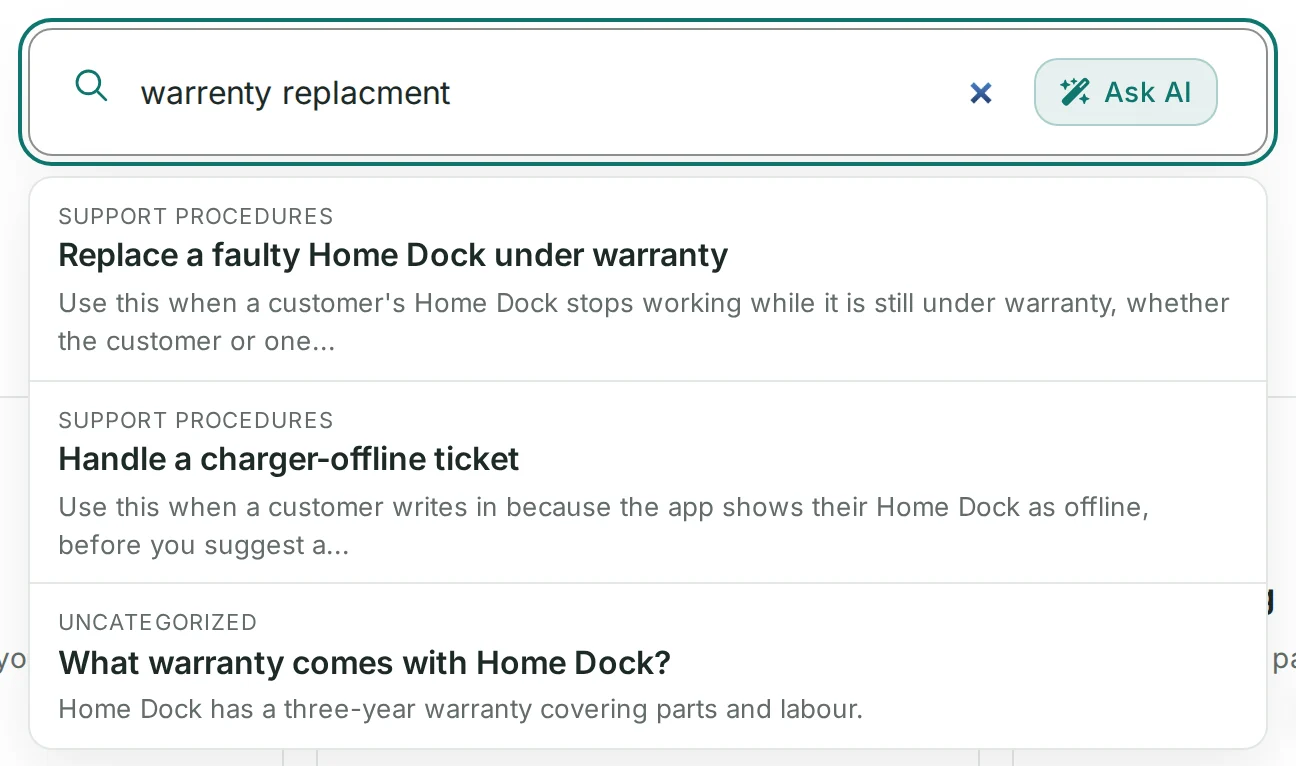
Search that forgives typos

14-day free trial · No credit card required

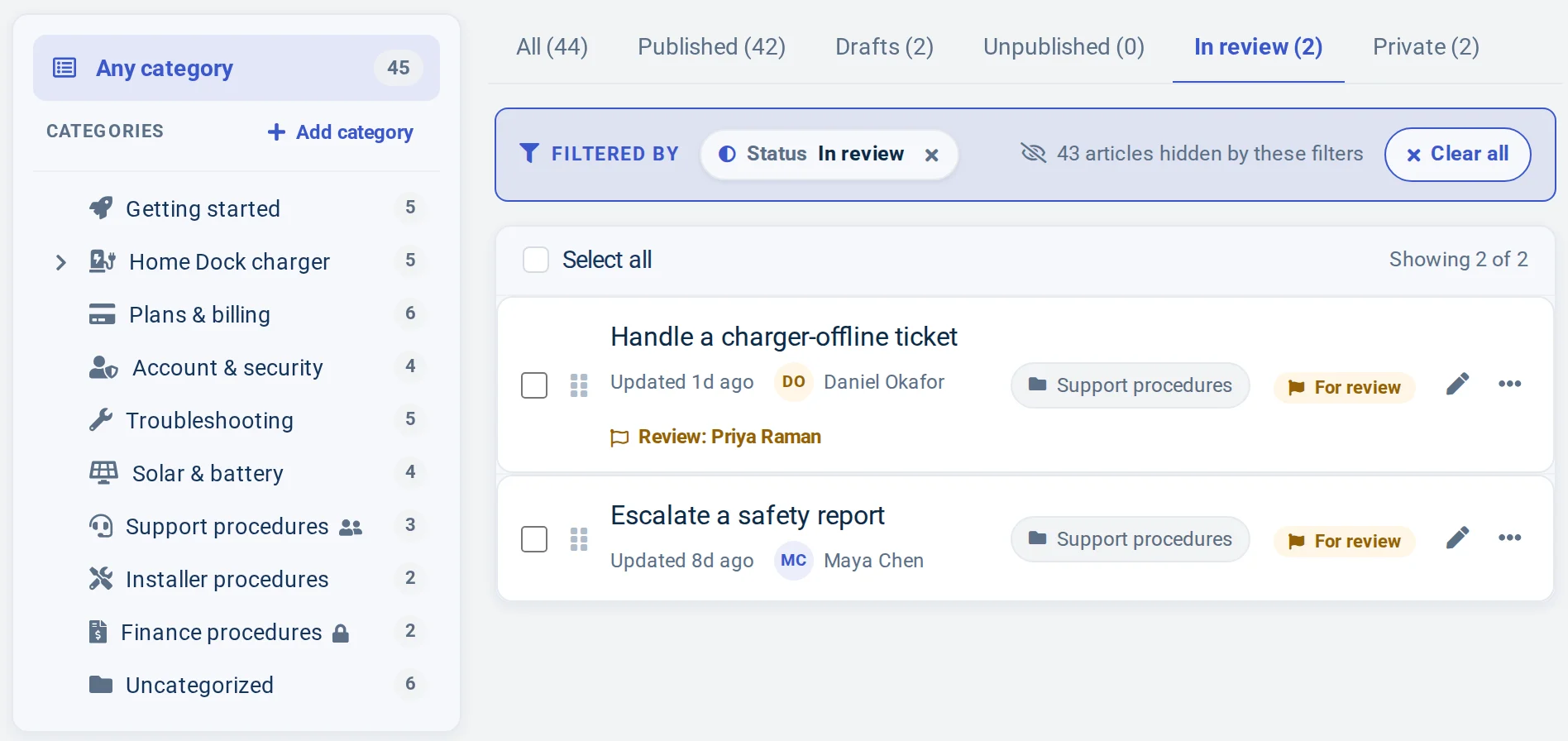
A demo help center's Articles list on the In review tab: two support procedures waiting for review, one assigned to a teammate, beside procedure categories for the support team, installers and finance, the finance one locked
A demo team's procedures, two of them due for review.
The problem

Procedures nobody can trust

Standard operating procedures often start out as documents in a shared drive, copied into chat whenever someone asks. A few months later there are three versions of the refund procedure, and nobody can say which one the team actually follows.

Access is all or nothing. Either everyone can open the folder, including the steps meant only for finance or the support leads, or a procedure is locked away from the person who needs it on a busy shift. And because nobody is asked to check a procedure when the process behind it changes, it goes out of date quietly, until a mistake shows it.

SOP software fixes this at the source: one place for every procedure, a review date for each, and access that matches who needs it.

How it works

Standard operating procedure software, built for upkeep

Access that matches who needs each procedure

Public procedures are listed in your help center and its search. Anyone with the link hides one from navigation and search, and opens it through a secret ?share= link. Private keeps it to the author and the teammates the author picks.

Categories work the same way: Everybody, Everybody with a link, Team members only, or Me and selected team members. You can also make the whole help center private or password-protected, or have readers sign in with your own login through JWT single sign-on.

  • Available on Growth and Catalyst: article and category access, a private or password-protected help center
  • Available on Catalyst: JWT single sign-on for readers
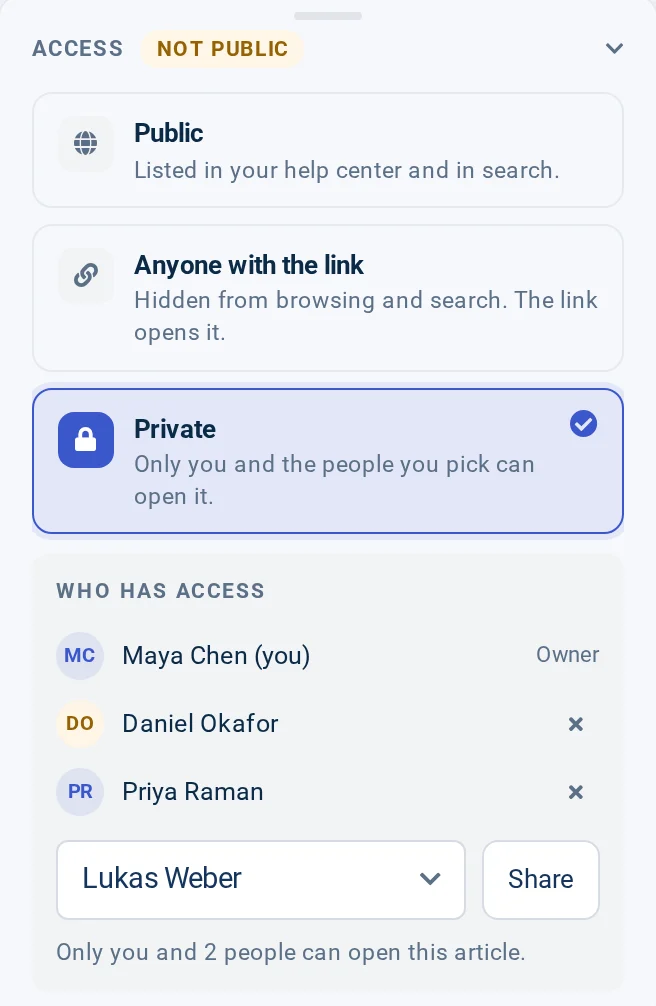
The Access card of a demo procedure, Approve a refund: Private is selected, and Who has access lists the owner and two teammates, with a Share button to add another

Reviews that keep procedures current

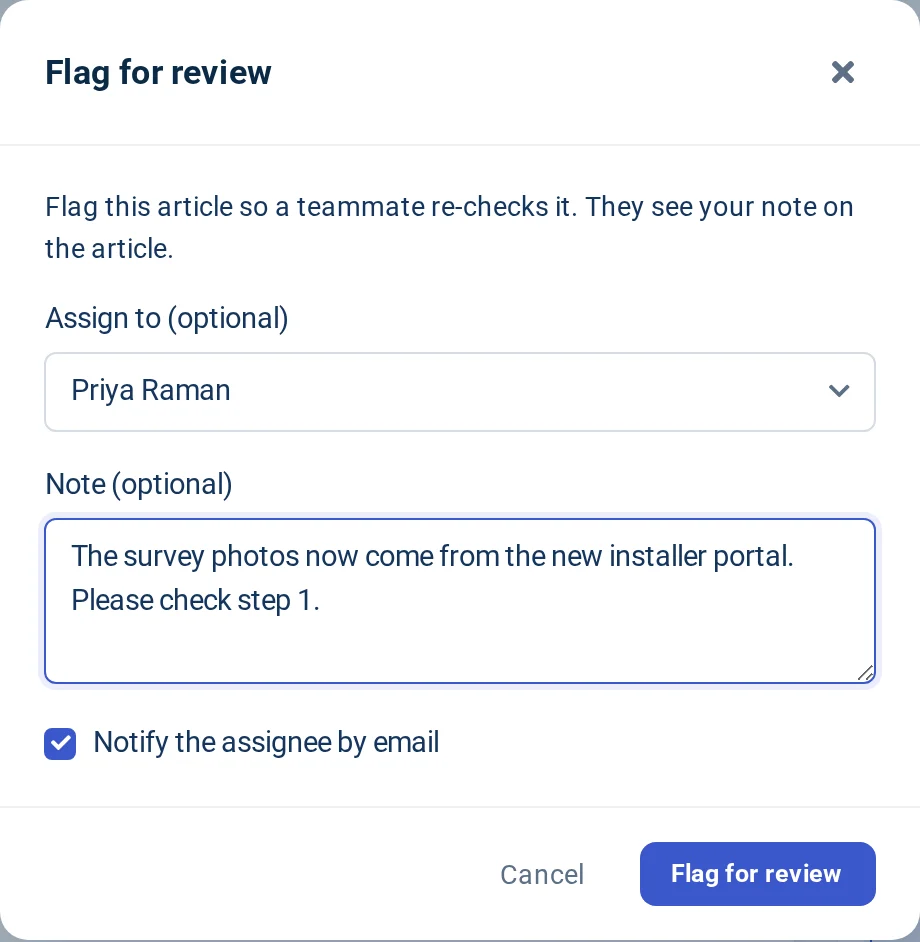
Processes change, and their procedures have to follow. When something changes, flag the procedure for review: assign a teammate, add a note, and they get an email. A banner on the article shows who flagged it and why, until someone marks it as reviewed.

For routine checks, schedule each procedure for review in a set number of days. When the date arrives, its author gets an email, and the In review tab of your Articles list gathers every procedure that is waiting for a check.

  • Available on every plan: flag for review, scheduled reviews and review emails
The Flag for review dialog on a demo procedure: assigned to a teammate, with a note asking them to check step 1 and Notify the assignee by email ticked

Who changed what, and when

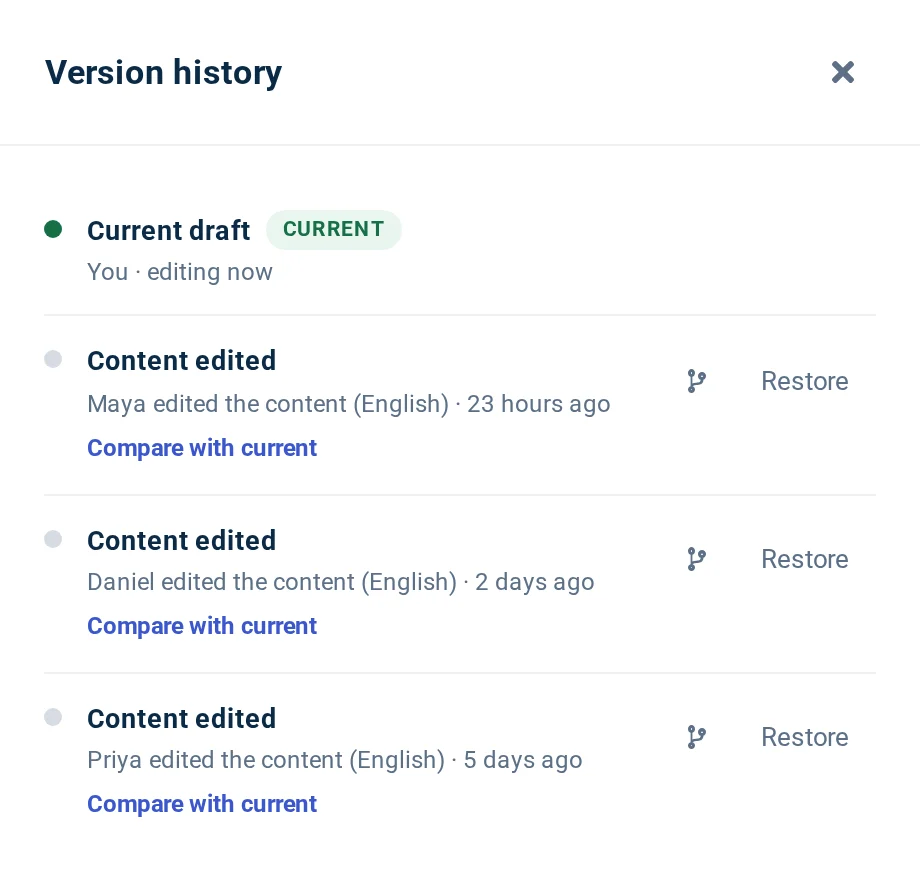
Each saved change is recorded. Version history lists each change with who made it and when, so when a step looks wrong you know who to ask. Compare any change with the current version to see exactly what it did.

If a change should not have gone in, restore the earlier version. Nobody has to guess which copy of a document is the current one. Version history is on every plan; how far back it reaches depends on your plan.

  • Available on every plan: version history, compare and restore, with a history window set by your plan
Version history for a demo procedure: three content edits by three teammates over five days, each with Compare with current and Restore

Update a live procedure without disrupting it

Rewriting a procedure that people follow every day is risky if half-finished steps go live before the update is done. With staged changes, edits to a published procedure are saved to a staged copy, and readers keep seeing the live version while you work.

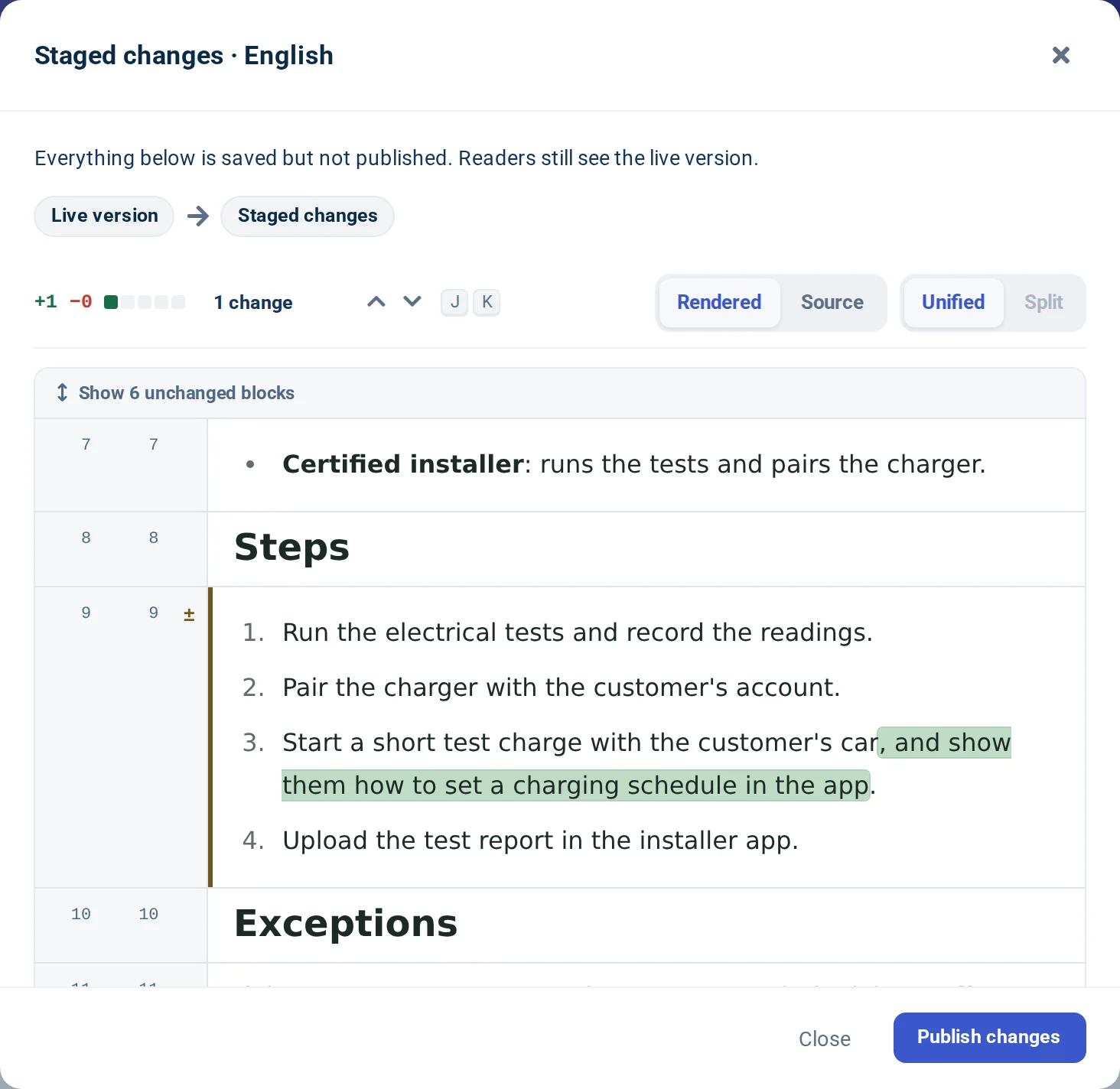
Compare with live highlights exactly what will change, before anyone sees it. Once the update has been checked, an editor clicks Publish changes and the whole update goes live at once. Teammates who cannot publish save their edits for review, and an editor publishes them.

  • Available on Catalyst: staged changes
Compare with live on a demo procedure: the staged copy adds a sentence to step 3, highlighted, above a Publish changes button
Quick start

Set up your SOP library

From scattered documents to procedures your team can trust.

  1. Bring your procedures in

    We move your existing procedures for you, free, on every plan. Or run one of the self-service importers yourself.

    How free migration works
  2. Decide who sees what

    Group procedures into categories and choose who can see each one: everybody, team members only, or you and selected teammates. Available on Growth and Catalyst.

    Set up private categories
  3. Set a review date

    Schedule each procedure for review, and flag one for a teammate whenever the process behind it changes.

    Schedule and flag reviews
Example

A sample SOP template

An example outline for a made-up company's procedure. The six headings work for any SOP.

Example Replace a faulty charger under warranty
Purpose
Replace faulty chargers the same way every time, so customers are charging again quickly.
Scope
Chargers under warranty that a customer or an installer reports as faulty.
Roles
Support agent confirms the fault, support lead approves exceptions, warehouse ships the unit.
Steps
  1. Confirm the serial number.
  2. Run diagnostics and attach the result.
  3. Open a replacement order.
  4. Send the return label.
Exceptions
Damage from a third-party installation goes to the support lead first.
Review date
Every six months, by the support lead.
Plan fit

Which plan your procedures need

Bootstrap

$29/mo
billed yearly, or $39 monthly

For one person publishing procedures anyone can read.

  • Unlimited articles and viewers
  • Reviews, review emails and version history
  • 1 team member, one language

Growth

$119/mo
billed yearly, or $149 monthly

For a team with procedures only some people should see.

  • Everything in Bootstrap, plus article and category access
  • A private or password-protected help center
  • White-glove support
  • Up to 10 team members, multiple languages

Catalyst

$179/mo
billed yearly, or $199 monthly

For teams that need sign-in and careful updates.

  • Everything in Growth, plus JWT single sign-on for readers
  • Staged changes for live procedures
  • Semantic (AI) search included
  • 3 hours of manual customization
  • White-glove, hands-on support
  • Unlimited team members

Compare every plan

FAQ

Questions about SOP software

Something missing? Our help center has the details.

What is SOP software?

SOP software is where a team writes, stores and maintains its standard operating procedures. Here, each procedure is a searchable article with review reminders and a version history.

Can some SOPs be public and others private?

Yes, on Growth and Catalyst. Set each article to Public, Anyone with the link or Private, and each category to Everybody, Team members only or Me and selected team members.

How do I make sure SOPs get reviewed?

Schedule each procedure for review in a set number of days; its author gets an email on the day. When a process changes, flag the procedure and assign a teammate, who gets an email with your note. Both are on every plan.

Can I see older versions?

Yes. Version history shows who changed each article and when, and lets you compare a change or restore an earlier version. It is on every plan; how far back it reaches depends on your plan.

Can I move my SOPs over?

Yes. Our team migrates your procedures for you, free, from tools including Confluence and Notion. You can also import them yourself from Zendesk Guide, Intercom, Document360, Help Scout Docs, Front Knowledge Base or HelpDocs. There is no Google Docs importer.

Which plan do I need?

Bootstrap suits one person publishing procedures anyone can read. Growth adds private articles and categories and up to 10 team members. Catalyst adds single sign-on for readers, staged changes and unlimited team members.

Keep every procedure current

Write each SOP once, share it with the right people, and know when it needs a check.

No credit card required · Free migration on every plan

Is HelpCenter.io right for your team?