Up next
The video did not load.
Lesson 1 of 10 · 0:48
Introduction
From Move to the new Template Editor · Verified against the live product on Nov 3, 2026
This lesson
Move from the classic template editor to the new one, with nothing changing for visitors until you're ready.
Prefer to read? Follow it step by step
Moments in this lesson
 Length 0:46
Up next · 0:46
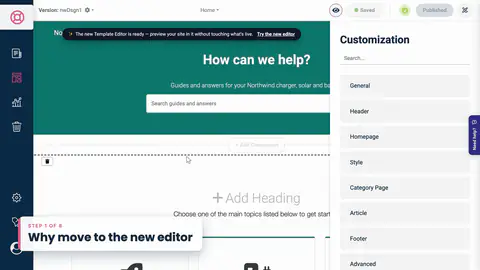
2. Why move to the new editor
Ready-made themes, a layout for every kind of page, dark mode, and a restore point every time you publish.
Transcript
- 0:05Hi!
- 0:06In this video, I'll show you how to move your help center from the classic template editor to the new one... without your visitors seeing a thing until you're ready.
- 0:15We'll look at why it's worth it, and start the move.
- 0:18Then we'll see what comes across on its own, fix what doesn't, and check your custom code.
- 0:23Finally, we'll preview every page, publish...
- 0:26and I'll show you how to switch back, too.
- 0:29I'm signed in to Northwind, a demo help center that still uses the classic editor.
- 0:33Here's its live site... with a teal header, a footer of its own, and a little custom CSS.
- 0:40To open the editor, I'll go back to the dashboard...
- 0:43and click Template Editor in the menu on the left.
Captions and this transcript come from the narration, word for word. Click any line to play from there.
About the course
Bring your classic design across, check what changed, and publish when you're ready. Your visitors see nothing until then.
What you'll learn
- What the new template editor adds, and what stays exactly the same
- How to start the move with Try the new editor, and why it's safe
- What comes across from your classic design on its own, in every language
- How to fix what doesn't, and update custom CSS written for the classic design
- How to preview every page at every size, and in dark mode
- Publishing the switch, restoring an earlier version, and switching back
- Who it's for
- Help centers still on the classic template editor.
- Format
- 10 lessons, 7:56 in all. English captions and a full transcript.
- Last verified
- Nov 3, 2026, on the live product with the Northwind demo help center
- Plans
- Everything in this course works on every plan.
Articles
Every lesson pairs with a help article, so you can read the steps at your own pace.
-
Move your help center to the new template editor self.helpcenter.io/content/move-to-the-new-template-editorGoes with these lessons
-
Which template editor does my help center use? self.helpcenter.io/content/which-template-editorGoes with
-
What carries over to the new template editor self.helpcenter.io/content/what-carries-over-to-the-new-template-editorGoes with these lessons
-
Custom CSS reference: selectors and examples self.helpcenter.io/content/custom-css-referenceGoes with
-
My custom CSS doesn't work self.helpcenter.io/content/custom-css-not-workingGoes with
-
Preview on phones, tablets and in dark mode self.helpcenter.io/content/preview-your-designGoes with
-
Publish your design self.helpcenter.io/content/publish-your-designGoes with
-
Switch back to the classic template editor self.helpcenter.io/content/switch-back-to-the-classic-editorGoes with
-
Contact HelpCenter.io support self.helpcenter.io/content/contact-supportGoes with