Up next
The video did not load.
Lesson 1 of 13 · 0:40
Introduction
From The Template Editor · Verified against the live product on Oct 20, 2026
This lesson
What the course covers, and the Northwind demo help center we use the whole way through.
Prefer to read? Follow it step by step
Moments in this lesson
 Length 1:02
Up next · 1:02
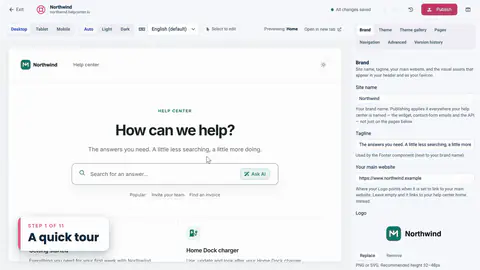
2. A quick tour
The live preview on the left, the settings on the right, and what each tab is for.
Transcript
- 0:05Hi!
- 0:06In this video, I'll walk you through the Template Editor in HelpCenter.io...
- 0:11the place where you decide how your help center looks.
- 0:14We'll start with the basics, like themes, colors and fonts.
- 0:18Then we'll look at how pages and components fit together.
- 0:21And at the end, I'll show you how to build a component of your own, with a little HTML.
- 0:26I'm signed in to Northwind, a demo help center we'll use the whole way through.
- 0:31To open the editor, I'll go to the menu on the left... and click Template editor.
Captions and this transcript come from the narration, word for word. Click any line to play from there.
About the course
Make your help center look exactly the way you want: themes, colors, pages, components and your own HTML.
What you'll learn
- Where the Template Editor is, and how the preview, settings and drafts work
- How to try a theme, keep what you like, and go back with Reset draft
- Brand, colors, fonts, spacing and corner radius
- The six page types, their layouts and regions, and how components fit together
- Select to edit: change text right in the preview
- Custom HTML, plus custom CSS that follows your theme's colors
- Header links, mobile and dark mode checks, publishing and version history
- Who it's for
- Anyone who owns the look of a help center, from a first-day trial to a redesign.
- Format
- 13 lessons, 10:35 in all. English captions and a full transcript.
- Last verified
- Oct 20, 2026, on the live product with the Northwind demo help center
- Plans
- Everything in this course works on every plan.
Articles
Every lesson pairs with a help article, so you can read the steps at your own pace.
-
Get started with the template editor self.helpcenter.io/content/template-editorGoes with these lessons
-
Choose a theme self.helpcenter.io/content/choose-a-themeGoes with
-
Which theme is right for you? self.helpcenter.io/content/theme-galleryGoes with
-
Add your logo, favicon and brand name self.helpcenter.io/content/logo-and-brandGoes with
-
Change colors, fonts and spacing self.helpcenter.io/content/colors-and-fontsGoes with
-
Pages, regions and shared headers explained self.helpcenter.io/content/pages-and-regionsGoes with
-
Add, move and remove components self.helpcenter.io/content/componentsGoes with
-
Edit text right in the preview self.helpcenter.io/content/edit-in-previewGoes with
-
Customize the article page self.helpcenter.io/content/article-pageGoes with
-
Add custom CSS self.helpcenter.io/content/custom-cssGoes with
-
Custom CSS reference: selectors and examples self.helpcenter.io/content/custom-css-referenceGoes with
-
Add links to your header and footer self.helpcenter.io/content/navigation-linksGoes with
-
Customize the header and footer self.helpcenter.io/content/header-and-footerGoes with
-
Preview on phones, tablets and in dark mode self.helpcenter.io/content/preview-your-designGoes with
-
Light and dark mode self.helpcenter.io/content/dark-modeGoes with
-
Publish your design self.helpcenter.io/content/publish-your-designGoes with
-
Restore an earlier design self.helpcenter.io/content/restore-a-designGoes with