
Up next
The video did not load.
Lesson 3 of 12 · 0:44
Write an FAQ
From FAQs and FAQ sections · Verified against the live product on Nov 4, 2026
This lesson
Type the question as the title, add a short answer, set the type to FAQ, and publish.
Prefer to read? Follow it step by step
Moments in this lesson
 Length 0:53
Up next · 0:53
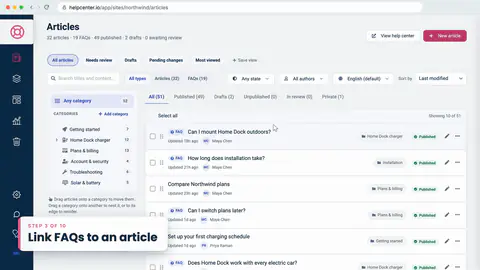
4. Link FAQs to an article
Attach saved FAQs in the Related FAQs card, or write a new one without leaving the article.
Transcript
- 1:28There's no separate button for FAQs.
- 1:31I'll click New article... type the question as the title, the way a customer would ask it... and a short answer below.
- 1:42Then, in the Details card, I'll set the Type to FAQ.
- 1:46FAQs stay short on purpose.
- 1:49If the text runs long, the editor keeps it an article until you shorten it.
- 1:53Like any article, an FAQ has a category, so I'll put this one in Home Dock charger... and Publish.
- 2:02Back in the list, it carries an FAQ badge.
- 2:05To fix a typo later, Quick edit opens the question and the answer, right here.
Captions and this transcript come from the narration, word for word. Click any line to play from there.
About the course
Write each answer once, and show it wherever your customers ask.
What you'll learn
- When to write an FAQ, and when an article is the better fit
- Writing an FAQ, and editing it with Quick edit
- Related FAQs: attach saved ones, or write new ones under an article
- Drafting FAQs from a long article with AI
- FAQ sections in articles, on your help center's pages, and on your website
- A section's design: 27 templates, light, dark and phone previews
- Editing one answer, and seeing it change everywhere
- Who it's for
- Support and content teams who answer the same questions in many places.
- Format
- 12 lessons, 9:57 in all. English captions and a full transcript.
- Last verified
- Nov 4, 2026, on the live product with the Northwind demo help center
- Plans
-
Works on every plan. One lesson covers a feature on a higher plan, and says so:
- Lesson 5 · Extend a long article with FAQs AI-drafted FAQs: Catalyst or AI add-on
Articles
Every lesson pairs with a help article, so you can read the steps at your own pace.
-
Write FAQs and add them to articles self.helpcenter.io/content/write-faqs
-
Write faster with AI writing help self.helpcenter.io/content/ai-writing-helpGoes with
-
Embed FAQ sections on your website self.helpcenter.io/content/faq-sections
-
Add, move and remove components self.helpcenter.io/content/componentsGoes with