Up next
The video did not load.
Video course · 5 lessons · 4:22
Find what customers search for and cannot find
From Find what customers search for and cannot find · Verified against the live product on Nov 12, 2026
This lesson
What a customer sees when your help center has no answer, and the three steps that fix it.
Prefer to read? Follow it step by step
Moments in this lesson
 Length 1:11
Up next · 1:11
2. See what people search for
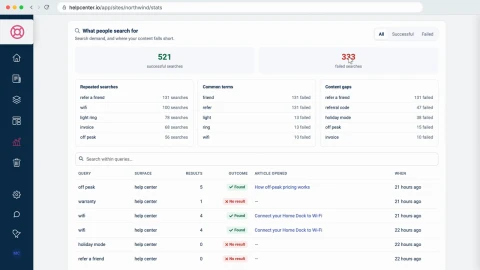
Open Statistics and read What people search for: which searches succeed, which fail, and the Content gaps that fail the most. Statistics are on every plan; how far back you can look depends on your plan.
Transcript
Lesson 1 · Introduction
- 0:05Hi!
- 0:06In this video, I'll show you how to find what your customers search for in your help center... and can't find.
- 0:13First, we'll see what people search for, in your statistics... Then we'll write the article that's missing, and check that search finds it... And finally, we'll turn on AI Answers, so readers can ask a whole question, and get an answer.
- 0:27I'm signed in to Northwind, a demo help center we'll use the whole way through.
Lesson 2 · See what people search for
- 0:34Every search in your help center is recorded, on every plan.
- 0:37To see them, go to the menu on the left... and click Statistics.
- 0:41The page opens on the last seven days.
- 0:44How far back you can look depends on your plan.
- 0:47At the top, What needs your attention already has the headline: over three hundred searches found no answer.
- 0:53Click See failed searches... and you're at What people search for.
- 0:58It counts the successful searches... and the failed ones.
- 1:01A search is successful when the reader opens an article from the results.
- 1:05It fails when they don't.
- 1:07Click Failed, to list only those.
- 1:10Each row is one search: what the reader typed... how many Results it returned... and the Outcome.
- 1:16Zero results means nothing in your help center matched.
- 1:19If there were results, and the reader still opened none, the article may be there... under a name they didn't recognize.
- 1:26Above the table, Content gaps adds it all up: the searches that failed the most.
- 1:31At Northwind, people searched for refer a friend a hundred and thirty one times this week... and for referral code, forty seven times.
- 1:39And there's no article about either.
Lesson 3 · Write the article that is missing
- 1:44You can start from your Overview, too.
- 1:46The Visitor pulse card lists the same searches... under Searched for, not found.
- 1:51Each one has a button: Write it.
- 1:54I'll click it for refer a friend.
- 1:56A new article opens, with the search as its title.
- 1:59Those are your readers' own words, and search matches the words in the title and the text... so keep them.
- 2:05I'll only give it a capital letter.
- 2:07Then write the answer.
- 2:08Readers also searched for referral code... so I'll use that phrase in the steps as well.
- 2:18Now give it a category.
- 2:20Click Uncategorized... and pick Plans and billing.
- 2:23Then click Publish... and it's live.
- 2:27Let's check it the way a reader would: signed out, on the help center.
- 2:31I'll search for refer a friend again... and there's the new article.
- 2:35Referral code finds it too.
- 2:38Your statistics are updated overnight.
- 2:41So look at Content gaps again in a week or two... and you'll see this gap close.
Lesson 4 · Turn on AI Answers
- 2:48Search matches words.
- 2:50So a whole question, like this one... brings up every article that shares a word with it.
- 2:55That's what AI Answers is for.
- 2:57AI Answers is included in the Catalyst plan, and it's an add-on for Bootstrap and Growth.
- 3:03To turn it on, open Settings... and find the AI features card.
- 3:07Switch on AI Answers... It saves at once, and the card shows Active.
- 3:13Your articles are then prepared for search by meaning, in the background.
- 3:17On a help center whose plan doesn't include it, the card offers to add it instead... with a button to View plans.
- 3:23Now back to the help center, as a reader.
- 3:26The search bar has a new button: Ask AI.
- 3:29I'll type the same question... and click it.
- 3:35The answer is written from your published articles: here, from the one we just published.
- 3:40The numbers point to its Sources, listed underneath... and each source is a link to the full article.
- 3:46Readers can rate the answer... and the matching articles are still listed below it.
Lesson 5 · Wrap-up
- 3:54So: open Statistics to see what people search for, and which searches fail... Write the missing article in your readers' own words, starting from Write it, on your Overview... And turn on AI Answers, so a whole question gets an answer, with its sources.
- 4:09To learn more, visit self dot helpcenter dot io.
- 4:13Thanks for watching!
Captions and this transcript come from the narration, word for word. Click any line to play from there.
About the course
See what readers search for and which searches fail, write the article that is missing in their own words, and turn on AI Answers so a whole question gets an answer.
What you'll learn
- Opening Statistics and reading What people search for: successful and failed searches
- Telling a search that found nothing from one whose results nobody opened
- Finding your Content gaps, the searches that fail the most
- Starting the missing article from Write it on your Overview, with the search as its title
- Publishing it and checking, signed out, that search finds it
- Turning on AI Answers, and what a reader gets from Ask AI: an answer, its sources and the matching articles
- Who it's for
- Anyone who runs a help center and decides what to write next.
- Format
- 5 lessons, 4:22 in all. English captions and a full transcript.
- Last verified
- Nov 12, 2026, on the live product with the Northwind demo help center
- Plans
-
Works on every plan. One lesson covers a feature on a higher plan, and says so:
- Lesson 4 · Turn on AI Answers AI answers: Catalyst or AI add-on
Articles
Every lesson pairs with a help article, so you can read the steps at your own pace.
-
See what people search for self.helpcenter.io/content/search-statisticsGoes with these lessons
-
Read your help center statistics self.helpcenter.io/content/statisticsGoes with
-
Search can't find an article self.helpcenter.io/content/search-cant-find-an-articleGoes with
-
How search works in your help center self.helpcenter.io/content/how-search-worksGoes with these lessons
-
Turn on AI Answers self.helpcenter.io/content/ai-answersGoes with