Up next
The video did not load.
Video course · 6 lessons · 5:34
Your help center in more than one language
From Your help center in more than one language · Verified against the live product on Nov 12, 2026
This lesson
From one language to two: add a language, translate by hand and with AI, release, and see what readers see, on Northwind, a demo help center.
Prefer to read? Follow it step by step
Moments in this lesson
 Length 1:14
Up next · 1:14
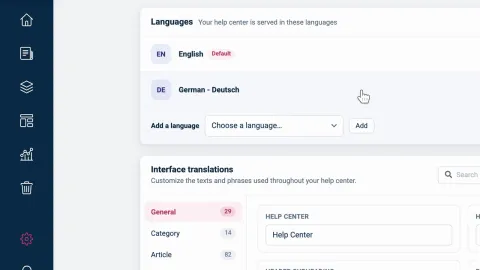
2. Add a language
Add German under Localization and see it join the list at 0% of articles. Then add the Language switcher to your design, so readers can change language once a translation is released. On Bootstrap, which includes one language, the menu is grayed out.
Transcript
Lesson 1 · Introduction
- 0:05Hi!
- 0:06In this video, I'll show you how to offer your help center in more than one language... so your readers find answers in the language they speak.
- 0:14First, we'll add a language... Then we'll translate an article by hand... and another one with AI... And finally, we'll release the translations, and see what your readers see.
- 0:25We'll use Northwind, a demo help center on the Catalyst plan.
- 0:29It's in English today... and by the end, it will be in German too.
Lesson 2 · Add a language
- 0:36Languages are managed in one place.
- 0:38In the menu on the left, click the gear... then Localization.
- 0:43Under Languages, you see every language your help center is served in.
- 0:47Northwind has one: English, marked Default.
- 0:50Multiple languages are part of the Growth and Catalyst plans.
- 0:54Bootstrap includes one language... so on Pebble, a help center on Bootstrap, this menu is grayed out.
- 1:01Back on Northwind: open Choose a language... pick German... and click Add.
- 1:07German joins the list, at zero percent of articles... because nothing is translated yet.
- 1:12Your readers don't see German yet, either.
- 1:15A new language appears on your help center once at least one published article is released in it.
- 1:20To let them switch when it does, your design needs a Language switcher.
- 1:24If it has none yet, add it now.
- 1:26In the Template editor, open Pages... choose the Header... click Add component... and pick Language switcher.
- 1:34The label under its name says Home only... so add it to your other pages the same way.
- 1:39Then click Publish... and Publish again to confirm.
- 1:42On your live help center, the switcher shows up together with the new language.
Lesson 3 · Translate an article by hand
- 1:49With a second language, every article gets a Language bar above its title.
- 1:54In Articles, I'll open one... and click German.
- 1:57There's nothing in German yet.
- 1:59So type the title... and then the text, as you would write any article.
- 2:07Readers still see only the English version.
- 2:10A translation stays hidden until you release it.
- 2:13When it reads well, turn on Released.
- 2:16Northwind is on Catalyst, where changes to a published article are staged first... so I'll finish with Publish changes.
- 2:23On Growth, there's no staging: turning on Released asks you to confirm, with Update and release.
- 2:30To see how far a language has come, go back to Articles, and open the language menu... German: one article translated.
- 2:37Choose it... and every article that still needs translating is marked Not translated.
Lesson 4 · Translate with AI
- 2:45On the Catalyst plan, AI can write the first draft for you.
- 2:49Automatic AI translations are part of Catalyst itself... the AI add-on doesn't include them.
- 2:55Open an article, click German in the Language bar... and click Auto-translate.
- 3:00The number next to it is how many you have left today, for this article.
- 3:04AI drafts the German version from English, and nothing is applied until you review it.
- 3:09Click Start translation.
- 3:11When the draft is ready, it opens for review.
- 3:14Read it through... Nothing is applied yet.
- 3:16If it isn't right, click Discard.
- 3:18If it is, click Apply translation.
- 3:21Now the draft is in the editor, where you can polish it like any other text.
- 3:25One term here isn't the one Northwind uses... so I'll correct it.
- 3:31Then, as before, turn on Released... and click Publish changes.
- 3:35Later, when the English version changes, the German tab is marked Outdated... and Update translation re-translates only the sections that changed.
Lesson 5 · Release translations and see what readers see
- 3:47Translating is rarely done in a day.
- 3:50Since the last lesson, Northwind's translator has written six more articles in German, and left them as drafts.
- 3:56On Localization, they show as six waiting.
- 3:59Click the waiting count.
- 4:01The summary tells you how many are published, so they go live as soon as this finishes.
- 4:06Click Release six translations... and a moment later, they're live.
- 4:10German's share of the articles goes up.
- 4:13Now let's look as a reader would, signed out.
- 4:15In the header is the language switcher from the first lesson.
- 4:18It lists a language once it has a released article.
- 4:21Choose German... and the help center is in German.
- 4:24The address shows the language code... and a reader whose browser prefers German lands here on their first visit.
- 4:31Category names, buttons and labels, and the texts in your design are translated separately.
- 4:36Northwind has done those too.
- 4:38Search follows the language: it looks only at articles released in German.
- 4:42And every translation has its own address, in its own language.
- 4:47One last place: the widget on your own website.
- 4:50It shows your default language, unless its code says otherwise.
- 4:53So on Northwind's German pages, I'll add a lang option with the language code... save... and the widget opens in German.
Lesson 6 · Wrap-up
- 5:04So: add a language under Localization... translate your articles by hand, or have AI draft them on Catalyst... release them one at a time, or all at once... and your readers choose the language they speak.
- 5:18Buttons, labels and the texts in your design have their own guides, at self dot helpcenter dot io.
- 5:24Thanks for watching!
Captions and this transcript come from the narration, word for word. Click any line to play from there.
About the course
Add a language, translate articles by hand or with AI, release them when they are ready, and see what readers see.
What you'll learn
- Adding a language under Localization, and what Bootstrap shows instead
- Adding the Language switcher to your design, so readers can change language
- Translating an article's title and text in the editor's Language bar, and releasing it
- Having AI draft a translation, reviewing it before anything is applied, and polishing it
- Releasing every waiting translation of a language at once
- What readers get: addresses with a language code, search in their language, and the widget in the language you set
- Who it's for
- Teams whose customers read in more than one language, on the Growth or Catalyst plan. Translating with AI needs Catalyst.
- Format
- 6 lessons, 5:34 in all. English captions and a full transcript.
- Last verified
- Nov 12, 2026, on the live product with the Northwind demo help center
- Plans
-
Works on every plan. These lessons cover features on higher plans, and say so:
- Lesson 2 · Add a language Multiple languages: Growth and Catalyst
- Lesson 3 · Translate an article by hand Multiple languages: Growth and Catalyst
- Lesson 4 · Translate with AI Automatic AI translations: Catalyst
- Lesson 5 · Release translations and see what readers see Multiple languages: Growth and Catalyst
Articles
Every lesson pairs with a help article, so you can read the steps at your own pace.
-
Add a language to your help center self.helpcenter.io/content/add-a-languageGoes with these lessons
-
Translate an article self.helpcenter.io/content/translate-an-articleGoes with
-
Translate articles with AI self.helpcenter.io/content/ai-translationGoes with
-
Release translations and change your default language self.helpcenter.io/content/manage-languages
-
How readers see other languages self.helpcenter.io/content/languages-for-readers
-
Translate buttons and labels self.helpcenter.io/content/interface-translationsGoes with
-
Translate texts in your design self.helpcenter.io/content/translate-design-textsGoes with