Up next
The video did not load.
Lesson 5 of 6 · 1:17
Release translations and see what readers see
From Your help center in more than one language · Verified against the live product on Nov 12, 2026
Multiple languages: Growth and Catalyst
This lesson
Release every waiting translation of a language at once from Localization. Then look as a reader: the language switcher, addresses with a language code, search in their language, and the widget on your own website.
Prefer to read? Follow it step by step
Moments in this lesson
 Length 0:31
Up next · 0:31
6. Wrap-up
Add a language, translate by hand or with AI, release one at a time or all at once. Buttons, labels and the texts in your design have their own guides.
Transcript
- 3:47Translating is rarely done in a day.
- 3:50Since the last lesson, Northwind's translator has written six more articles in German, and left them as drafts.
- 3:56On Localization, they show as six waiting.
- 3:59Click the waiting count.
- 4:01The summary tells you how many are published, so they go live as soon as this finishes.
- 4:06Click Release six translations... and a moment later, they're live.
- 4:10German's share of the articles goes up.
- 4:13Now let's look as a reader would, signed out.
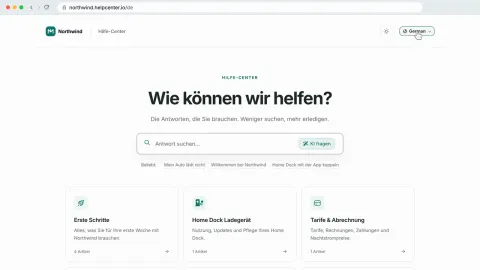
- 4:15In the header is the language switcher from the first lesson.
- 4:18It lists a language once it has a released article.
- 4:21Choose German... and the help center is in German.
- 4:24The address shows the language code... and a reader whose browser prefers German lands here on their first visit.
- 4:31Category names, buttons and labels, and the texts in your design are translated separately.
- 4:36Northwind has done those too.
- 4:38Search follows the language: it looks only at articles released in German.
- 4:42And every translation has its own address, in its own language.
- 4:47One last place: the widget on your own website.
- 4:50It shows your default language, unless its code says otherwise.
- 4:53So on Northwind's German pages, I'll add a lang option with the language code... save... and the widget opens in German.
Captions and this transcript come from the narration, word for word. Click any line to play from there.
About the course
Add a language, translate articles by hand or with AI, release them when they are ready, and see what readers see.
What you'll learn
- Adding a language under Localization, and what Bootstrap shows instead
- Adding the Language switcher to your design, so readers can change language
- Translating an article's title and text in the editor's Language bar, and releasing it
- Having AI draft a translation, reviewing it before anything is applied, and polishing it
- Releasing every waiting translation of a language at once
- What readers get: addresses with a language code, search in their language, and the widget in the language you set
- Who it's for
- Teams whose customers read in more than one language, on the Growth or Catalyst plan. Translating with AI needs Catalyst.
- Format
- 6 lessons, 5:34 in all. English captions and a full transcript.
- Last verified
- Nov 12, 2026, on the live product with the Northwind demo help center
- Plans
-
Works on every plan. These lessons cover features on higher plans, and say so:
- Lesson 2 · Add a language Multiple languages: Growth and Catalyst
- Lesson 3 · Translate an article by hand Multiple languages: Growth and Catalyst
- Lesson 4 · Translate with AI Automatic AI translations: Catalyst
- Lesson 5 · Release translations and see what readers see Multiple languages: Growth and Catalyst
Articles
Every lesson pairs with a help article, so you can read the steps at your own pace.
-
Add a language to your help center self.helpcenter.io/content/add-a-languageGoes with these lessons
-
Translate an article self.helpcenter.io/content/translate-an-articleGoes with
-
Translate articles with AI self.helpcenter.io/content/ai-translationGoes with
-
Release translations and change your default language self.helpcenter.io/content/manage-languages
-
How readers see other languages self.helpcenter.io/content/languages-for-readers
-
Translate buttons and labels self.helpcenter.io/content/interface-translationsGoes with
-
Translate texts in your design self.helpcenter.io/content/translate-design-textsGoes with