Up next
The video did not load.
Lesson 2 of 5 · 1:23
See and restore earlier versions
From Keep articles accurate · Verified against the live product on Nov 12, 2026
This lesson
Open an article's Version History to see who changed what and when, see exactly what a change did, and restore an earlier version. How far back the history goes depends on your plan.
Prefer to read? Follow it step by step
Moments in this lesson
 Length 1:21
Up next · 1:21
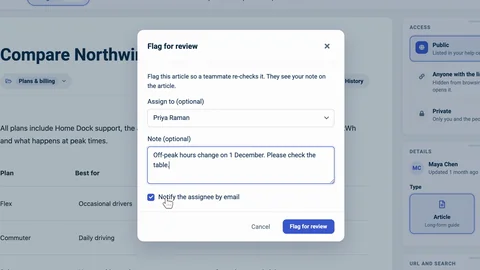
3. Flag an article for review
Ask a teammate to check an article, with a note that says what to look at, and find it under In review. They mark it as reviewed, and Schedule for review brings an article back on a date.
Transcript
- 0:36A customer just told us this guide is wrong: step three says to charge the car to one hundred percent.
- 0:43Let's find out when that changed, and who changed it.
- 0:46Every article keeps a history of its changes.
- 0:48To see it, click Version History, above the article.
- 0:52Each entry says what changed, who changed it, and how long ago.
- 0:56The latest one: Daniel edited the content, three days ago.
- 1:00To see the change itself, click the compare icon next to it... What was removed is struck through in red, and what was added is green.
- 1:08So that's where one hundred came from.
- 1:10Split puts the old and the new side by side.
- 1:14Under an older entry, Compare with current shows everything that changed since then... And with Base and Compare, at the top, you can compare any two points in the history.
- 1:24Now let's take Daniel's change back.
- 1:26Click Restore next to it... and confirm with Restore.
- 1:29The text is back the way it was right before that change.
- 1:32And because this article is published, readers get the restored version straight away.
- 1:37The restore is listed as a new entry, so you can undo it the same way.
- 1:42How far back the history goes depends on your plan.
- 1:45Northwind is on Catalyst, which keeps a year.
- 1:48Pebble, a smaller help center on the Bootstrap plan, sees its latest changes... and a note below them: older changes are hidden by your plan's history window.
Captions and this transcript come from the narration, word for word. Click any line to play from there.
About the course
See who changed what and take a change back, ask a teammate to review an article, and rework a live article with staged changes while readers keep seeing the published version.
What you'll learn
- Reading an article's Version History: what changed, who changed it and when
- Seeing exactly what a change did, and comparing any two points in the history
- Restoring an earlier version, and what readers see when you do
- How far back the history goes on your plan
- Flagging an article for a teammate to review, and finding it under In review
- Scheduling a review, so an article comes back for a re-check on a date
- Editing a live article as a staged copy, comparing it with the live version and publishing it
- Who it's for
- Teams whose help articles are edited by more than one person, and anyone who has to answer "who changed this?".
- Format
- 5 lessons, 5:10 in all. English captions and a full transcript.
- Last verified
- Nov 12, 2026, on the live product with the Northwind demo help center
- Plans
-
Works on every plan. One lesson covers a feature on a higher plan, and says so:
- Lesson 4 · Rework a live article safely Staged changes: Catalyst
Articles
Every lesson pairs with a help article, so you can read the steps at your own pace.
-
Keep your help center up to date self.helpcenter.io/content/keep-your-help-center-up-to-dateGoes with these lessons
-
See and restore earlier versions of an article self.helpcenter.io/content/article-versionsGoes with
-
Flag articles for review self.helpcenter.io/content/flag-for-reviewGoes with
-
Edit live articles safely with staged changes self.helpcenter.io/content/staged-changesGoes with