Up next
The video did not load.
Lesson 1 of 5 · 0:35
Introduction
From Match your brand from your website · Verified against the live product on Nov 12, 2026
This lesson
From nothing but your website's address to a help center that looks like your brand, on Northwind, a demo company.
Prefer to read? Follow it step by step
Moments in this lesson
 Length 1:01
Up next · 1:01
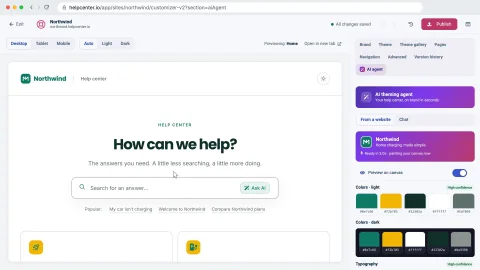
2. Paste your website, get a theme
Open the AI agent in the Template Editor, paste your website, tick the box that says the site is yours, and watch the agent read your colors, fonts, logo and favicon.
Transcript
- 0:05Hi!
- 0:06In this video, I'll show you how to make your help center match your brand... starting from nothing but your website's address.
- 0:13First, we'll paste the website into the Template editor, and get a theme back... Then we'll review it in light and dark, and apply it to a draft... And finally, we'll publish it, and see how to go back.
- 0:25This is the website of Northwind, a demo company we'll use the whole way through... and this is its help center, still with the look it started with.
Captions and this transcript come from the narration, word for word. Click any line to play from there.
About the course
Paste your website's address, review the light and dark theme the AI theming agent proposes, then apply it to your draft and publish.
What you'll learn
- Opening the AI agent in the Template Editor and pasting your website
- What the agent reads from your site: colors, fonts, your logo and your favicon
- Comparing the proposal with your help center as it is, in light and in dark
- Reading how confident the agent is about your colors and fonts, and unticking what you would rather keep
- Applying the proposal to your draft, retrying with a hint, and undoing it
- Publishing the new design, and restoring an earlier version
- Who it's for
- Anyone with a help center on HelpCenter.io and a website of their own. Every plan, including the 14-day trial.
- Format
- 5 lessons, 4:00 in all. English captions and a full transcript.
- Last verified
- Nov 12, 2026, on the live product with the Northwind demo help center
- Plans
- Everything in this course works on every plan.
Articles
Every lesson pairs with a help article, so you can read the steps at your own pace.
-
Make your help center look like your brand self.helpcenter.io/content/customize-your-help-centerGoes with these lessons
-
Brand your help center from your website with the AI theming agent self.helpcenter.io/content/brand-from-your-websiteGoes with these lessons
-
Preview on phones, tablets and in dark mode self.helpcenter.io/content/preview-your-design
-
Publish your design self.helpcenter.io/content/publish-your-designGoes with
-
Restore an earlier design self.helpcenter.io/content/restore-a-designGoes with