Up next
The video did not load.
Lesson 3 of 6 · 1:00
Ask what people could not find
From Run your help center from Claude and ChatGPT · Verified against the live product on Nov 10, 2026
AI agents: Growth and Catalyst
This lesson
Ask "What did people search for and not find?" and get every failed search, how often it failed, and why. The Stats page shows the same numbers.
Prefer to read? Follow it step by step
Moments in this lesson
 Length 0:40
Up next · 0:40
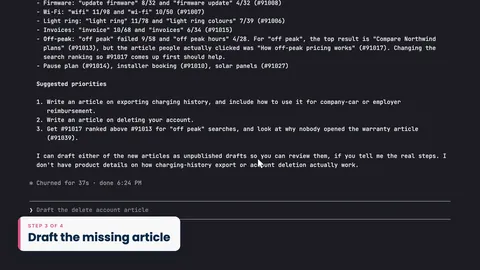
4. Draft the missing article
Ask Claude to draft the top missing article. It lands as a draft, so you review it in the editor and publish it yourself.
Transcript
- 2:19Once HelpCenter.io is connected, you can ask about your help center in plain words.
- 2:24I'm using Claude Code, in the terminal, but you can ask the same question in Claude or ChatGPT.
- 2:31I'll ask: What did people search for and not find?
- 2:35Claude reads your help center's search statistics.
- 2:37That takes it about half a minute, so I've sped it up.
- 2:41And here's the answer: every search that failed in the last seven days... and how often it failed.
- 2:47Export charging history failed two hundred and fourteen times... company car reimbursement, ninety six... and delete account found nothing at all.
- 2:56For each one, Claude tells you why.
- 2:59People looking for their charging history were shown an article about exporting energy to the grid... and nobody opened it.
- 3:06Your dashboard shows the same numbers.
- 3:08Open Stats... and scroll down to What people search for.
- 3:12Content gaps lists the same three searches at the top, with the same counts.
Captions and this transcript come from the narration, word for word. Click any line to play from there.
About the course
Connect Claude or ChatGPT to your help center, ask what readers couldn't find, and have it draft the missing article for you to publish.
What you'll learn
- Installing the HelpCenter.io plugin in Claude or ChatGPT, and choosing which help centers it can reach
- Asking what people searched for and didn't find, and checking the same numbers on the Stats page
- Having Claude draft the missing article as a draft, then reviewing and publishing it yourself
- Seeing and removing connected apps
- Letting your readers' own assistants answer from your help center, with a link back to the article
- Who it's for
- Anyone who runs a help center and works in Claude or ChatGPT.
- Format
- 6 lessons, 5:37 in all. English captions and a full transcript.
- Last verified
- Nov 10, 2026, on the live product with the Northwind demo help center
- Plans
-
Works on every plan. These lessons cover features on higher plans, and say so:
- Lesson 2 · Install the plugin and sign in AI agents: Growth and Catalyst
- Lesson 3 · Ask what people could not find AI agents: Growth and Catalyst
- Lesson 4 · Draft the missing article AI agents: Growth and Catalyst
Articles
Every lesson pairs with a help article, so you can read the steps at your own pace.
-
Connect Claude, ChatGPT and other AI agents self.helpcenter.io/content/connect-ai-agentsGoes with these lessons
-
What AI agents can do in your help center self.helpcenter.io/content/ai-agent-toolsGoes with these lessons
-
Let readers use your help center in their AI assistant self.helpcenter.io/content/public-mcp-serverGoes with