Up next
The video did not load.
Lesson 1 of 6 · 0:35
Introduction
From Run your help center from Claude and ChatGPT · Verified against the live product on Nov 10, 2026
This lesson
Connect an AI assistant once, then ask it about your help center and let it draft what's missing. Your readers' assistants can answer from it too.
Prefer to read? Follow it step by step
Moments in this lesson
 Length 1:43
Up next · 1:43
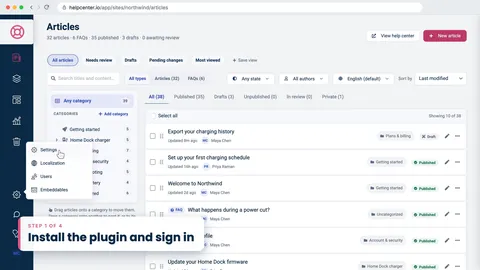
2. Install the plugin and sign in
Add HelpCenter.io in Claude or ChatGPT, sign in, and tick the help centers it may work on. A help center on a plan without AI agents is locked.
Transcript
- 0:05Hi!
- 0:06In this video, I'll show you how to run your help center from Claude and ChatGPT... You connect it once, and then you just ask.
- 0:15First, we'll install the plugin and sign in... Then we'll ask what people searched for and couldn't find... have Claude draft the missing article, and publish it ourselves... And finally, we'll let your readers' own AI assistants answer from your help center.
- 0:30I'm signed in to Northwind, a demo help center we'll use the whole way through.
Captions and this transcript come from the narration, word for word. Click any line to play from there.
About the course
Connect Claude or ChatGPT to your help center, ask what readers couldn't find, and have it draft the missing article for you to publish.
What you'll learn
- Installing the HelpCenter.io plugin in Claude or ChatGPT, and choosing which help centers it can reach
- Asking what people searched for and didn't find, and checking the same numbers on the Stats page
- Having Claude draft the missing article as a draft, then reviewing and publishing it yourself
- Seeing and removing connected apps
- Letting your readers' own assistants answer from your help center, with a link back to the article
- Who it's for
- Anyone who runs a help center and works in Claude or ChatGPT.
- Format
- 6 lessons, 5:37 in all. English captions and a full transcript.
- Last verified
- Nov 10, 2026, on the live product with the Northwind demo help center
- Plans
-
Works on every plan. These lessons cover features on higher plans, and say so:
- Lesson 2 · Install the plugin and sign in AI agents: Growth and Catalyst
- Lesson 3 · Ask what people could not find AI agents: Growth and Catalyst
- Lesson 4 · Draft the missing article AI agents: Growth and Catalyst
Articles
Every lesson pairs with a help article, so you can read the steps at your own pace.
-
Connect Claude, ChatGPT and other AI agents self.helpcenter.io/content/connect-ai-agentsGoes with these lessons
-
What AI agents can do in your help center self.helpcenter.io/content/ai-agent-toolsGoes with these lessons
-
Let readers use your help center in their AI assistant self.helpcenter.io/content/public-mcp-serverGoes with