Up next
The video did not load.
Lesson 1 of 5 · 0:29
Introduction
From Set up a help center from scratch · Verified against the live product on Nov 10, 2026
This lesson
From nothing at all to a help center your customers can read, in three steps, for Pebble, a budgeting app.
Prefer to read? Follow it step by step
Moments in this lesson
 Length 1:53
Up next · 1:53
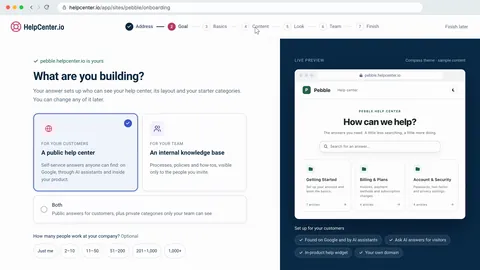
2. Create your account and name your help center
Sign up with no credit card, keep or change the suggested address, and answer a short setup. Your dashboard opens with a checklist for the rest.
Transcript
- 0:05Hi!
- 0:06In this video, I'll show you how to set up a help center from scratch... and have it live for your customers by the end.
- 0:13First, we'll create an account and name the help center... Then we'll write and publish a first article... And finally, we'll publish the help center itself, so anyone can read it.
- 0:24We'll do it for Pebble, a budgeting app, starting from nothing at all.
Captions and this transcript come from the narration, word for word. Click any line to play from there.
About the course
From a new account to a help center anyone can read: sign up, write and publish your first article, then publish your help center.
What you'll learn
- Signing up with no credit card and choosing your help center's address
- The short setup: what you're building, its name, starter categories and a starting look
- Writing an article with steps, a heading and a screenshot, and choosing its category
- Saving a draft, publishing it, and seeing your help center the way your team sees it
- Confirming your email, activating your plan and publishing your help center
- Checking it signed out, the way a customer sees it
- Who it's for
- Anyone starting a help center on HelpCenter.io, from the signup page to a help center customers can read.
- Format
- 5 lessons, 5:28 in all. English captions and a full transcript.
- Last verified
- Nov 10, 2026, on the live product with the Northwind demo help center
- Plans
- Everything in this course works on every plan.
Articles
Every lesson pairs with a help article, so you can read the steps at your own pace.
-
Set up your help center: a first-hour checklist self.helpcenter.io/content/set-up-your-help-centerGoes with these lessons
-
Create your HelpCenter.io account self.helpcenter.io/content/create-your-account
-
Write and publish your first article self.helpcenter.io/content/write-your-first-articleGoes with
-
Publish your help center self.helpcenter.io/content/make-your-help-center-publicGoes with